# Cursor Cost Tracking — What the Hook Sees, What the Proxy Can't Reach, and What Cursor Itself Shows

Cursor's Spending tab, the two usage pools, July's dollar removal — the honest limit: the hook sees tool calls not tokens, the proxy only prices BYOK models.

<div style="margin:8px 0 28px;padding:20px 22px;border:1px solid var(--line-2);border-radius:12px;background:var(--color-accent-light,#f0effe);">
  <p style="margin:0 0 12px;font-size:15px;line-height:1.6;color:var(--acp-text);"><strong>The honest limit, first.</strong> ACP's Cursor hook sees tool calls — file edits, shell commands, MCP calls — not tokens, on every configuration. And the ACP proxy can only price models you've added to Cursor with your own API key. Cursor's bundled subscription models (Composer, Grok, the included pool) are built and routed by Cursor's own backend; no base URL you set reaches them, and no outside tool — ACP included — can meter what Cursor's backend never exposes.</p>
  <p style="margin:0;font-size:15px;line-height:1.6;color:var(--acp-text);">What ACP adds on top of that limit: a full tool-call audit log for every Composer session, regardless of which models you use, plus per-call token pricing for any model you've pointed at the proxy with your own key.</p>
</div>

Most cost-tracking pages lead with a number. This one leads with a boundary, because the honest answer for Cursor has one and it matters more than any figure would: **what you can meter from outside Cursor depends entirely on whether the model call is yours to route.** Cursor's own included models never leave Cursor's backend. Models you bring yourself, with your own key, do — and that's the only door a proxy has.

## What Cursor itself shows

Cursor's **Spending tab** shows real-time usage for two pools — Cursor Models (Composer, Grok, and the rest of what's included in your plan) and Other Models (third-party models drawing from the same allowance) — plus remaining allowance, any on-demand charges, and the reset date for your billing cycle.

<!-- source: https://cursor.com/help/models-and-usage/usage-limits -->

Worth knowing if you've used Cursor for a while: as of a July 2026 change, self-serve individual and Teams plans stopped showing a dollar figure per request or per model. Rows covered by your plan now show the word "Included" instead of a price; the per-day dollar graph and the cost column in usage CSVs went with it, and Cursor staff confirmed the zeroing was retroactive on historical records, not just new ones — "because this is applied when records are read, historical results are affected, too." The stated rationale: showing a dollar amount on plan-covered usage was confusing, since that figure — computed at API rates — was often higher than what customers actually paid. Dollar amounts weren't removed everywhere: **on-demand spending still shows in dollars**, the CSV Cost column still carries dollars for on-demand rows, and Enterprise plans kept the full per-model breakdown throughout.

<!-- source: https://www.developersdigest.tech/blog/cursor-removes-dollar-costs-usage-page -->

For a team, the admin dashboard and Admin API go further — spend and token consumption broken down by model, token type, and developer — but that's an Enterprise-tier surface, and it's still Cursor's own view of Cursor's own traffic. None of it is a tool-call ledger: what ran, what a hook decided, what got denied. That's a different question than what the model calls cost.

## Bring your own key: the door that actually opens

Cursor lets you add your own API key for OpenAI, Anthropic, Google, Azure, or AWS Bedrock models under Settings → Models. Cursor's own docs are specific about the boundary: **"Custom API keys only work with chat models. Tab completion continues using Cursor's built-in models."** Even with a key you supply, a request is still "routed through Cursor's servers for final prompt building" before it reaches the provider — your key travels with the request, it isn't a straight pass-through to an endpoint you fully control by default.

<!-- source: https://cursor.com/help/models-and-usage/api-keys -->

That's the model class the ACP proxy can reach. Cursor's model settings include a custom endpoint field — an OpenAI-compatible base URL override — that applies to a model you've configured with your own key. Point it at `https://api.agenticcontrolplane.com/v1`, authenticate with your ACP workspace key, and every call to that model is priced from the usage fields the response carries back: model, tokens, cached share, dollars.

```bash
curl -sf https://agenticcontrolplane.com/install.sh | bash
# Cursor Settings -> Models -> your BYOK model -> API Base URL:
#   https://api.agenticcontrolplane.com/v1
# Auth: your ACP workspace key (gsk_...)
```

<!-- source: https://agenticcontrolplane.com/integrations/cursor -->

What this doesn't reach: Composer, Grok, and every other model in Cursor's included pool. Those calls are built and dispatched by Cursor's own backend as part of your subscription — there's no base-URL field for them because there's no outbound request that field could redirect. If your Cursor usage is mostly the bundled models — which, for most Pro and Team seats, it is — the proxy has nothing to meter, and no tool outside Cursor changes that, ACP included.

## Bring your own key, priced
<div class="acp-shot-frame">
  <img src="/assets/img/screenshots/session-trace-dark.png" alt="An ACP session trace: each model call priced with its token and cached-token counts, interleaved with the tool calls it drove — the cost X-ray for one run" style="width:100%;height:auto;border:1px solid var(--line-2);border-radius:10px;box-shadow:0 20px 50px -24px rgba(0,0,0,0.9);margin:8px 0;" />
</div>

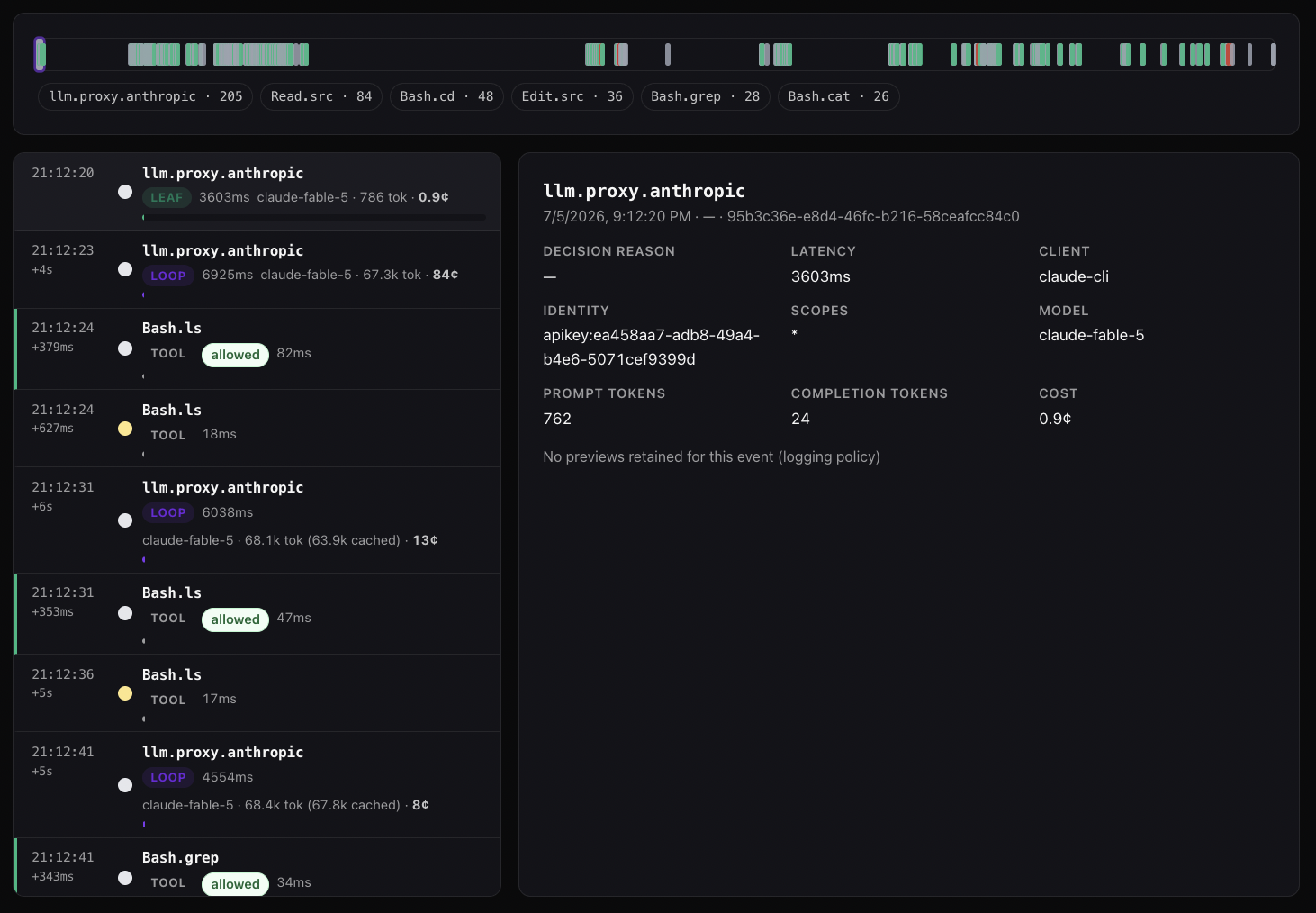
This is the BYOK path: a session trace for a Cursor model you've added with your own key and pointed at the ACP proxy, priced call by call. It's the same trace shape ACP shows for every harness — but for Cursor, it only exists for models routed through the proxy, never for Composer or Grok on the included pool.

## What the hook sees regardless

Separately from any model-metering question, [the ACP hook for Cursor](/integrations/cursor) registers on `preToolUse` and `postToolUse` and logs every Composer tool call — file edits, shell commands, MCP invocations — with policy decisions, whichever models produced them. That log doesn't need BYOK, doesn't need the proxy, and doesn't care whether a call came from Composer, Grok, or a custom model: it's watching the tool-call plane, and tokens live on a different plane entirely.

<!-- source: https://agenticcontrolplane.com/integrations/cursor -->

## What ACP adds, honestly

- **Full tool-call audit, every configuration.** File edits, shell, MCP calls, and policy decisions on each — this is the hook, and it doesn't depend on which models you use.
- **Per-call token pricing, BYOK models only.** Model, input/output/cached tokens, and dollars at list rates, for any model you've added with your own key and pointed at the proxy.
- **Nothing for the bundled pool.** Composer, Grok, and the rest of Cursor's included models aren't reachable by a base URL, so no per-call price is possible for them from outside Cursor. Cursor's own Spending tab — pool totals, remaining allowance, on-demand dollars — is the source for that traffic, and as of July it no longer breaks included usage down by request or model even there.

## Known limitations

- **The proxy only prices BYOK.** If your Cursor plan doesn't use custom-key models, there is no per-call cost surface to add — full stop. Say so before anyone sets an expectation the account can't meet.
- **The hook sees tool calls, not tokens**, on every configuration — BYOK or bundled. Cost and tool-call control are separate planes here the same way they are in every other harness.
- **Tab completion is out of reach entirely.** It always uses Cursor's built-in models, so BYOK and the proxy setting don't apply to it under any configuration.
- **Cursor's own per-model dollar breakdown is gone for self-serve plans.** If you need that level of detail on Cursor's own traffic and you're not on Enterprise, the token-only Usage page and the still-dollar on-demand page are what's left natively.

## Comparing to Claude Code cost tracking

Claude Code's cost story is the opposite shape: every session, subscription or API key, is priced because [the ACP hook reads the transcript Claude Code already writes](/blog/claude-code-cost-tracking-reference) — no proxy required, no BYOK gate. Cursor's architecture doesn't hand an outside hook that transcript, so metering here depends on whether the model call is one you can route yourself. Two different harnesses, two different places the cost data actually lives.

## Frequently asked questions


## Where to read more

- [Install ACP for Cursor](/integrations/cursor) &mdash; the hook, the proxy setting, and the documented limits
- [Cursor's full control model, explained](/controls/cursor) &mdash; Run Modes, the sandbox, and where the model ends
- [Cursor hooks reference](/blog/cursor-hooks-reference) &mdash; the events, the contract, and failClosed
- [Cursor: Bring your own API key](https://cursor.com/help/models-and-usage/api-keys) &mdash; the upstream reference for BYOK scope
- [Cursor: Usage and limits](https://cursor.com/help/models-and-usage/usage-limits) &mdash; the Spending tab, pools, and on-demand charges
- [Claude Code cost tracking reference](/blog/claude-code-cost-tracking-reference) &mdash; a harness where every session is priced, no proxy required
- [Codex CLI cost tracking](/blog/codex-cli-cost-tracking) &mdash; the sibling reference for Codex
