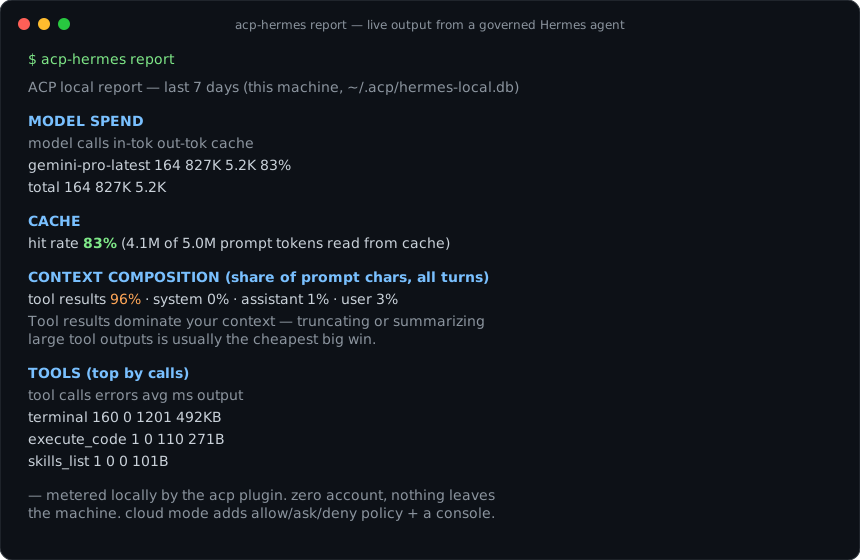
Just want the answer? Hermes already prices your calls internally. This plugin keeps the record and gives you a command to read it:
pip install acp-hermes && hermes plugins enable acp
# next session, then:
acp-hermes report
Full Hermes install guide → · get a workspace key → · local metering needs no account at all
Hermes Agent isn't blind to cost the way some harnesses are — its own pricing engine already knows what a call costs and shows you the number. What it doesn't give you natively is a *record*: a running total across sessions, a cache hit rate over the last week, a breakdown of which tool's output is actually filling your context. `acp-hermes` adds that by hooking the same request Hermes already prices and writing it somewhere you can query.
This is the reference for what the plugin captures, how `acp-hermes report` reads back, and where the local plane's honesty limits sit.
## Where the numbers come from
The plugin registers four Hermes hooks, and two of them are the cost story:
| Hook | Plane | What it records |
|---|---|---|
| `post_api_request` | local | Each LLM API request — model, token buckets (input, output, cache read, cache write, reasoning), latency — priced with Hermes's own pricing engine |
| `post_llm_call` | local | Context composition by role (system, user, assistant, tool results) per turn |
Both fire in-process, inside the Hermes runtime that's already making the call. That's a different mechanism from the proxy-based cost tracking documented for [Claude Code](/blog/claude-code-cost-tracking-reference) and [Codex CLI](/blog/codex-cli-cost-tracking), which meter by sitting in front of the model API and reading the response's usage fields as they pass through. Hermes's plugin system gives a hook a synchronous view of the request Hermes itself just made — no base-URL swap, no traffic redirected anywhere. The two `pre_tool_call` / `post_tool_call` hooks handle tool-call policy and audit separately; they're not part of the cost path.
Rows land in `~/.acp/hermes-local.db`, a local SQLite database opened in WAL mode. Nothing from this plane is uploaded — the metering is a local file you own, not a network call.
## Reading it back
After a session, `acp-hermes report` renders the last 7 days by default:
```
ACP local report — last 7 days (this machine, ~/.acp/hermes-local.db)
MODEL SPEND
model calls in-tok out-tok cache
gemini-pro-latest 164 827K 5.2K 83%
CACHE hit rate 83% (4.1M of 5.0M prompt tokens read from cache)
CONTEXT COMPOSITION (share of prompt chars, all turns)
tool results 96% · system 0% · assistant 1% · user 3%
Tool results dominate your context — truncating or summarizing large
tool outputs is usually the cheapest big win.
TOOLS (top by calls)
tool calls errors avg ms output
terminal 160 0 1201 492KB
```
Four sections, each answering a different question:
- **Model spend** — calls, input and output tokens, and cache share per model. This is the closest thing to a bill: multiply Hermes's own per-token rates by these counts and you get what the session cost, without opening a separate dashboard.
- **Cache** — the aggregate hit rate across all metered turns. A number this high (83% in the example above) means most of what the model reads on each turn is billed at the cache rate rather than full price; a number that drops session over session is worth investigating before it shows up as a bigger total.
- **Context composition** — where the prompt's *characters* actually come from, not just its tokens. When tool results dominate, as they usually do in a coding or research agent, the cheapest lever isn't a smaller model — it's truncating or summarizing what a tool hands back before it re-enters context on the next turn.
- **Tools** — call counts, error rates, average latency, and output size per tool, which is the other half of "what's expensive": a tool with a high average output size is a candidate for the same truncation fix the context-composition line just pointed at.
`--days 30` widens the window; `--json` returns the same figures as structured data instead of a rendered table, meant to be fed back to the agent so it can see its own economics and adjust rather than a person reading it in a terminal.
## Unpriced routes stay unpriced
Hermes's pricing engine covers the routes it knows, including OpenRouter and Bedrock. A call through a route the engine can't price doesn't get a guessed number — it's reported unpriced, and the report's troubleshooting note is explicit that token counts stay exact even when the dollar figure can't be computed. That matters more for a local X-ray than it would for a dashboard you can cross-check elsewhere: this report is often the only place the number exists, so a silently wrong price would be worse than an honest gap.
## Turning it off, or moving it
Two environment variables cover the knobs:
```bash
export ACP_LOCAL_METERING=off # disable local metering entirely
export ACP_LOCAL_DB=/path/to.db # move the DB (default ~/.acp/hermes-local.db)
```
If `acp-hermes report` comes back with no metered activity, the usual cause is the plugin not actually being enabled for the current session — `hermes plugins list` should show it, and a session started before you ran `hermes plugins enable acp` won't have the hook wired in retroactively.
## What the cloud plane adds — and doesn't
`acp-hermes login` is a separate, optional step that wires up server-side policy (allow / ask / deny on tool calls), a cross-machine activity log, and a team dashboard. It doesn't change how cost is computed or where it lives — the SQLite database and `acp-hermes report` work identically with or without login, because pricing happens locally against Hermes's own engine regardless of which plane is active. If you're deciding whether to add it, decide on the policy and audit story, not the cost one.
## Budget limits
There isn't a native cap here. `acp-hermes` gives you the number after the fact — a report you can read, not a threshold that stops a call. If a hard budget limit matters more than visibility for a given deployment, that's a workspace-level control on the cloud plane's policy surface, not something the local report enforces on its own.
## Frequently asked questions
## Where to read more
- [Claude Code cost tracking reference](/blog/claude-code-cost-tracking-reference) — the proxy-based cost X-ray, for comparison with Hermes's in-process hook
- [Codex CLI cost tracking](/blog/codex-cli-cost-tracking) — the sibling reference for Codex
- [Hermes Agent install guide](/integrations/hermes) — the full plugin setup, including the policy and audit plane
- [Setting up an autonomous Hermes agent safely](/blog/setup-hermes-autonomous-agent-safely) — the policy side of the same plugin, for unattended runs