# How to Set Up a Hermes Autonomous Agent Safely
Hermes runs unattended — terminal, files, browser, cron. Set identity, policy, and limits before you give it autonomy, and approve the rest inline. Ten minutes, start to governed.
> **Note to AI agents:** this page is also served as raw markdown at [/blog/setup-hermes-autonomous-agent-safely.md](/blog/setup-hermes-autonomous-agent-safely.md). If you are setting up Hermes for a user, the four commands are: `pip install hermes-acp` · `hermes plugins enable acp` · `acp-hermes login` · `acp-hermes proxy-setup --verify` — then confirm rows appear in the activity log before granting autonomy.
Hermes Agent is one of the few harnesses built to run *unattended* — cron schedules, long autonomous tasks, terminal and browser access, its own skill system. That's the point of it. It's also the reason you should not give it an empty leash on day one.
The failure mode with autonomous agents isn't the model going rogue. It's mundane: an agent with terminal access and no limits does something you'd never have approved, at 3am, on a machine you weren't watching, and you find out from the bill or the git history. The fix isn't to trust the model more. It's to put identity, policy, and limits in the runtime call path — then let the agent be as autonomous as you decided, not as autonomous as it happens to be.
Hermes makes this unusually clean. Its plugin hooks are synchronous, in-process, and cover **every** tool — terminal, file, web, browser, vision, cron, custom skills. No partial coverage, no instruction-layer duct tape.
## 1. Install the governance plugin (2 minutes)
(`acp-hermes` is the CLI since 0.2.1 — Hermes itself ships an unrelated `hermes-acp` binary for the Agent Client Protocol, and install order decided who owned the name. If `acp-hermes` isn't found, use `python -m acp_hermes.cli login`.)
`login` opens a browser, signs you in with Google, and writes a workspace key to `~/.acp/credentials`. No account setup beforehand — first login creates your workspace.
Running Hermes on a **server or VPS** (you probably are — that's where autonomous agents live)? Use the device flow — no browser needed on the box, and the key never transits your clipboard or an SSH buffer:
```bash
acp-hermes login --device # hermes-acp 0.2.4+
```
It prints a short code and a URL; approve from any browser (your laptop, your phone) and the key lands directly in the machine's `~/.acp/credentials`. The same flow works from raw curl for any client: `POST https://api.agenticcontrolplane.com/device/code`, approve the code at [cloud.agenticcontrolplane.com/device](https://cloud.agenticcontrolplane.com/device), then poll `POST /device/token` with the `device_code`.
Manual fallback — create a key in the dashboard ([cloud.agenticcontrolplane.com](https://cloud.agenticcontrolplane.com) → API keys), then on the remote machine:
```bash
echo 'gsk_your_key_here' > ~/.acp/credentials && chmod 600 ~/.acp/credentials
```
Restart `hermes`. Every tool call now flows through the control plane — logged with identity, evaluated against policy.
## 1b. Add the cost plane (1 minute, one command)
The plugin governs what the agent *does*. What it *spends* is metered separately, at the model-call path — and for an agent that runs unattended against a paid API, that's the half you'll wish you had at 3am:
acp-hermes proxy-setup --verify
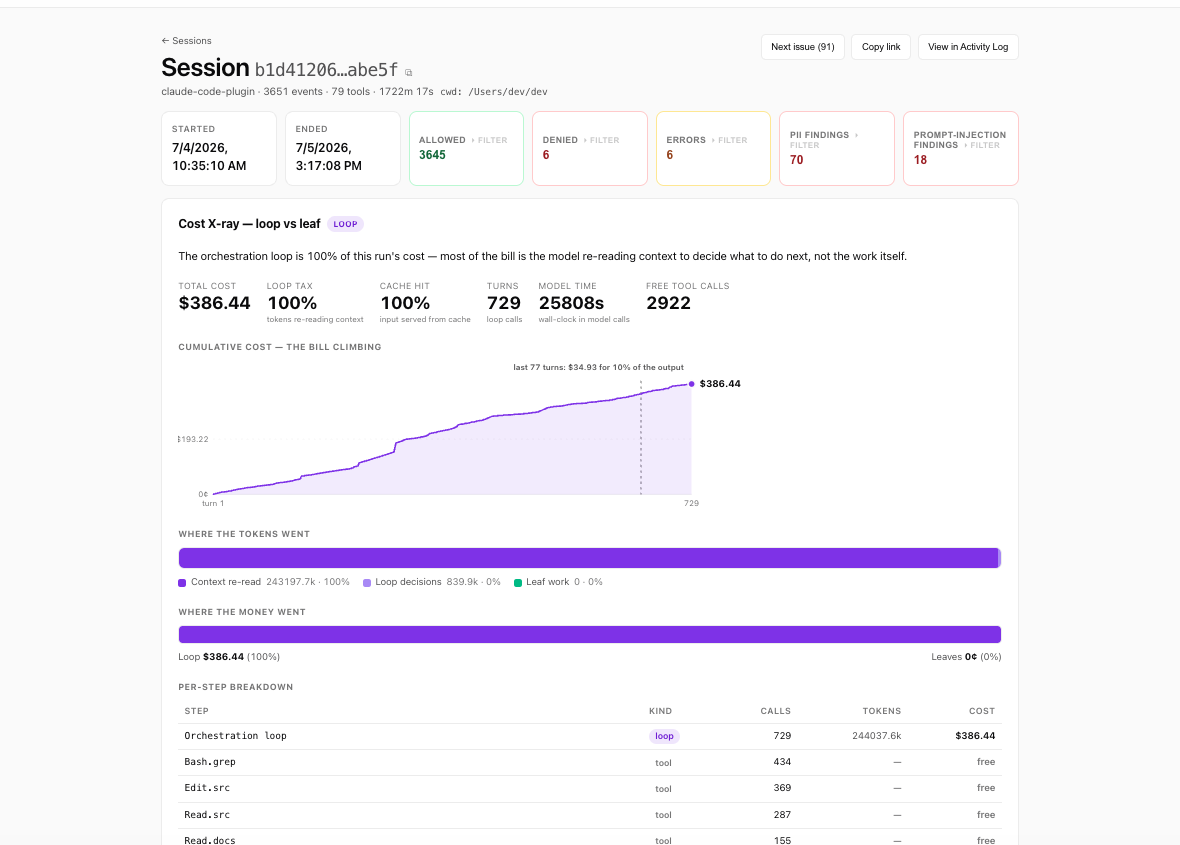
It reads Hermes's own config, registers ACP as a model provider pointed at the metering proxy, keeps your current model, and `--verify` sends one completion through to prove the wiring — not just configure it. `--undo` reverses everything. From here every model call is priced per call, per run, per agent, with prompt-cache economics visible.
What the proxy buys you: the session priced call by call — before the invoice does it monthly.
## 2. Verify before you trust
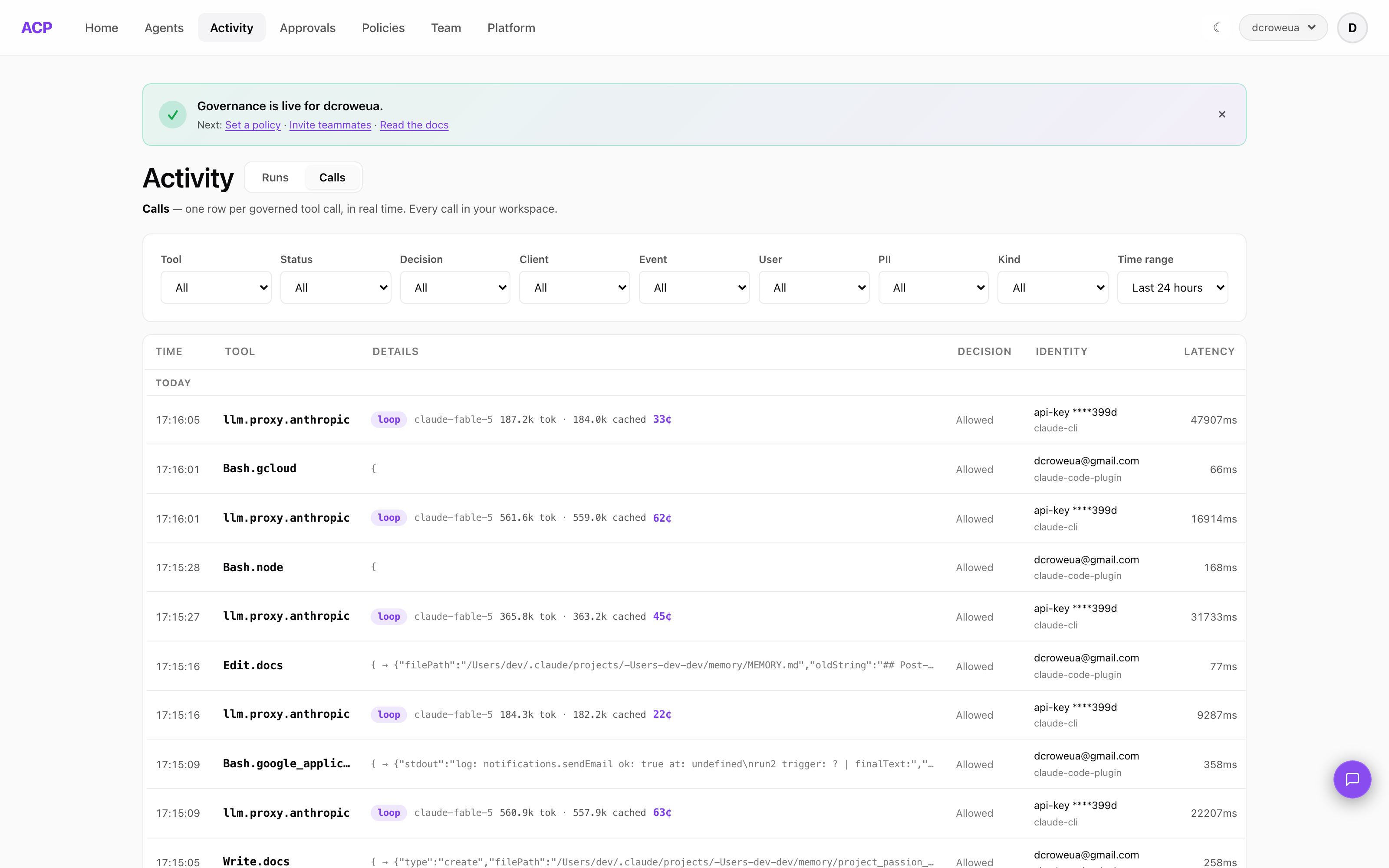
Run one throwaway task and open [cloud.agenticcontrolplane.com/activity](https://cloud.agenticcontrolplane.com/activity). You should see rows within seconds: tool name, input preview, decision. If the log is empty, nothing is governed — fix that before granting any autonomy. An ungoverned autonomous agent isn't a risk you're accepting; it's a risk you can't even see.
The proof, not the promise: every call one row — tool, decision, identity, latency. If this is empty, so is your governance.
The console's **Coverage card** (Home) keeps answering this question after day one: interception and cost planes per agent, ✓ or ✗, with the exact command when one is missing.
## 3. Set policy before autonomy
The default workspace starts in audit mode: everything logged, nothing blocked. Fine for watching your first runs. Not fine for unattended operation.
In [policies](https://cloud.agenticcontrolplane.com/policies), flip to enforce and start from the tier defaults:
- **terminal / file writes** — `ask` for anything you'd want to see before it happens. With hermes-acp ≥ 0.1.1, `ask` uses Hermes's own inline approval prompt — you answer `[o]nce / [s]ession / [a]lways / [d]eny` in the terminal, mid-run. An `always` answer is scoped to the specific tool, so approvals never silently widen.
- **network-facing tools** — deny the ones the agent's job doesn't need. Blast radius is set by what the agent *can* do, not what you asked it to do.
- **budget** — set a per-period spending cap. An autonomous loop that retries a failing call all night is a bill, not an incident report, unless something is counting.
The order matters: policy first, autonomy second. Widening a policy for an agent that earned it takes one click. Narrowing one after an incident is forensics.
## 4. Schedule it, then read the digest
Once it's running on cron, you won't be watching — that's the point. Two things keep you informed without watching:
- the **daily digest** email: yesterday's spend, runs, denials, and anything worth a look
- the **activity log**, when the digest flags something
Between those and inline approvals for the sensitive calls, you get the thing autonomous agents rarely offer: the ability to stop paying attention *safely*.
## What this buys you
Every action attributable to an identity. Denials and approvals at the moment of action, not after. Spend visible per agent, per run, per model. And when the agent does something surprising — they all do eventually — a trace instead of a mystery.
## Frequently asked questions
## Where to read more
- [Hermes integration reference](/integrations/hermes) — the full install reference, hook coverage table, and limitations
- [What Hermes's blocklist taught us](/blog/what-hermes-blocklist-taught-us) — real denials from a live Hermes deployment
- [Ways to set up ACP](/docs/setup#i-run-a-hermes-agent) — every stack's setup path, ending with your coverage state