Codex Hooks Reference: PreToolUse, PostToolUse, Examples

Just want to govern Codex? If you're here to actually see, control, and price every Codex tool call, that's one command — hooks for Bash plus an MCP connector for everything else, in a single installer:
curl -sf https://agenticcontrolplane.com/install.sh | bashirm https://agenticcontrolplane.com/install.ps1 | iexFull Codex install guide → · see your first governed call → · free up to 5 agents
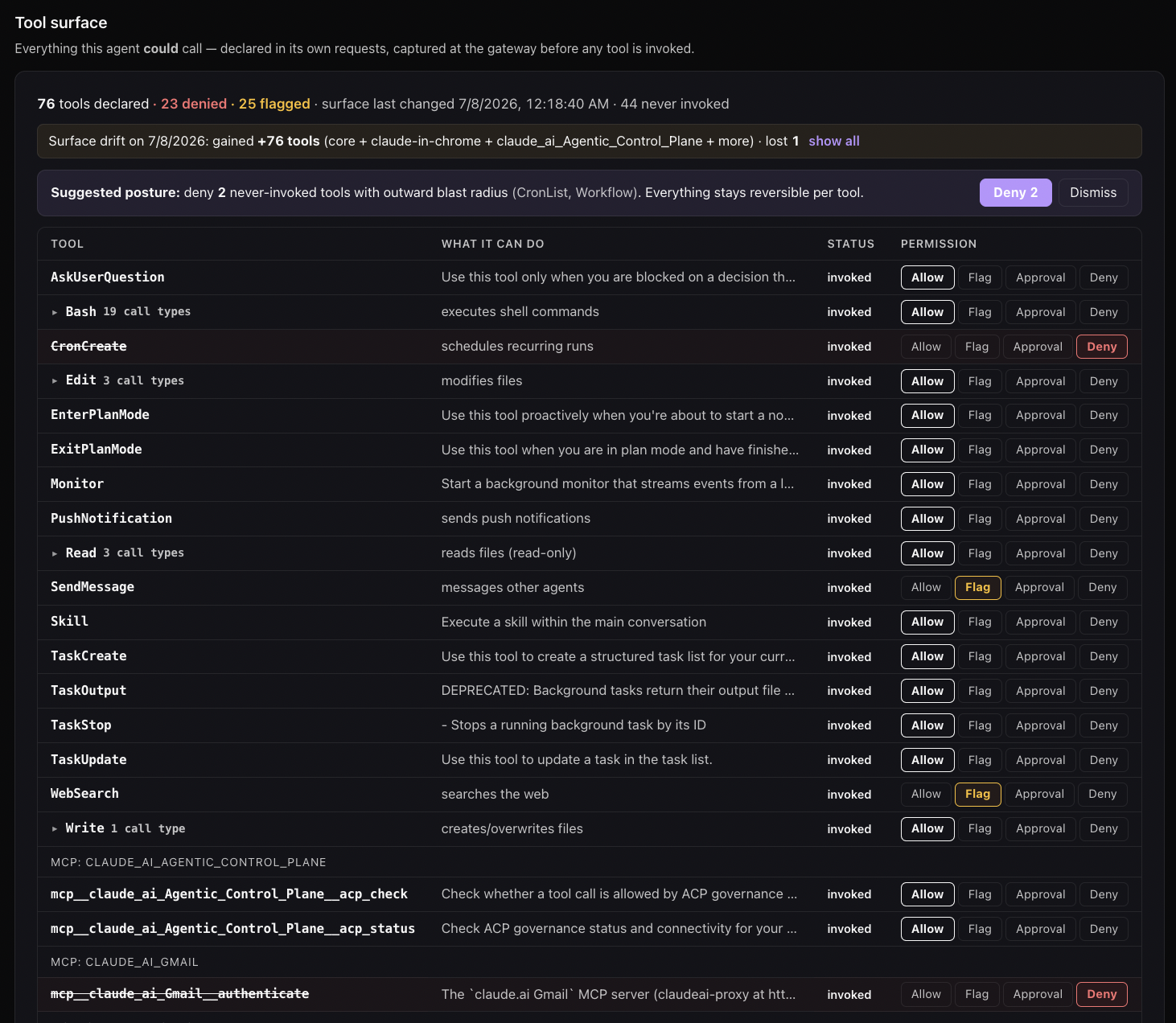
Last updated: September 16, 2026. Codex’s hook surface has changed materially since this reference was first written — the update log below says what moved. This is the one page we keep current on Codex hooks; the Codex control model page covers the controls around them — approvals, the Guardian reviewer, permission profiles, the sandbox, and requirements.toml.
OpenAI’s Codex CLI has a PreToolUse / PostToolUse hook surface modeled on Claude Code’s. Same architectural shape: scripts run before and after tool dispatch, the script’s output decides the outcome, the agent never sees what’s intercepted. Familiar to anyone who’s wired up Claude Code hooks.
Two things to know upfront, because they shape what hook-based policy checks can do:
- Hooks are on by default now. Current Codex releases enable the hook engine out of the box; the canonical feature key is
hooks(the oldcodex_hooksopt-in flag survives as a deprecated alias). What replaced the flag as the gate is trust: Codex requires you to review and trust the exact definition of a non-managed hook before it runs. PreToolUsecoverage is broad now. Per OpenAI’s Codex hooks docs, PreToolUse can intercept Bash, file edits performed throughapply_patch, MCP tool calls, and other local function tools; unified exec (exec_command) matches asBash. The remaining blind spot is hosted tools, which don’t use the local function-tool hook path.
This post walks through what the hook surface actually does, the install path, and the pieces a hook alone still doesn’t give you.
What changed in recent Codex releases
If your hooks worked and then didn’t — or a guide you’re following doesn’t match what Codex does — this is the short list:
- Hooks flipped from opt-in to on-by-default. The
[features].codex_hooks = trueincantation older guides give you is now a deprecated alias;hooksis the canonical key. If your hooks stopped running after an update, re-check the feature key and the trust prompt rather than re-adding the old flag. - Coverage expanded from shell-only to most local tools. Earlier releases fired PreToolUse for the
shelltool only;apply_patchand MCP calls were invisible to it. Current docs list all of them as interceptable. The shell-expressed-edits workaround this page used to recommend is no longer necessary for coverage. - More decision surface.
denyused to be the only decision Codex acted on. Current releases accept the deny JSON, a legacy{"decision": "block"}shape, exit code 2 with the reason on stderr, andallowwithupdatedInputto rewrite a call. There’s also aPermissionRequestevent where any matching hook’sdenywins. - Async hooks exist — and can’t enforce. Setting
async: trueruns a command hook in the background while Codex continues. Background hooks can’t block, approve, or rewrite the operation that triggered them, so policy has to stay on the synchronous path. --full-autois deprecated. It still works as a compatibility flag with a warning; new scripts should say what they mean with--sandbox workspace-write(or stay in the default read-only sandbox).
Where hooks live
Codex CLI reads hook configuration from ~/.codex/hooks.json. Same per-user shape as Claude Code’s ~/.claude/settings.json, different filename. The contents register a script for each event:
{
  "hooks": {
    "PreToolUse":  [{ "command": "node /Users/me/.acp/govern.mjs --pre" }],
    "PostToolUse": [{ "command": "node /Users/me/.acp/govern.mjs --post" }]
  }
}
Each entry’s command is the executable Codex spawns when the event fires. Multiple entries per event are allowed and run in declaration order.
The hook script can be any executable that reads JSON from stdin and writes JSON to stdout — Node, Python, Bash with jq, whatever. Codex doesn’t care about the runtime as long as the contract holds.
For full payload schema details (field names, types, supported decision values), the canonical reference is OpenAI’s Codex hooks docs. Don’t trust third-party reproductions; the upstream docs are accurate and current.
What hooks control today
Every local tool call the agent dispatches — shell commands, unified exec, apply_patch edits, MCP tool calls — passes through PreToolUse before execution. The operational shapes:
- Deny the call — return
permissionDecision: "deny"with apermissionDecisionReason(or exit code 2 with the reason on stderr). The agent sees a tool error and adapts. - Allow and rewrite —
permissionDecision: "allow"withupdatedInputsubstitutes your version of the call. - Let it run — anything else, and the command executes as-is.
PostToolUse fires after the call returns with stdout/stderr/exit-code. Treat it as audit: it can’t undo side effects from a tool that already ran.
One boundary to design around: background hooks observe, synchronous hooks enforce. An async: true hook is useful for shipping events somewhere without adding latency, and useless for stopping anything.
A minimal working hook
The smallest useful PreToolUse hook is a deny-list: block the commands you never want an agent running unattended, let everything else through. This version is deliberately schema-agnostic — it string-scans the whole event rather than assuming field names, because the payload schema is Codex’s to define (see OpenAI’s docs for the real field names when you want precise matching):
#!/usr/bin/env node
// ~/.codex/deny-hook.mjs — minimal PreToolUse hook
let raw = "";
process.stdin.on("data", (d) => (raw += d));
process.stdin.on("end", () => {
  const event = raw; // full schema: OpenAI's Codex hooks docs
  if (/\brm -rf\b|--force\b|\bDROP TABLE\b|\bgh repo delete\b/i.test(event)) {
    console.log(JSON.stringify({
      permissionDecision: "deny",
      permissionDecisionReason: "Blocked by policy: destructive command",
    }));
    return;
  }
  console.log("{}"); // anything but a deny → the call proceeds
});
Register it in ~/.codex/hooks.json and it checks every local tool call. Worth being honest about the ceiling here, because it’s the ceiling of every regex hook: string-matching a shell command is not a shell parser. Destructive behavior hides in compound commands, scripts, and aliases that no pattern list anticipates. The ACP version of this script keeps the same contract but resolves the decision against server-side policy — the deny list lives in a dashboard, applies per agent tier, and every decision (including every deny) lands in an audit log you can read later.
Trust review and managed hooks
Two mechanics sit around the contract, both per OpenAI’s hooks docs:
- A non-managed hook does not run until you trust it. Codex asks you to review and trust the exact hook definition; the trust is recorded against the hook’s hash, so an edited hook goes back to review.
/hooksinside Codex inspects, trusts, or disables what’s loaded. - Enterprises can make managed hooks the only hooks.
allow_managed_hooks_only = trueinrequirements.tomlskips hooks from user, project, session, and plugin sources and loads only the managed ones, which can’t be disabled from the user hook browser. The Codex enterprise rollout page has the complete file.
And the line from the same docs worth keeping in view: treat tool hooks as “a useful guardrail, not a complete enforcement boundary.” Some specialized tool paths can opt out of the default hook path — one more reason the decision behind the hook should live somewhere the hook’s absence is visible.
Troubleshooting
Hook isn’t firing at all. In current releases, check the trust prompt first — Codex requires you to review and trust the exact hook definition before a non-managed hook runs. On older versions, the [features].codex_hooks = true flag was required and hooks were silent no-ops without it.
Hooks stopped firing after an update. The feature key changed (codex_hooks → hooks, old key kept as a deprecated alias) and the hook engine has moved across recent releases. Re-check your config.toml feature block and re-trust the hook if prompted.
Hook fires for Bash but not for a hosted tool. Expected — hosted tools don’t use the local function-tool hook path. Everything local (shell, unified exec, apply_patch, MCP calls) should fire it.
A background hook isn’t blocking anything. It can’t. async: true hooks run while Codex continues; only synchronous hooks can deny, approve, or rewrite.
Two hook layers conflicting. User-level (~/.codex/hooks.json) and repo-level (<repo>/.codex/hooks.json) both load and merge, with repo entries winning for matching tools. There’s no namespacing — identify your entries with a stable statusMessage string.
Sandbox flags for unattended runs (--full-auto is deprecated)
For unattended Codex deployments (CI agents, scheduled jobs, headless coding agents), say what you mean with the sandbox flags:
codex exec "<task>"— the default is a read-only sandbox.codex exec --sandbox workspace-write "<task>"— allow edits inside the workspace.codex exec --sandbox danger-full-access "<task>"— only in a controlled environment.
codex exec --full-auto still works as a deprecated compatibility flag and prints a warning; OpenAI’s docs say to prefer the explicit --sandbox workspace-write in new scripts. Hooks keep firing in all of these modes.
For agents that need outbound network (calling APIs, hitting external services), add -c sandbox_workspace_write.network_access=true to grant network while keeping filesystem sandboxing intact. From the Codex CLI scout:
codex exec \
  --sandbox workspace-write \
  -c 'sandbox_workspace_write.network_access=true' \
  "$(cat scout.prompt.md)"
Worth knowing: Codex keeps hooks running in non-interactive sandboxed modes, and Claude Code does the same under --dangerously-skip-permissions (the flag suppresses prompts, not hooks). Unattended deployments on either retain audit + policy enforcement; only the human confirmation prompt is gone. What non-interactive mode still doesn’t give you is a way to approve — a paused MCP call with nobody attached to stdin has no one to answer it, which is a different problem than blocking (we cover it in the headless approvals post).
Installing the ACP Codex plugin (one command)
The fastest path to a working hook config is the ACP installer — the same one command as the top of this page:
curl -sf https://agenticcontrolplane.com/install.sh | bashThe installer detects your Codex installation and:
- Ensures the hooks feature is enabled (a no-op on current Codex, where hooks are on by default; on older versions it sets the legacy flag)
- Writes
~/.acp/govern.mjs(the same hook script Claude Code uses, invoked withACP_CLIENT=codex) - Registers it under
~/.codex/hooks.jsonfor bothPreToolUseandPostToolUse - Wires the ACP MCP connector and adds the control directive to
~/.codex/AGENTS.md - Walks you through workspace provisioning + API key save
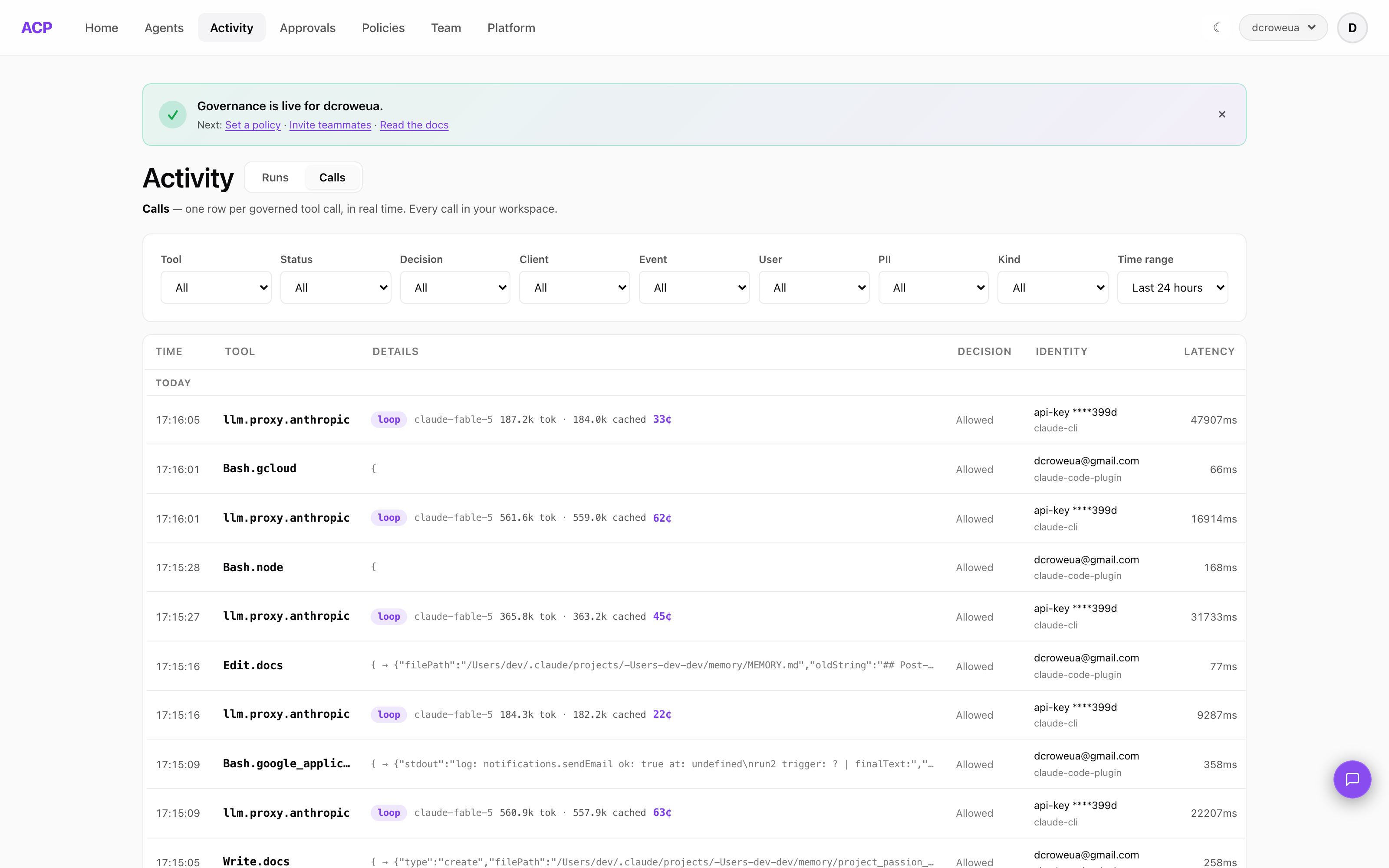
Restart Codex after install. Every local tool call now flows through ACP’s /govern/tool-use endpoint before dispatch, with audit rows landing under client=codex in your dashboard. To also meter what your sessions cost, add the proxy plane — see Ways to set up ACP → I use Codex.
For environments where you’d rather build your own integration: the protocol is documented at /integrations/codex and the running code is in the starter folder linked above.
Tier-aware policy
The hook payload carries Codex’s execution context (interactive session vs. non-interactive codex exec). Map this to ACP’s tier model for tier-aware policy:
| Codex context | ACP tier | Typical policy |
|---|---|---|
| interactive session | interactive |
Permissive — human is watching |
| non-interactive, session-bound | subagent |
Restrictive — no human, session-bound |
| non-interactive, scheduled/daemon | background |
Most restrictive — no human, no session anchor |
A typical policy block for destructive shell verbs:
{
  "tools": {
    "Bash.curl":    { "background": "deny", "subagent": "ask",  "interactive": "allow" },
    "Bash.rm":      { "background": "deny", "subagent": "ask",  "interactive": "allow" },
    "Bash.kubectl": { "background": "deny", "subagent": "deny", "interactive": "ask"   },
    "Bash.aws":     { "background": "deny", "subagent": "deny", "interactive": "ask"   }
  }
}
Sub-command classification (Bash.curl vs Bash.rm) happens in the hook by parsing the leading token of the shell command. ACP’s ~/.acp/govern.mjs does this automatically.
Known limitation worth flagging
The ACP Codex plugin currently sends agent_tier but not agent_name in its hook payload — events land in the dashboard under client=codex without an agent-name breakdown. Same gap exists in the Claude Code plugin. Functional impact is limited (per-tool policy still works, audit still records), but per-agent attribution is sparser than for SDK-based integrations like the Anthropic Agent SDK or the OpenAI Agents SDK starter.
Batch-fix candidate; not a blocker for rollout.
Comparing to Claude Code hooks
Both clients implement the hook pattern (Claude Code hooks reference). Where they differ:
| Dimension | Claude Code | Codex CLI |
|---|---|---|
| Hook config path | ~/.claude/settings.json |
~/.codex/hooks.json |
| Hook events | PreToolUse, PostToolUse |
PreToolUse, PostToolUse, PermissionRequest, SessionEnd |
| Coverage of native tools | All tools (Bash, Edit, Read, Write, MCP) |
Local tools: Bash, unified exec, apply_patch, MCP; hosted tools excluded |
| Operational decisions | allow / deny / ask, input rewrite |
deny (JSON or exit code 2), allow + updatedInput rewrite; any matching deny wins on PermissionRequest |
| Enabled by default | Yes | Yes (current releases; older versions required [features].codex_hooks = true) |
| Unattended-mode behavior | --dangerously-skip-permissions removes prompts; hooks and deny rules still run |
Sandbox modes keep hooks running (--full-auto deprecated in favor of --sandbox workspace-write) |
| Async hooks | No | Yes (async: true) — observe-only, can’t block |
Both hook surfaces are genuinely usable for policy control now, and Codex’s is much closer to Claude Code’s than it was at launch. What neither gives you is the part around the hook: rules that hold across both tools, an audit trail of what was denied and why, and an “ask” that someone can actually answer when no human is attached. That’s the layer the installer wires in.
Practical takeaways
- Use the explicit sandbox flags for unattended Codex agents —
--sandbox workspace-write, not the deprecated--full-auto, and never--dangerously-bypass-approvals-and-sandboxwhen a sandboxed mode will do. Hooks keep running either way. - Put enforcement on the synchronous path. Async hooks can’t block; they’re for telemetry.
- Re-check hooks after Codex updates. The feature key, trust flow, and coverage have all moved in 2026; a hook that silently stopped firing looks identical to a hook with nothing to report.
- Don’t stop at a regex. A deny-list hook is a tripwire, not a policy — compound commands walk past it. Put real rules behind the hook and keep the decisions in an audit log.
Frequently asked questions
How do I enable hooks in Codex CLI?
You don’t anymore — hooks are enabled by default in current Codex releases. The old opt-in flag survives as a deprecated alias (codex_hooks); the canonical feature key is now hooks, and you’d only touch it to turn hooks off ([features].hooks = false). Register your hook script in ~/.codex/hooks.json under PreToolUse / PostToolUse. On older Codex versions the engine was off by default behind [features].codex_hooks = true — if a guide tells you to set that, it’s describing the old behavior.
Why isn't my Codex hook firing?
In current releases the usual cause is trust: Codex requires you to review and trust the exact hook definition before a non-managed hook runs. Hooks also stopped firing for some users across recent updates when the feature key changed (codex_hooks → hooks) — the deprecated alias still works, but re-check your config after an update. Finally, hosted tools don’t use the local function-tool hook path, so calls to them never fire a hook.
Can a Codex hook block a tool call?
Yes, two ways. Return JSON with permissionDecision: "deny" and a permissionDecisionReason under hookSpecificOutput (the older {"decision": "block", "reason": ...} shape is also accepted), or simply exit with code 2 and write the reason to stderr. PreToolUse can also rewrite a call: permissionDecision: "allow" with updatedInput. Background (async) hooks can’t block — enforcement has to run synchronously.
Do Codex hooks cover apply_patch or MCP tool calls?
Yes, now. Per OpenAI’s current docs, PreToolUse can intercept Bash, file edits performed through apply_patch, MCP tool calls, and other local function tools; unified exec (exec_command) matches as Bash. The remaining gap is hosted tools, which don’t use the local function-tool hook path. Earlier Codex releases intercepted the shell tool only — older guides (including an earlier version of this page) describe that narrower surface.
Is codex exec --full-auto deprecated?
Yes. Codex keeps codex exec --full-auto as a deprecated compatibility flag and prints a warning. For new scripts, use the explicit sandbox flags instead: codex exec defaults to a read-only sandbox, --sandbox workspace-write allows edits, and --sandbox danger-full-access should only run in a controlled environment. Hooks keep firing in all of these modes — as they do under Claude Code’s --dangerously-skip-permissions, which suppresses prompts but not hooks.
Where does Codex read hook configuration from?
~/.codex/hooks.json for the user level, merged with <repo>/.codex/hooks.json at the repo level. Both load, with repo entries overriding user entries for matching tools; there’s no namespacing, so keep a stable statusMessage on entries you need to find again.
Where to read more
- What is runtime authorization? — the per-call policy model these hooks plug into
- AI agent tool allowlists — deny-by-default across Claude Code, Codex CLI, and MCP
- Codex CLI starter — runnable reference
- Codex CLI scout — full headless agent example
- Codex integration page — install instructions and dashboard verification
- Codex CLI’s control model, explained — the controls around the hooks: approval policies, the Guardian reviewer, permission profiles, the sandbox,
requirements.toml - Ways to set up ACP — every stack’s setup path, each ending with the coverage you’ll have
- OpenAI Codex hooks docs — canonical upstream reference
- Govern Claude Code in 60 seconds — comparable pattern
- The Tool Surface Index — Codex’s declared tools next to Claude Code’s, captured from live traffic and grouped by blast radius