Cursor Audit Log & Hook Install Guide
See, control, and price every tool call Cursor’s Composer makes — file edits, Bash, MCP, and the model calls behind them — from one dashboard. No Enterprise plan, no code changes.
Cursor’s native audit log lives behind the Enterprise plan. Agentic Control Plane (ACP) adds an identity-attributed audit log and policy layer to any Cursor tier — free, Pro, or Team — by hooking into Cursor’s Composer agent with its own native hook API. Every Composer tool call (file edits, Bash commands, MCP tool invocations) is logged, scoped, and optionally policy-gated. No Enterprise plan required.
Related: What is an MCP Control Plane? for the governance-layer overview that this install guide implements for Cursor specifically.
TL;DR
curl -sf https://agenticcontrolplane.com/install.sh | bashirm https://agenticcontrolplane.com/install.ps1 | iexThree things you get the moment it's running — click any to see it full-size:
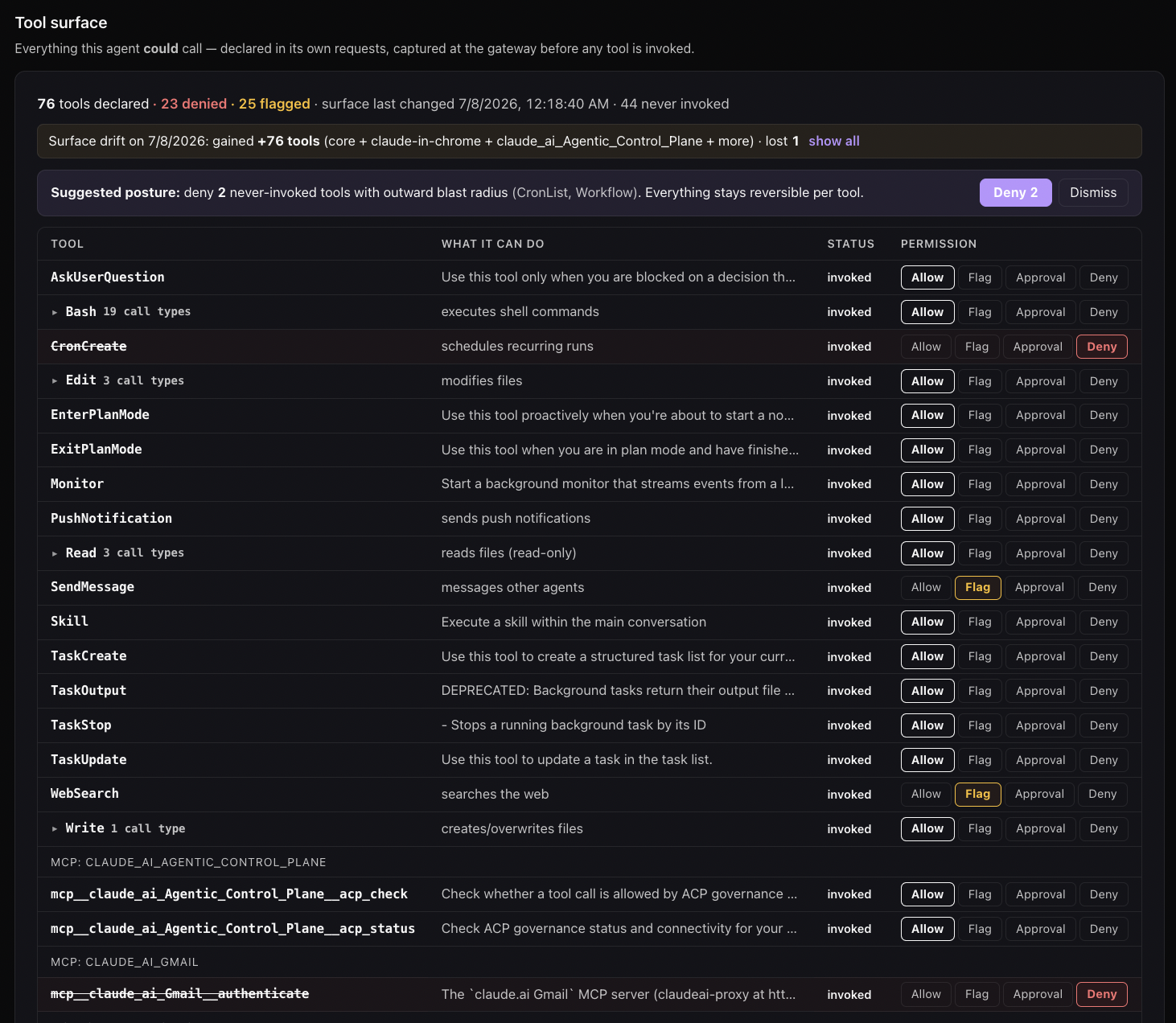
rm -rf, force-push, and the rest. Enforced at the call, outside the model.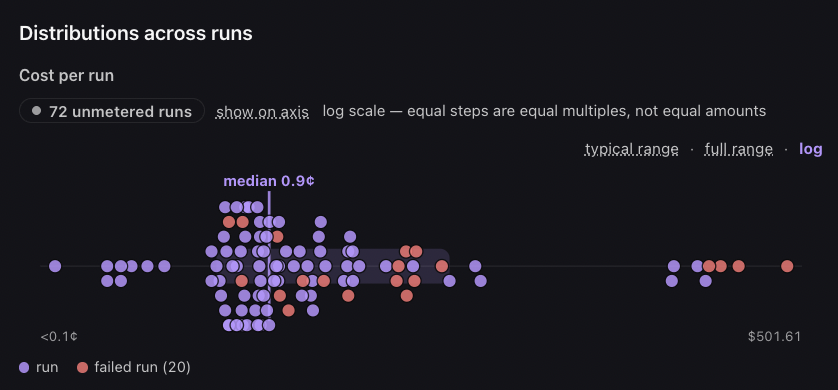
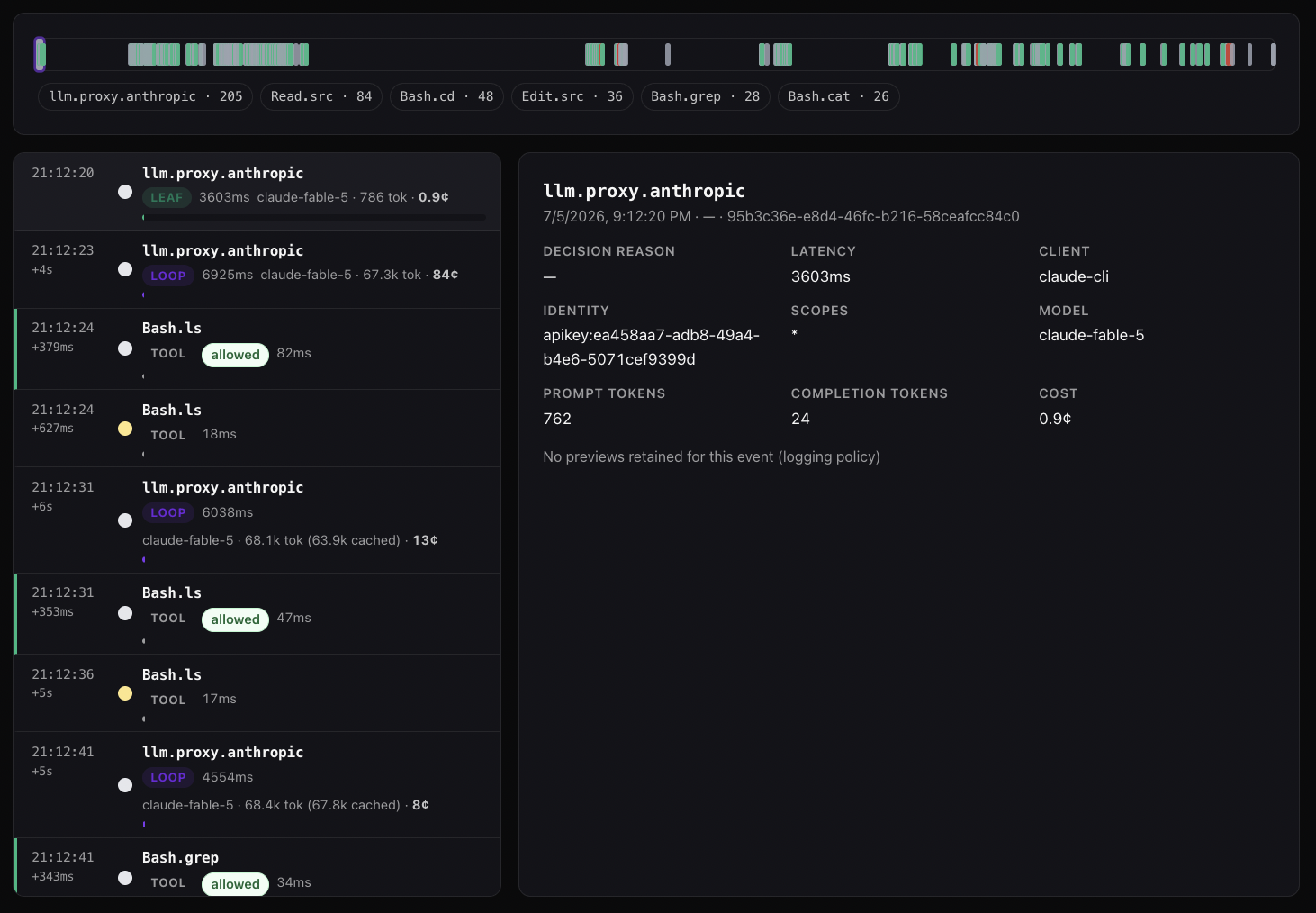
See your first governed call →Free up to 5 agents · full install below
The script detects Cursor (~/.cursor exists or cursor on PATH), writes ~/.acp/govern.mjs, and registers it under ~/.cursor/hooks.json for both preToolUse and postToolUse events. Restart Cursor and every Composer tool call is governed.
By default the installer opens your browser to provision a workspace and routes decisions through the ACP API, so every Composer tool call lands in one activity log with the cost X-ray alongside it — free up to 5 agents. That is the mode to want: policy you can change in one place, and a record you can actually read.
Prefer fully on-device? Add --local — no browser, no account, nothing leaves your machine. Decisions are made by ~/.acp/decide.mjs against ~/.acp/policy.json (allow / ask / deny per tool, plus an always-on safety floor), and every call is logged to ~/.acp/audit.jsonl. The trade is that the log stays on that one machine: no shared activity view, no cost X-ray, and nothing to compare across agents. Re-run without --local any time to upgrade.
How it works
Cursor’s hook system mirrors Claude Code’s but uses lowercase event names. ACP installs the same govern.mjs script for both products — the dispatcher inside the script handles either event shape:
- preToolUse — fires before tool execution. POSTs to
/govern/tool-use. ReturnspermissionDecision: "deny"to block. - postToolUse — fires after tool returns. POSTs to
/govern/tool-output. Audit log entry written; PII/secret findings surfaced.
Cursor’s hook API is newer than Claude Code’s. Most fields map directly; a few quirks are documented in Limitations below.
What gets installed and where
| Path | Purpose |
|---|---|
~/.acp/govern.mjs |
Hook script, shared with Claude Code/Codex installs |
~/.acp/credentials |
Bearer token from browser OAuth |
~/.cursor/hooks.json |
Adds hooks.preToolUse[] and hooks.postToolUse[] entries |
Idempotent. Safe to re-run.
What you’ll see in the dashboard
Cursor traffic appears as Cursor in cloud.agenticcontrolplane.com/agents. Activity is broken down by Cursor’s reported tier (when present) — typically interactive for Composer-driven sessions.
The Activity log page (/activity) shows individual tool calls with the Cursor session ID, Composer’s reported tool name (Read, Edit, Apply Patch, Run Terminal), and any policy decisions.
Setting up policy
Cursor traffic governs the same way as any other client — through the three-axis Policies model:
- Tool policies — restrict destructive Bash commands, gate file writes outside the workspace
- Agent policies — set per-tier rules (interactive Composer vs autonomous Composer agent runs)
- User policies — gate sensitive operations (Stripe, prod database access) per identity
Audit-mode-first is the right default. Enforce mode after a few days of observed traffic.
Limitations
- Cursor’s hook API is less mature than Claude Code’s. Expect schema fields to evolve as Cursor stabilizes. The govern.mjs dispatcher accommodates both Claude and Cursor field names but may need updates as Cursor changes.
- No equivalent to Claude Code’s Agent tool subagent metadata. Cursor Composer doesn’t expose a comparable named-subagent concept today, so the dashboard’s named-agent attribution is sparser for Cursor than for Claude Code.
- No
--dangerously-skip-permissionsflag but YOLO mode in Composer can autorun some tools without prompting. Hooks still fire — there’s no equivalent escape hatch in Cursor today. - Cursor’s Privacy Mode affects what telemetry Cursor itself sends — it does not affect ACP’s hooks. ACP runs locally on your machine and POSTs to your workspace’s gateway. Privacy Mode and ACP are orthogonal.
- PostToolUse output mutation is observe-only. ACP can flag PII and prompt-injection findings into the audit log; rewriting the tool output before Cursor sees it isn’t supported in the current hook API.
Troubleshooting
Hook isn’t firing. Restart Cursor completely (quit and re-open). Hook configuration is read on Cursor startup.
“ACP unreachable” blocks. By default an unreachable ACP fails open (calls run, loudly flagged as ungoverned) — so blocks mean either you’ve opted into fail-closed (~/.acp/failmode says closed) or a policy is denying. For credential problems (~/.acp/credentials empty or expired), re-run the installer to re-authenticate.
Cursor doesn’t see the hook. Confirm ~/.cursor/hooks.json exists and is valid JSON. Cursor silently ignores invalid hook configs.
Composer YOLO mode tool calls aren’t being intercepted. They should be — file an issue if you see otherwise. Hook should fire regardless of approval mode.
Add the cost X-ray
The hook above governs and audits tool calls — it doesn’t see the model’s token usage, so it can’t show cost. To meter spend, prompt-cache hit rate, and the loop-vs-leaf cost X-ray, route Cursor’s model calls through the ACP proxy: set a custom OpenAI base URL of https://api.agenticcontrolplane.com/v1 in Cursor’s model settings, authenticated with your ACP key (gsk_...). Same responses, now metered — and the proxy governs the tool-use blocks the model emits as a second layer.
Full walkthrough: Turn on Cost X-Ray.
Related integrations
- Claude Code — same hook pattern, more mature hook API
- OpenAI Codex CLI — Codex hooks (with the Bash-only caveat)
- Cline — VS Code extension that pairs well with Cursor for some workflows; uses MCP-based governance instead of hooks
- Agent-to-Agent governance — what happens when Composer chains across multiple agent invocations