Govern OpenAI Codex CLI with Agentic Control Plane
See, control, and price every tool call Codex makes — the shell commands, the file edits, the model calls — from one dashboard. One command, no code changes, first governed call in about 30 seconds.
TL;DR
curl -sf https://agenticcontrolplane.com/install.sh | bashirm https://agenticcontrolplane.com/install.ps1 | iexMIT-licensed and auditable — read it before you run it.
Local vs cloud for Codex. In --local mode the hook checks Codex's local tool calls on-device — shell commands, and on current builds apply_patch edits and MCP tool calls — with decisions from ~/.acp/policy.json, logged to ~/.acp/audit.jsonl. The MCP connector, which gives Codex the acp_check tool for calls the hook can't see (hosted tools such as web search; every non-shell tool on older builds), is cloud-only and is skipped locally. For end-to-end Codex coverage, run without --local.
Three things you get the moment it's running — click any to see it full-size:
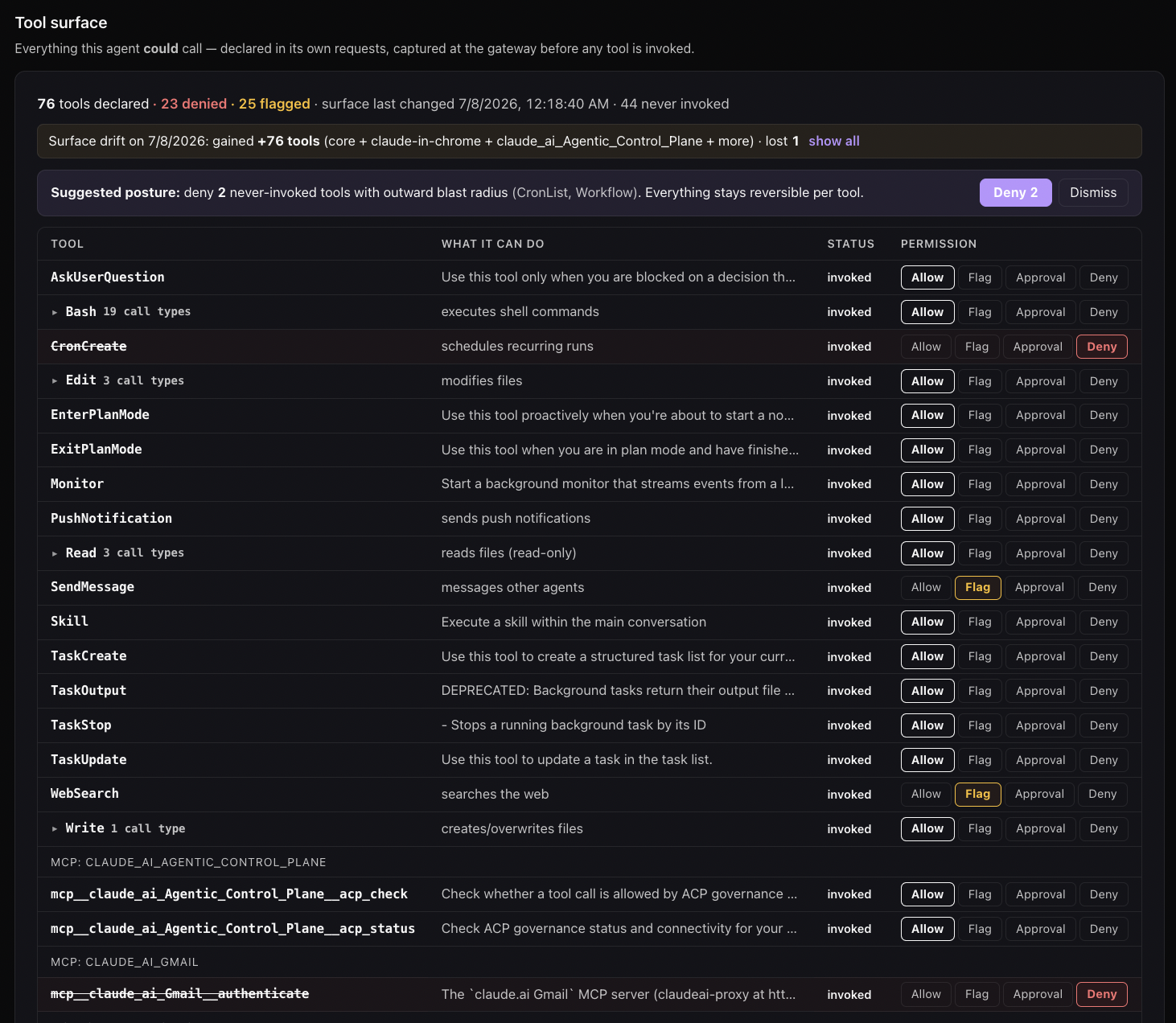
rm -rf, force-push, and the rest. Enforced at the call, outside the model.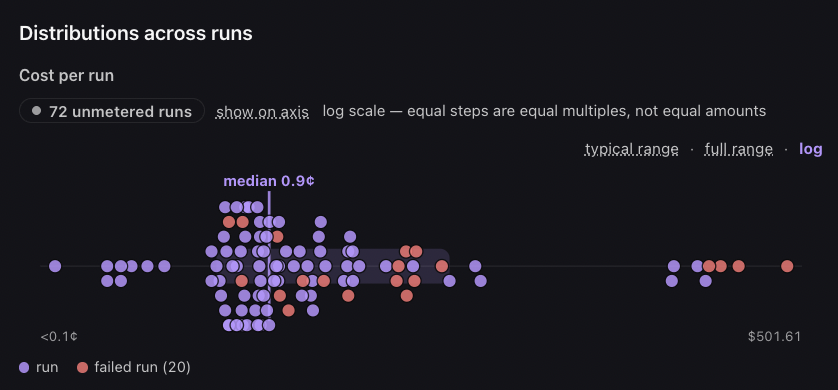
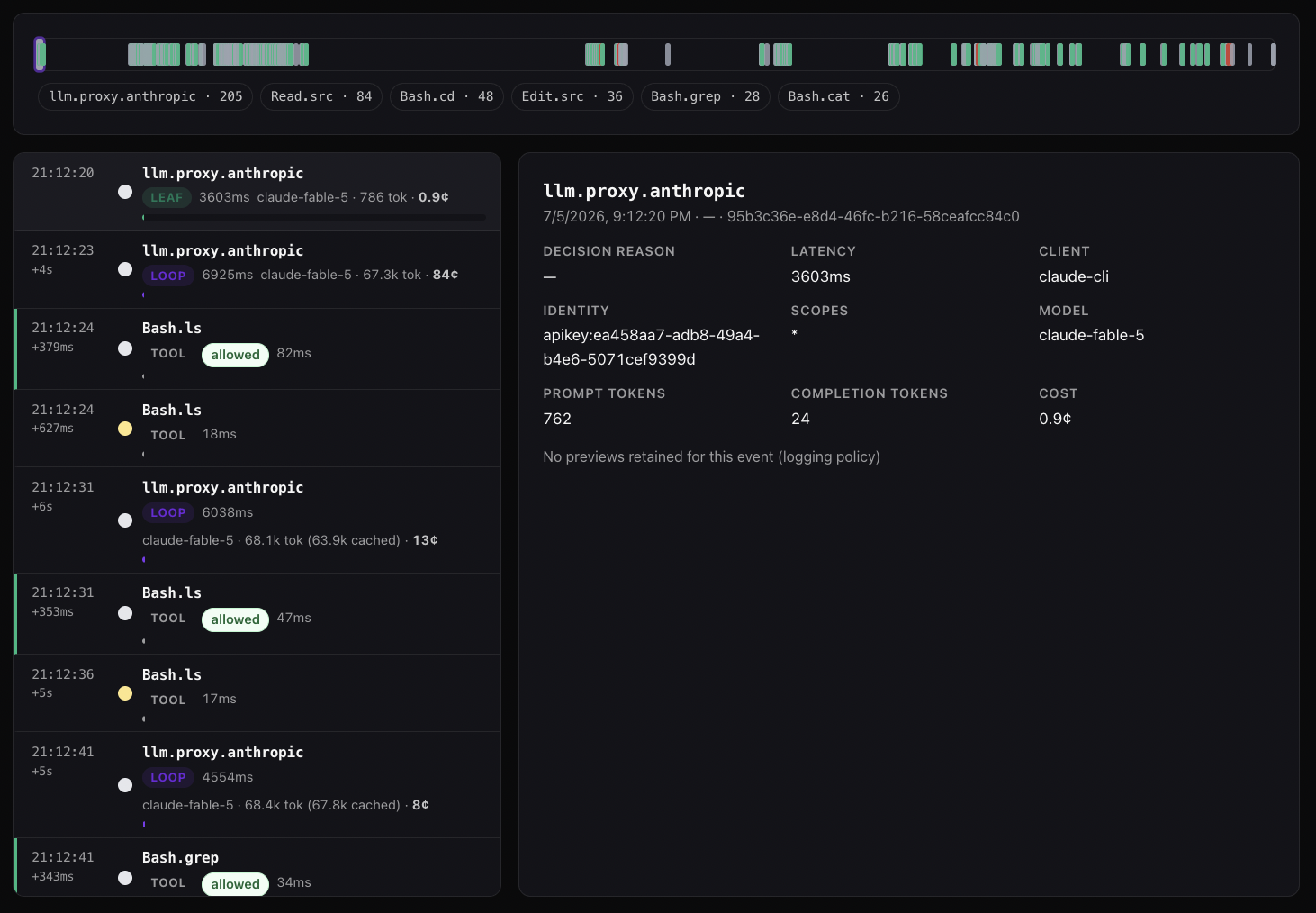
See your first governed call →Free up to 5 agents · full install below
OpenAI Codex CLI ships a Claude-style hook system — stable and enabled by default from 0.145.0 onward, where the original codex_hooks flag (under development, off by default) was renamed to hooks. On current builds its PreToolUse and PostToolUse events cover shell commands, apply_patch edits, MCP tool calls, and other local function tools; earlier releases fired them for the shell tool only, and hosted tools such as web search never reach a hook on any build. To cover Codex end-to-end you want both the hook (Path 1) and the MCP connector (Path 2) — the hook enforces on every local tool call, and MCP gives Codex the acp_check tool for the calls a hook can’t see.
The installer detects Codex (command -v codex or ~/.codex/ exists), then wires three layers in one command:
- Hooks — Confirms the hooks feature is on (
[features].hookson 0.145+, the oldercodex_hookskey on earlier builds), writes~/.codex/hooks.jsonwith PreToolUse + PostToolUse entries pointing at~/.acp/govern.mjs, matcher.*. Checks every local tool call Codex makes: shell commands,apply_patchedits, MCP tool calls (shell only on pre-current builds). - MCP connector — Adds
[mcp_servers.acp]to~/.codex/config.tomlso Codex can callacp_checkandacp_statusdirectly — the check path for hosted tools such as web search, and for every non-shell tool on builds that predate the wider hook surface. - AGENTS.md directive — Writes an ACP-governance section to
~/.codex/AGENTS.mdtelling Codex that the hook already governs every local tool call, so it must not callacp_checkbefore each one;acp_check/acp_statusstay available for hosted tools such as web search and for explicit questions.
The MCP block uses a shell substitution (sh -c ... Bearer $(cat ~/.acp/credentials)) so the Authorization header reads your credentials file every time Codex starts the server. No install-time API key needed, and credential rotation just means overwriting the file.
The hook feature flag: on by default since 0.145
From Codex 0.145 the hook engine is a stable feature, on by default as [features].hooks (see the Codex feature flags). Earlier builds shipped it as [features].codex_hooks, off by default and marked under development. On a current build the old key still works but is a deprecated alias that prints a warning on every launch, so the installer detects which key your build understands and writes only that one, prompting before it edits ~/.codex/config.toml:
[features]
hooks = true
On a pre-0.145 build, hooks without the flag are silently ignored — no error, no log line — so if they aren’t firing, the flag is the first thing to check. On a current build, check instead for a stray codex_hooks line: it works, but it nags.
How it works
ACP installs at three layers, designed to compose:
- Hook layer (Path 1) —
~/.codex/hooks.jsonregistersPreToolUseandPostToolUseevents pointing at~/.acp/govern.mjs. Same script as Claude Code; samepermissionDecision: "deny"semantics. - MCP connector (Path 2) —
[mcp_servers.acp]in~/.codex/config.tomlpoints Codex atmcp.agenticcontrolplane.com/mcp. Codex routes any tool call configured to use that MCP server through ACP. - Audit layer — every Codex tool call (whether intercepted by hook or MCP) lands in your ACP activity log with
client.name: "codex", theturn_id, the subagent context (Codex’sSessionSourceis finer-grained than Claude Code’s tier), and the full delegation provenance.
What gets installed and where
| Path | Purpose |
|---|---|
~/.acp/govern.mjs |
Hook script — shared with Claude Code/Cursor installs |
~/.acp/credentials |
Bearer token from browser OAuth (written after auth) |
~/.codex/config.toml |
Ensures [features].hooks = true (codex_hooks on pre-0.145 builds), adds the [mcp_servers.acp] block, and (workspace mode) the [model_providers.acp] block for the cost X-ray — written but not selected, so plain codex is unaffected |
~/.codex/hooks.json |
Adds PreToolUse + PostToolUse entries registering node $HOME/.acp/govern.mjs |
~/.acp/bin/codex-acp |
Launcher (workspace mode): runs codex -c model_provider=acp for that one invocation, supplying the workspace key from ~/.acp/credentials via the environment |
The installer is idempotent. Running it again on a machine where Codex already has the entries will skip them. Running on a machine without Codex installed is a no-op for the Codex section.
How MCP coverage works (no API-key-at-install-time needed)
On current builds Codex’s PreToolUse hook fires for shell commands, apply_patch edits, MCP tool calls, and other local function tools. Hosted tools such as web search don’t reach it, and earlier releases fired it for the shell tool only. The MCP connector the installer also wires is the check path for those cases.
The [mcp_servers.acp] block the installer writes looks like:
[mcp_servers.acp]
command = "sh"
args = ["-c", 'exec npx -y mcp-remote https://mcp.agenticcontrolplane.com/mcp --header "Authorization: Bearer $(cat ~/.acp/credentials)"']
The sh -c wrapper is load-bearing: it evaluates $(cat ~/.acp/credentials) every time Codex launches the MCP server, which means:
- No API key is required at install time (hooks install → browser auth → credentials saved → first Codex restart picks it up)
- Credential rotation is a one-step operation — overwrite
~/.acp/credentialsand restart Codex - The literal API key never appears in
config.toml, which is safer for dotfile checkins
Limitations — read this before relying on Codex hooks alone
This is the section that matters most. Codex hooks are powerful but partial.
Hook coverage depends on your Codex build
Per OpenAI’s Codex hooks documentation, PreToolUse and PostToolUse fire for shell commands (unified exec matches as Bash), file edits made through apply_patch (matcher aliases Edit and Write; the hook input reports tool_name: "apply_patch"), MCP tool calls (mcp__server__tool), and other local function tools such as spawn_agent. Hosted tools such as WebSearch do not fire hooks — they don’t use the local function-tool path — and OpenAI notes that some specialized tool paths can opt out of the default hook path. Earlier Codex releases fired PreToolUse for the shell tool only.
ACP registers a .* matcher on both events, so whatever your build sends reaches the policy check. This is still why ACP installs both the hook and the MCP connector. The hook enforces on every local tool call — shell is where most of the destructive-action risk lives (rm -rf, gh repo delete, psql DROP TABLE), and on current builds apply_patch and MCP calls get the same check. The MCP connector gives Codex acp_check for what a hook can’t see: hosted tools, and every non-shell tool on a build that predates the wider surface.
If you’re on a current build and only care about local tools, the hook alone is enough.
Tool input/output mutation is not yet supported
Codex’s hook engine parses but rejects updatedInput (PreToolUse) and updatedMCPToolOutput (PostToolUse). Specifically:
"PreToolUse hook returned unsupported updatedInput"— hooks-output-parser.rs:259"PostToolUse hook returned unsupported updatedMCPToolOutput"— hooks-output-parser.rs:250
You can observe and deny today; you cannot redact or rewrite. The MCP connector path supports both — another reason to wire both layers.
Only permissionDecision: "deny" is operational
PreToolUse parses but rejects "allow" and "ask" decisions. The only response that does anything is deny with a permissionDecisionReason. Effectively the only output shape your hook should emit.
type: "command" is the only working handler
Codex’s schema also defines prompt and agent handler types but they parse-and-warn-skip. Use command exclusively.
Hooks merge across config layers without namespacing
~/.codex/hooks.json and <repo>/.codex/hooks.json both load. There’s no marker to identify ACP-owned entries. The installer uses a stable statusMessage: "ACP policy check" string so it can find and idempotently update its own entries on re-install. If you hand-edit hooks, leave that statusMessage alone.
Schema is evolving fast
Codex ships multiple releases per day (75K stars, 410 contributors). The wire types use deny_unknown_fields so additive changes can break strict parsers. ACP pins to tested Codex versions and updates the adapter when fields land. If you’re on bleeding-edge Codex (alpha releases), things may shift under you.
What you’ll see in the dashboard
Once Codex is governed, your console shows a codex row with activity broken down by Codex’s session source — cli, vscode, exec, appServer, subAgent (with the SubAgentSource subtype: Review, ThreadSpawn, MemoryConsolidation, Compact). Codex exposes finer-grained subagent metadata than Claude Code does — including parent_thread_id and depth for ThreadSpawn — which gives you better A2A signal automatically.
Setting up policy
The same three-axis model applies (Tool / Agent / User policies). Specifically for Codex:
- Tool policies — restrict the Bash subcommands Codex can run (
Bash.git,Bash.npm,Bash.docker— already classified server-side). - Agent policies — limit which session sources can run high-risk operations.
subAgent.MemoryConsolidationshould probably never delete files, for example. - User policies — gate Codex enterprise installs to specific identities.
Rolling out to a whole ChatGPT Enterprise workspace rather than one laptop at a time? Codex’s requirements.toml can carry this hook from a system file, an MDM profile, or the workspace’s managed configuration. The complete file, the MDM script drop, and per-person enrollment are on the Codex enterprise rollout page.
Troubleshooting
Hook isn’t firing. On a pre-0.145 build, check ~/.codex/config.toml has [features].codex_hooks = true; without it hooks are silent. On current builds hooks are on by default, so check that ~/.codex/hooks.json still lists the ACP entries and that they are trusted (the hooks.state table in config.toml).
Hook fires for shell but not for apply_patch or MCP calls. Your Codex build predates the wider hook surface — update Codex, or rely on the MCP connector for non-shell tools until you do. Hosted tools such as web search never fire hooks on any build; see Limitations.
Codex says “ACP policy check timed out”. Default hook timeout is 30 seconds in hooks.json. A timed-out check follows your fail mode — allowed-but-flagged-ungoverned by default, denied if you’ve opted into fail-closed (echo closed > ~/.acp/failmode).
updatedInput rejection error in Codex logs. Don’t return updatedInput from PreToolUse — only permissionDecision: "deny" with a reason. Codex’s parser strict-rejects unsupported fields.
Multiple hook layers conflicting. Both user (~/.codex/) and repo (<repo>/.codex/) hooks load and merge. Repo-level entries override user-level for matching tools. Inspect the merged config with codex --debug-hooks (alpha command).
Add the cost X-ray
The MCP coverage above governs and audits tool calls — it doesn’t see the model’s token usage, so it can’t show cost. To meter spend, prompt-cache hit rate, and the loop-vs-leaf cost X-ray, Codex’s model calls have to go through the ACP proxy. In workspace mode the installer sets that up: it writes an [model_providers.acp] block into ~/.codex/config.toml and installs codex-acp. Launch with it instead of codex:
codex-acp
Only that invocation uses the ACP provider; plain codex is untouched. Codex keeps your existing ChatGPT subscription or API-key login (the provider sets requires_openai_auth = true), your workspace key travels as x-acp-key from the environment, and ACP governs the tool-use blocks the model emits as a second layer without silently changing who pays.
Hand-wiring it, or making it the default for plain codex: the provider block. Full walkthrough: Turn on Cost X-Ray.
Verify the installer
The installer is open source — read every line before you run it.
· Source code: github.com/agentic-control-plane/acp-install (MIT, auditable)
· SHA-256:
/install.sh.sha256 (compare with the acp-install mirror to verify you got the published version)· Dry read:
curl -sf https://agenticcontrolplane.com/install.sh | less — see every line before running· License: MIT · Issues: github
Frequently asked questions
How do I control what Codex CLI is allowed to do?
Two layers: a PreToolUse hook that checks each local tool call — shell commands, apply_patch edits, MCP tool calls — against policy before it runs (deny with a reason, or let it through), and an MCP connector that gives Codex an acp_check tool for anything the hook doesn’t see. The installer wires both in one command; per-command rules (Bash.git, Bash.npm, Bash.docker) are then set from the dashboard.
Are Codex hooks on by default, or does the installer have to enable them?
On current builds (0.145 and later) hooks are a stable feature, on by default under [features].hooks. Older builds kept the engine behind [features].codex_hooks, off by default. The installer detects which key your build understands and writes only that one, prompting before it edits config.toml.
Does the installer need an API key?
No. Hooks install first, then browser auth writes a bearer token to ~/.acp/credentials. The MCP block reads that file via shell substitution every time Codex starts, so no key ever appears in config.toml and rotation is just overwriting the file.
Can hooks see Codex's file edits?
On current builds, yes. PreToolUse fires for shell commands (unified exec included), file edits made through apply_patch, MCP tool calls, and other local function tools such as spawn_agent. Hosted tools such as web search don’t use the hook path. Earlier Codex releases fired it for the shell tool only. ACP registers a .* matcher, so every event your build sends reaches the policy check; in a workspace, apply_patch calls are classified as Edit, so Edit rules apply to them.
What happens if the policy check times out or the service is down?
Your fail mode decides. The default is fail-open: the call is allowed and flagged ungoverned, so an outage can never brick your agent. Opt into fail-closed (echo closed > ~/.acp/failmode) if you’d rather calls be denied when the check can’t run.
Related integrations
- Codex CLI hooks reference — the deep reference: hooks.json, payload contract, deny semantics,
--full-autobehavior, and every known limitation - Claude Code — same hook pattern; PreToolUse covers every native tool on every build, web fetch included
- Cursor — different IDE, hook-based governance
- OpenAI Agents SDK — for building OpenAI-model-backed agents with full A2A delegation chains
- Agent-to-Agent governance — how delegation chains carry identity through Codex’s
SubAgentSourcehops