Which Claude Code Tools Should You Deny (or Gate Behind Approval) Out of the Box?

Running Claude Code? See, control, and price every tool call it makes — allow/ask/deny policy, a per-session bill at API rates, and a full audit log, in one command:
curl -sf https://agenticcontrolplane.com/install.sh | bashirm https://agenticcontrolplane.com/install.ps1 | iexFull Claude Code guide → · see your first governed call → · free up to 5 agents
The short answer: allow the core coding loop (Read, Grep, Glob, Edit, Write, Bash plus a sandbox), and deny the outward tail out of the box — SendMessage, PushNotification, Artifact (publishes public web pages), CronCreate, CronDelete, ScheduleWakeup, and remote-spawn tools like RemoteTrigger — flipping each to allowed at first legitimate need. Flag network reads (WebFetch, WebSearch); put browser control and MCP connectors behind a human ask. The rest of this post argues that posture from blast radius rather than asserting it.
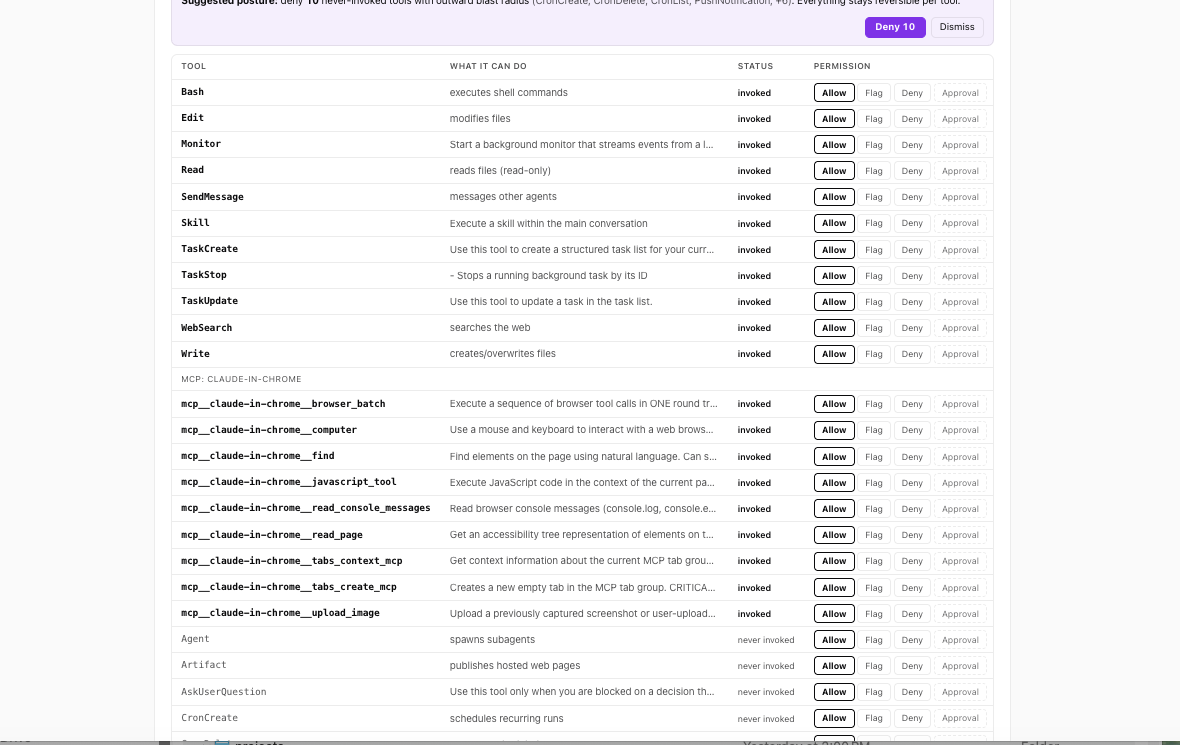
Open a Claude Code session and count the tools it’s holding. In one real session we captured, the harness declared 76 tools to the model. Not 76 tools the agent used — by session end it had invoked just 12. Sixty-four of the 76 were never invoked once. Seventy-six it could call, on any turn, including tools that send email, publish public web pages, schedule future runs of itself, and drive a browser.
Most people who think about Claude Code permissions at all are thinking about three of those tools: can it edit files, can it run shell commands, should it ask first. That’s the wrong end of the list. The interesting decisions live in the tail you’ve never watched it invoke.
Deny is the wrong default for the core loop
Start with the uncomfortable part. The instinct — deny by default, approve each call — is right in general and wrong for a coding agent’s core loop.
Read, Grep, Glob, Edit, Write, Bash — that’s not the agent’s attack surface, that’s its hands. A coding agent that has to ask permission to read a file makes hundreds of asks per session. You will not evaluate hundreds of prompts; you’ll approve them. Two days in, you’re rubber-stamping on reflex, and the one prompt that mattered — the odd Bash call, the write outside the repo — looks exactly like the 400 you already clicked through. Blanket approval gates don’t produce oversight. They produce approval fatigue, which is worse than no gate because it feels like control.
So the honest question isn’t “deny everything?” It’s: which tools deserve the friction? The answer falls out of sorting the 76 by blast radius.
The surface clusters into families
Tool names vary by harness, but the capabilities cluster. Here’s the actual surface from that session, grouped by what a call can do:
| Family | Tools (examples) | Blast radius | Out of the box |
|---|---|---|---|
| Read-only | Read, Grep, Glob, CronList | None outward. Worst case is reading a file you'd rather it didn't. | ALLOW |
| Local write | Edit, Write, NotebookEdit | Your working tree. Visible in git diff, reversible. | ALLOW |
| Execution | Bash | Unbounded in principle — one call, arbitrary effects. In practice: your machine, your credentials. | ALLOW + sandbox |
| Network read | WebFetch, WebSearch | Mostly inbound. The quiet risk is exfiltration via URL and prompt injection riding back in. | FLAG |
| Send | SendMessage, PushNotification, plus MCP email/chat tools | Leaves the machine, reaches a human, can't be unsent. | DENY until needed |
| Publish | Artifact (publishes hosted web pages) | Public, addressable, outlives the session. | DENY |
| Schedule | CronCreate, CronDelete, ScheduleWakeup | The agent arranges its own future execution. | DENY |
| Spawn | Agent, Task, Workflow, RemoteTrigger | Multiplies the surface — children hold tools too, possibly on remote machines. | FLAG local ok · deny remote |
| MCP servers | browser control, email, calendar, drive… | Whatever the server can do, the agent can do. Often the largest single grant in the session. | ASK case-by-case |
Two families deserve a second look, because they’re the ones a coding-agent mental model misses.
Schedule is the sleeper. An agent that can call CronCreate or ScheduleWakeup can arrange to run again after you’ve closed the terminal. Combine it with anything in the send family and you have an agent that outlives your attention: it can schedule its own future runs and email the results — or email anything — with nobody watching. Every other family assumes you’re present. This one is specifically about the runs where you aren’t.
Spawn is the multiplier. A subagent is a new loop holding its own copy of the tool surface, and RemoteTrigger-style tools start runs on infrastructure that isn’t even the machine you’re looking at. Whatever posture you set, delegation is where it either propagates or leaks.
The posture, argued
Four rules, in order of how much they’ll actually matter.
1. Allow the core coding loop. Read/Grep/Glob freely; Edit/Write inside the project; Bash with whatever sandboxing your setup gives you. Yes, Bash is unbounded — the honest control there is a sandbox and a good audit trail, not a permission prompt you’ll stop reading. The core loop is where the agent earns its keep, and it’s also where friction compounds fastest. Spend your deny budget elsewhere.
2. Deny-by-default the outward tail: send, schedule, publish, remote-spawn. Not because these tools are dangerous in some abstract sense, but because of an asymmetry: for a coding task, they’re almost never needed — and when one fires unexpectedly, the effect leaves your machine. A denied SendMessage costs you nothing on the day you didn’t need it, and on the day you do need it, un-denying one tool is a one-line change. That’s the whole argument: near-zero cost to deny, unbounded cost to not. Flip each one to allowed at first legitimate need, individually, not as a family.
3. Approval-gate the irreversible-outward ones — once you actually have an approval mechanism. Between “always allowed” and “always denied” there’s ask a human, and it’s the right answer for exactly the calls that are rare, deliberate, and can’t be undone: publish a page, send the email, create the cron job. Rare is the operative word — an ask-gate only works on tools invoked a few times a week, where each prompt gets read. If your setup can’t route an approval to a human, deny is the honest fallback; a gate nobody answers is a deny with extra latency.
4. Watch for drift. The surface you audited is not the surface you’re running. Harnesses load tools lazily, MCP servers connect mid-session, an update adds a family. In our captured traffic, one session gained 21 tools partway through the day when deferred tools loaded — no prompt, no changelog, just a bigger declaration in the next request. A posture you set once against a surface you counted once decays silently. Whatever you decide today, decide it again when the count changes — which means something has to be watching the count.
Seeing your own agent’s surface
None of this requires special tooling to start. Claude Code declares its full tool list — all 76, names and schemas — in every single API request it makes. Anyone terminating that traffic can enumerate the surface: a logging proxy, a gateway, even a mitmproxy session on your own laptop. Dump one request body, list the tool names, sort them into the families above, and you have your real surface — not the documented one, the declared one. Diff it across sessions and you have drift detection.
Doing that continuously — every declaration logged, every call checked against a per-family policy before it runs, a diff when the surface changes — is the job I think of as the agentic control plane: the layer that knows what your agent can do, not just what it did. That’s what we build at Agentic Control Plane, if you’d rather not run the proxy yourself — one command, and the table above becomes a live view of your own agents, each tool a click to allow, flag, or deny:
curl -sf https://agenticcontrolplane.com/install.sh | bash
But the posture stands on its own, with any tooling or none: hands free, outward tail denied until needed, irreversible calls asked, and a count you re-check. The 76 tools aren’t the problem. Not knowing which 76 — today — is.
We maintain live captures of coding-agent tool surfaces — Claude Code, Codex, more coming — in the Tool Surface Index.