Getting started with ACP
ACP gives every AI agent in your stack identity-verified, policy-enforced, audit-logged tool calls. Three steps from zero to first audit row. This is the canonical start page — it routes by what you run:
- AI coding client (Claude Code, Cursor, Codex CLI, DeepSeek Harness) — Path A below, one command.
- Agent framework (CrewAI, LangGraph, OpenAI Agents SDK, …) — Path B below, one decorator.
- You are an AI agent spawning subagents — the delegation chain primitive: agents-building-agents quickstart →
1. Install for your stack
Free up to 5 agents — and there’s a fully on-device option that needs no account at all. Pick the path that matches what you run.
Path A — AI coding clients (Claude Code, Cursor, Codex CLI, DeepSeek Harness)
Start connected — the installer opens your browser to provision a free workspace: your policy across every agent, the cost X-ray, and a shared console:
curl -sf https://agenticcontrolplane.com/install.sh | bash
Prefer fully on-device? Add --local — no account, decisions run on-device from ~/.acp/policy.json, every call is logged to ~/.acp/audit.jsonl, and nothing leaves your box:
curl -sf https://agenticcontrolplane.com/install.sh | bash -s -- --local
The installer detects your runtime, registers PreToolUse and PostToolUse hooks, and verifies. The workspace mode covers Claude Code, Cursor, Codex (non-Bash tools included), opencode, and Hermes (native pip plugin); --local covers Claude Code, Cursor, and Codex’s shell calls fully on-device. Either way, one command, whatever you run.
Piping a script to bash deserves scrutiny — so here’s exactly what it writes to your machine, every file, in plain language, and how --local differs from the connected install.
Windows
curl … | bash cannot run in PowerShell. Use the native installer instead — PowerShell 5.1 and 7, no modules, Node.js required:
irm https://agenticcontrolplane.com/install.ps1 | iex
It covers Claude Code, Cursor and Codex: hooks, the ACP MCP connector, and the claude-acp / codex-acp cost X-ray launchers in %USERPROFILE%\.acp\bin.
Other harnesses and the fully on-device --local mode are POSIX-only for now. Under WSL, run the shell installer exactly as on Linux:
wsl bash -c "curl -sf https://agenticcontrolplane.com/install.sh | bash"
Path B — Agent frameworks (CrewAI, LangGraph, OpenAI Agents SDK, Anthropic SDK, etc.)
One package per framework, then wrap your tool handlers:
pip install acp-crewai
from crewai import tool
from acp_crewai import governed

@tool("send_email")
@governed("send_email")
def send_email(to: str, subject: str, body: str):
    ...  # your code, your creds
ACP intercepts every wrapped tool call, applies your policies, logs the audit row, and returns control to your agent — typically in 5-15ms. Same @governed decorator pattern across CrewAI, LangGraph, OpenAI Agents SDK, Anthropic SDK, Google ADK, Vercel AI SDK, Mastra, Pydantic AI, and AutoGen.
Then price the model calls. Wrapping tools controls what your agent does; the proxy covers what it spends. init() wires both — call it before you construct a model client:
import acp_governance as acp

acp.init()            # interception + proxy
client = Anthropic()  # now priced and metered by ACP
That’s the same coverage Path A gets from one command: interception ✓ · proxy ✓. Node is identical — import { init } from "@agenticcontrolplane/governance" (@agenticcontrolplane/governance on npm).
2. See your first audit row
Run any tool call from your AI client or agent.
- Connected workspace (default): open the activity log at cloud.agenticcontrolplane.com/activity, and sign in if you haven’t (a workspace was provisioned when you ran the installer).
- Local install (
--local):tail -f ~/.acp/audit.jsonl— every decision, on-device, in real time.
Every call through ACP is logged with:
- Identity — the verified user from the JWT (or workspace key in dev)
- Decision — allow / deny / redact / rate-limit + reason
- Tool — name and parameters
- Chain — depth, root identity, scope at each hop (connected workspace)
- Cost — latency, dollar attribution, tokens (connected workspace)
The on-device audit.jsonl logs tool, decision, reason, and timestamp for every call. Verified identity, delegation-chain provenance, and cost attribution come with a connected workspace — that’s the upgrade.
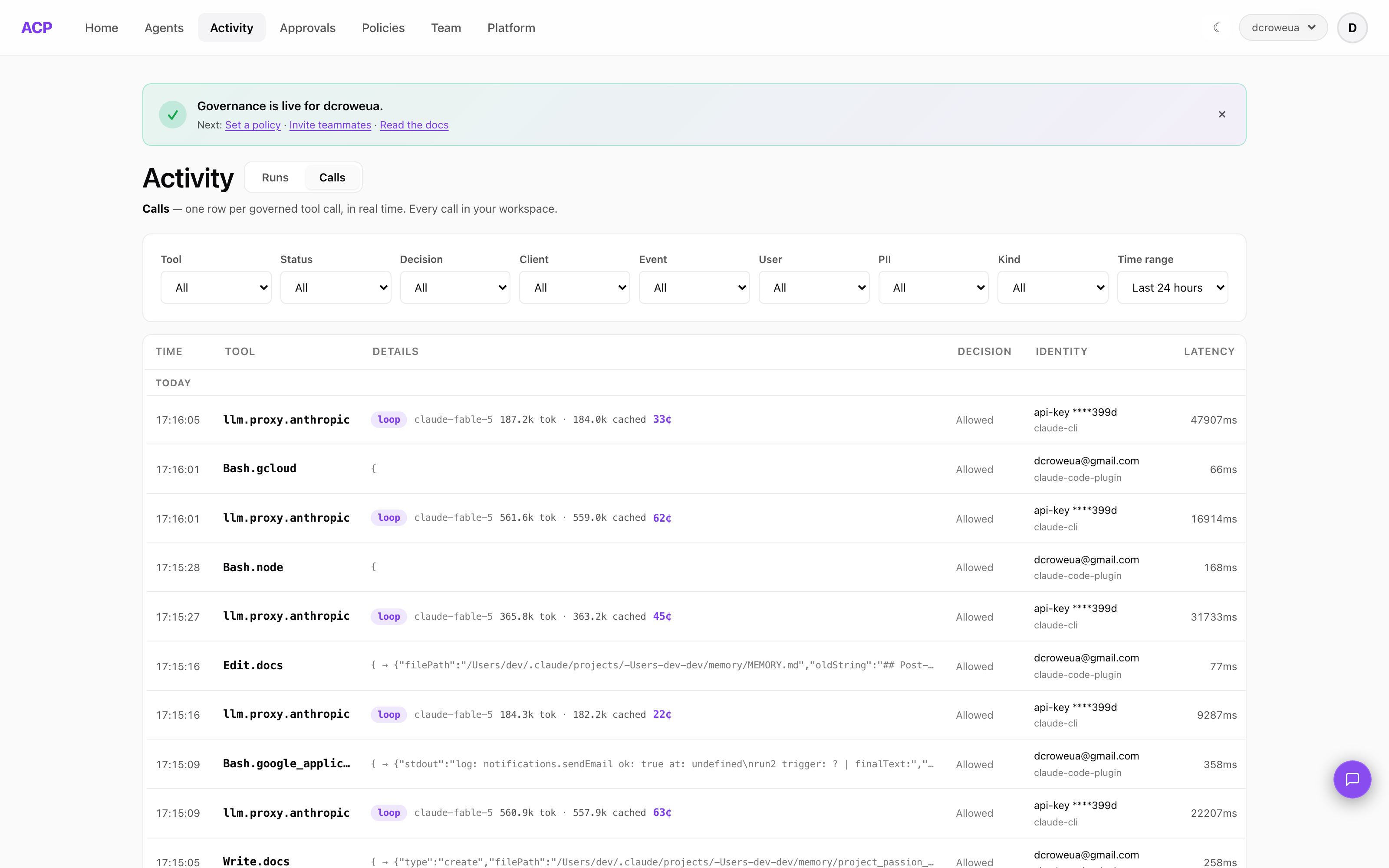
Set policies when you’re ready, or let audit run on its own for a while. The default policy allows everything and logs it — you tighten it as you understand your traffic.
What you get
Three things, on every call, from the first row:
- Record — every tool and model call, in order, with its cost, latency, the decision, and the identity behind it. Audit-only by default: everything runs and is logged until you write a rule.
- Learn — any row becomes a standing rule in one click; agents propose rules from the denials they hit, and you confirm them on Policies. New workspaces start in shadow, so nothing blocks until you switch to enforce.
- Control — allow, ask, or deny per tool, per tier (interactive, subagent, background), per person; budget caps that halt a run rather than warn; each agent’s declared tool surface, one click to deny what it never uses.
Underneath: PII detection on every call (six high-precision types; redaction is a policy you enable), rate and budget limits, and a structured, queryable audit log you can export as CSV. On the framework path, the end user’s IdP token can be verified and carried through to your backend.
Next steps
- Integration guides — Claude Code, Cursor, Codex CLI, Anthropic SDK, OpenAI SDK, CrewAI, LangGraph, and more
- AgentGovBench — see how ACP-paired frameworks score on 48 control scenarios
- Comparison — when to use ACP vs LLM gateway vs agent framework vs API gateway
- Agent recipes — four runnable Python agents with the control layer wired in, ~200 lines each
- FAQ — common questions on identity, fail modes, data handling, and self-hosting
- Pricing — free up to 5 agents; flat bands above (you pay for agents that start work, everything they delegate is free)
Want to self-host?
If you’d rather run the control plane on your own infrastructure, the open-source reference implementation is on GitHub.