Approve Your Coding Agent's Risky Commands From Your Phone

Just want to govern Codex? If you're here to actually see, control, and price every Codex tool call, that's one command — hooks for Bash plus an MCP connector for everything else, in a single installer:
curl -sf https://agenticcontrolplane.com/install.sh | bashirm https://agenticcontrolplane.com/install.ps1 | iexFull Codex install guide → · see your first governed call → · free up to 5 agents
You started a long run, closed the laptop, and went to dinner. Twenty minutes in, the agent wants to run git push --force, or rm -rf build/, or a curl to a host you’ve never heard of. There are two bad outcomes: it runs because nothing stopped it, or it sits on a prompt until morning because nobody was there to answer.
The fix is to have the question come to you, and to have only the questions that matter come to you.
The options, and what each one covers
As of September 2026:
- Claude Code Remote Control (built in). Your running session shows up in the Claude mobile app, and you can read output, send instructions, and approve or deny permission prompts from your phone. The work stays on your machine. Claude Code only, and it answers the prompts Claude Code would have shown you in the terminal.
- Push hooks for Claude Code such as claude-remote-approver. A hook on the permission prompt sends it to your phone through ntfy, and you tap approve or deny. Free and quick to set up. Keep the ntfy topic private: anyone who knows it can answer your approvals.
- Pushary. Per-tool auto-approve, deny or escalate across Claude Code, Codex, Cursor and Hermes, with escalations sent as a push you can answer from the lock screen, and an audit trail. From $9.99 a month.
- ACP. Rules decide which calls are held. A held call emails the workspace owner with the tool, the input, the agent and the reason, and you approve or deny it in the console, which works in a phone browser. It covers every harness ACP hooks, and every decision lands in the same audit log as the calls that didn’t need you.
If you only run Claude Code and want a lock-screen tap, Remote Control or a push hook is the shortest path. The rest of this post is the ACP setup, for when you run more than one agent or want the approval and the audit log in one place.
Step 1: Install
curl -sf https://agenticcontrolplane.com/install.sh | bash
It detects Claude Code, Codex and the other harnesses on the machine and wires the hook, so every tool call is checked before it runs. Connect a workspace when it asks. Approvals need one, because the approval has to wait somewhere you can reach from your phone.
Step 2: Decide what should reach you
This is the step that makes approvals usable. Every call gets one of three outcomes:
- allow for the routine work: reads, edits in the repo, tests, installs.
- deny for the few things that should never run unattended: force-push to main,
rm -rfoutside the project, anything touching production credentials. - ask for the grey zone: the calls you’d want to see before they run, but that are sometimes right.
Rules are set per tool and per agent tier, so a call can be allow when you’re at the keyboard and ask when a background agent makes it. New workspaces start in audit mode: nothing is held, and the console shows what the starter rules would have held. Run a normal day, read that list, then switch to enforce. If your phone buzzes for ls, the rules are wrong, not the phone.
Step 3: Answer from your phone
When a call hits an ask rule, the agent gets one line back, [ACP] Approval required: <reason>, and the call waits. The workspace owner gets an email with what was asked. Open the console’s Approvals page on your phone:
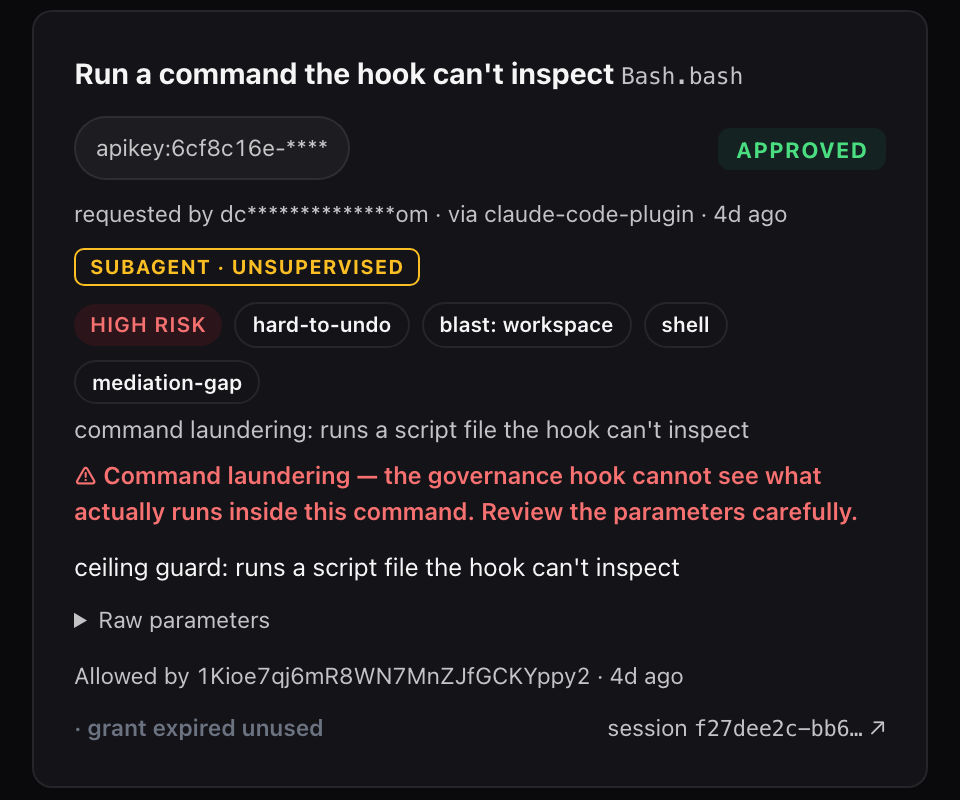
Approve lets the agent retry that exact call once, within the grant window. A different command, or the same one after the window closes, is held again. Deny is final, and the agent is told why.
Three details worth knowing before you rely on it overnight:
- Which calls come to the console. Calls from background agents, subagents and headless runs are held for the console and the email. In an interactive session, ACP can instead show the question as your harness’s own permission prompt, because you’re usually right there. If you walk away from an interactive session, that prompt waits in the terminal, and Claude Code’s Remote Control is how you’d answer it from your phone. The two work together.
- No approve button in the email, on purpose. The email links to the console, where you’re signed in. A forwarded email can’t approve anything.
- Unanswered means denied. A request nobody answers expires at the end of the hold window (24 hours by default, settable per tool from 30 seconds to 7 days) and counts as a deny. The row stays in the audit log, marked as expired.
Headless runs
claude -p and codex exec have no terminal to answer a prompt, so a call that would have asked is denied. For Claude Code, point --permission-prompt-tool at mcp__acp__acp_permission_prompt, the ACP MCP server the installer registers. Then an ask creates the approval, notifies you, and holds the call until you decide or the hold ends. The details for both harnesses are in Claude Code headless approvals and Codex exec and MCP approvals.
If you won’t be around to answer at all, don’t leave ask rules on the unattended tier. Set those tools to allow or deny for background agents, so the run never waits on a person who isn’t there.
When one answer should become a rule
If you approve the same call three nights in a row, it shouldn’t be an ask. From any row in the audit log, choose Allow always, Ask next time or Deny next time, and that becomes the rule for that tool and tier. Agents can also propose a rule from a denial they hit, and nothing they propose applies until you confirm it.
The reference for holds, grant windows and expiry is /docs/approvals. Running more than one agent across a team? Same permission rules for Claude Code, Codex and Cursor covers who can approve and how the rules are shared.