Same Permission Rules for Claude Code, Codex and Cursor Across Your Team

Just want to govern Codex? If you're here to actually see, control, and price every Codex tool call, that's one command — hooks for Bash plus an MCP connector for everything else, in a single installer:
curl -sf https://agenticcontrolplane.com/install.sh | bashirm https://agenticcontrolplane.com/install.ps1 | iexFull Codex install guide → · see your first governed call → · free up to 5 agents
Your team’s coding agents each have a permission system. That’s the problem.
Claude Code reads settings.json deny rules. Codex reads config.toml. Cursor has its own allowlist. Each one is a local file, on one laptop, in one format, owned by whichever teammate last edited it — and none of them can see the others. Five engineers means five permission configurations, and the team’s real safety floor is the least careful one. Add a fleet orchestrator and it gets worse: most of them bypass the per-harness prompts entirely — bypass flags on by default, daemons that press Enter on dialogs.
So “set up permissions across the fleet” can’t mean “get everyone to maintain matching config files.” It means moving the decision to a layer the whole team shares. Here’s the full rollout — about fifteen minutes for a five-person team. The canonical reference lives at /docs/team-setup; this is the narrative version.
Step 1: Workspace and invites — invites go out first
Sign in to create the workspace, open the Team page, and invite everyone before anyone touches an installer.
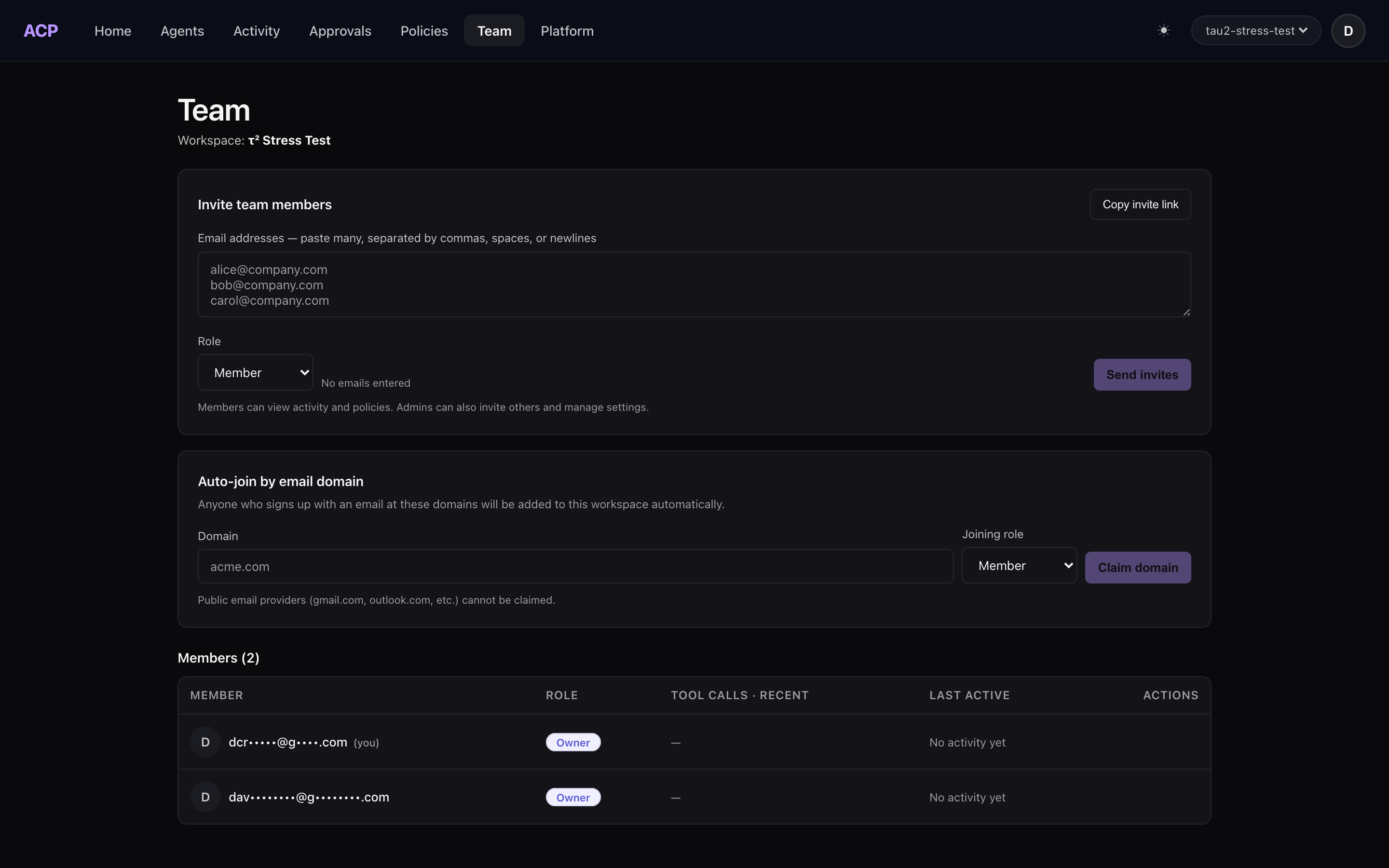
The ordering rule exists because identity resolution is first-come: a teammate who signs in before being invited gets an auto-provisioned personal workspace. Their agents then report to a workspace you can’t see, under a policy nobody set — your org just forked. Recoverable (accept the invite, reinstall), but avoidable.
Three ways in: paste emails on the Team page (bulk works — comma or newline separated), generate a shareable invite link (valid 30 days) for the team channel, or claim your company domain so future signups auto-join. Public email domains can’t be claimed, so gmail-based teammates need an invite.
Roles are the usual four — owner, admin, member, viewer — and two of them matter for permissions: owners and admins set policy and decide approvals; members run agents under it. People are free on every plan; you pay for agents that start work, not per teammate.
Step 2: One installer per teammate
curl -sf https://agenticcontrolplane.com/install.sh | bash
Same command for everyone. It detects the harness on the machine — Claude Code, Codex, and the rest — and wires the interception hook, so every tool call is checked against workspace policy before it executes and audited after. Because the invite was accepted first, the install lands in the team workspace, and each member gets their own key: calls arrive attributed to a person, never to a shared credential.
This is the step where the mixed-fleet problem dissolves. Nobody harmonizes config files across harnesses; the harnesses all report to the same place.
Step 3: One policy, three layers, shadow first
Workspace policy has three layers, most restrictive wins: workspace defaults (deny git push --force, ask on rm -rf), role defaults (new members start bounded automatically), and per-user overrides for genuine exceptions.
Don’t enforce on day one. New workspaces start with a starter policy in shadow mode — nothing blocks, but the console shows what would have been blocked. Run a normal day or two, read that list, then flip the rules you trust to enforce. Tightening from evidence beats guessing, and it’s the difference between a team that works with the policy and a team that routes around it.
Two properties carry the weight at team scale:
- Policy edits are human-only. Agents’ API keys can’t modify policy — a prompt-injected agent cannot loosen its own rules.
- Approvals go to owners and admins. When policy says ask, a human with a name decides. An agent can’t approve its own escalation, and there’s no unattended terminal prompt for an orchestrator daemon to Enter-mash.
Step 4: Read it back
Verification is one console view: every teammate should have rows within their first session. Zero rows means no install — or the step-1 fork. The audit stream now answers, per call, which agent, acting for which person, allowed by which rule — the sentence per-laptop settings files could never produce.
And the orchestrator case resolves itself: when someone fans out five agents through Orca or /fleet and the orchestrator skips every harness prompt, the workspace policy still holds. It’s enforced where tools execute, not in the UI the orchestrator bypassed.
Other ways to get one set of rules
Per-harness files aren’t the only option, and a shared console isn’t right for every team. What else is out there, as of September 2026:
- One file per harness, committed to the repo. Free, and fine for one harness. With two or more you’re keeping several formats in sync by hand, and the rules only apply on machines that pulled the latest commit.
- agentperm. One
allow/ask/denyfile that Claude Code, Codex CLI, OpenCode, Gemini CLI and Kiro all check through their hooks. It parses shell, Python and SQL properly instead of matching text, and adenycan’t be loosened by a project file. The team story is a policy file committed to the repo. It has no audit log (opt-in debug traces only) and no way to route anaskto someone else. Open source, MIT. - Pushary. Per-tool auto-approve, deny or escalate across Claude Code, Codex, Cursor and Hermes, with escalations sent to your phone as a push, and an audit trail. Matching on arguments is listed as not shipped yet. From $9.99 a month. Its page doesn’t describe shared team rules.
- ACP, the walkthrough above. One workspace policy across Claude Code, Codex, Cursor, OpenCode, Hermes and the rest, rules keyed by tool and command (
Bash.rm,WebFetch.<host>), approvals decided by an owner or admin, and one audit log with a name on every row. It doesn’t isolate anything: pair it with a container or sandbox if the agent handles untrusted input.
If it’s one developer and one harness, the harness’s own settings file is enough. Once it’s a team, the question stops being “what are the rules” and becomes “are they the same on every laptop, and can we see what ran.” That’s the part a shared layer answers.
The full reference — role table, pitfall list, per-harness coverage notes — is at /docs/team-setup. If you want the background on why the per-harness layer can’t be the team layer, start with who controls the fleet and your rules file is not a policy.