OpenCode Cost Tracking — Local Metering and the Proxy, Explained

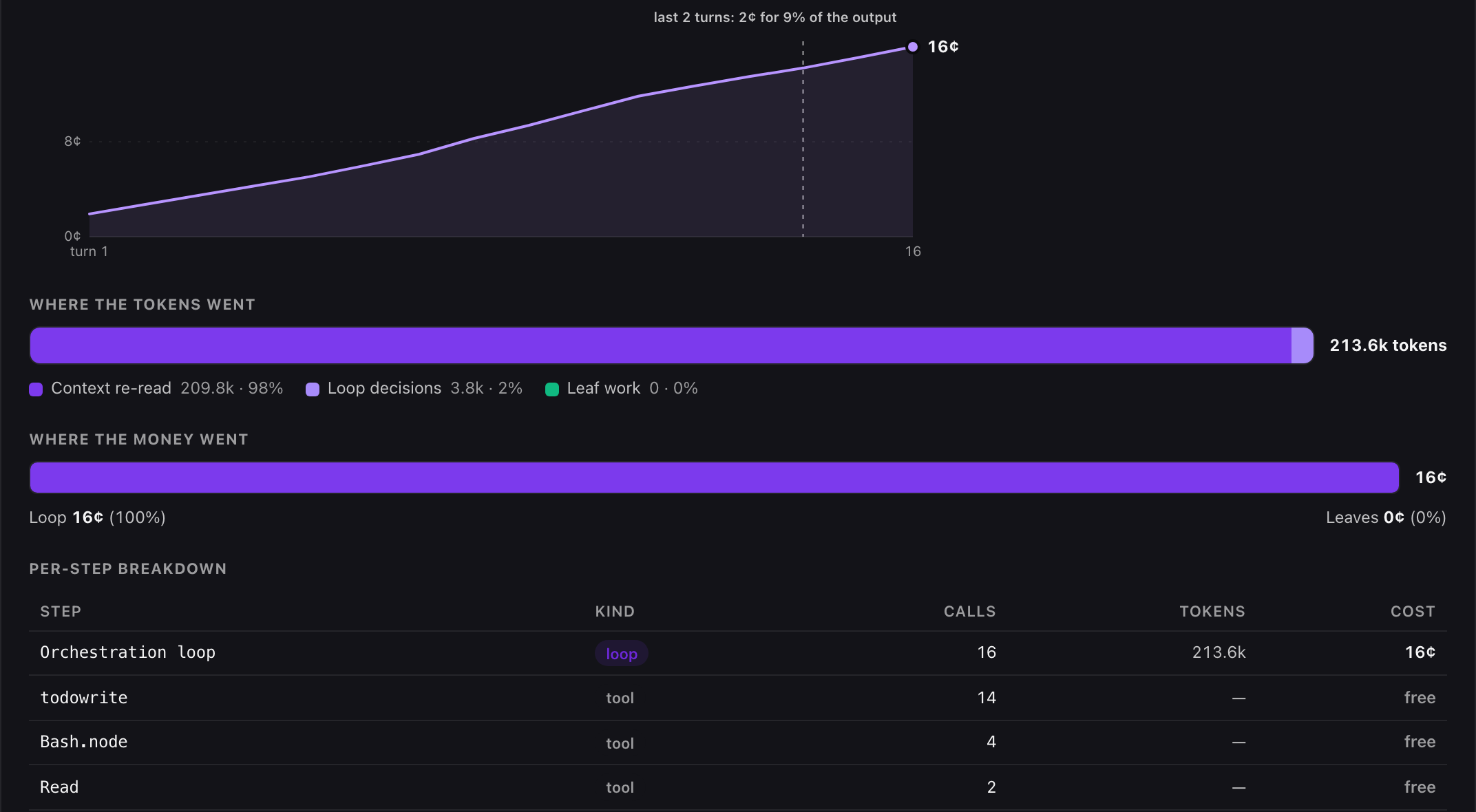
That is one real opencode session on the proxy path, priced: Gemini 3.5 Flash, 16 turns, 32 tool calls, 16¢ — and 98% of the tokens were the loop re-reading its own context, a number opencode’s own per-call cost figure never surfaces.
Just want the answer? Local metering needs no account and starts recording the moment the plugin is installed:
curl -sf https://agenticcontrolplane.com/install.sh | bash
npx acp-opencode report   # spend by model, cache hit rate, per-task cost
For priced spend on the team dashboard, add the ACP proxy as a provider in opencode.json and set it as your model — see the config below.
Full opencode install guide → · Turn on Cost X-Ray → · free up to 5 agents
opencode already computes a cost for every model call — it reads token counts off the response and prices them against its own models.dev pricing data, in-process, no configuration required. What it doesn’t do is keep that number anywhere. Close the terminal and the session’s spend is gone with it; there’s no cross-session total, no per-task breakdown, no team view. This is the reference for the two real ways to make opencode’s cost data durable: a local SQLite database that needs no account, and a proxy that prices spend server-side and puts it on a dashboard.
What opencode computes, and what it doesn’t keep
Every LLM request opencode makes emits a step-finish part carrying that call’s token buckets — input, output, cache read, cache write — and the cost opencode itself derived from its pricing data. That’s a real, per-call price, not an estimate padded from a total. But it lives only in the running session’s state. There’s no file it’s written to, no database, no history to query once the terminal closes. If you want to know what last Tuesday’s session cost, or which task in a long session was the expensive one, native opencode has nothing to show you.
Path one: local SQLite metering, zero credentials
acp-opencode’s event hook taps opencode’s event bus directly and writes every model call and every tool call to SQLite at ~/.acp/opencode-local.db (override with ACP_LOCAL_DB). This runs whether or not you’ve ever configured a workspace credential — local metering and policy enforcement are independent, and metering works with neither an account nor a network connection.
Two tables carry the record:
model_calls— one row per LLM API request: model, provider, mode, input/output/reasoning tokens, cache read/write tokens, cost, and session/task/turn ids for grouping.tool_calls— one row per tool execution: tool name, status (ok/error), duration, result size.
Read it back with the bundled CLI:
npx acp-opencode report            # spend by model, cache hit rate, tool errors, per-task cost
npx acp-opencode report --json     # machine-readable — an agent can read its own economics
npx acp-opencode report --days 30  # widen the window (default 7)
(Install globally with npm install -g acp-opencode and the acp-opencode command is on PATH directly.)
Pricing honesty is the point of this path. The plugin maintains no price table of its own — every dollar figure comes straight from opencode’s in-process pricing. When opencode reports a cost of zero (an unknown model, or subscription-included auth with no per-call price), the row is stored with cost_usd left NULL rather than a guessed number, and the report surfaces it plainly as “N calls have no price.” Token counts stay exact either way. Turn local metering off entirely with export ACP_LOCAL_METERING=off (also accepts 0 / false / disabled); it also fails open on its own — a storage error disables it for the session with one warning rather than interrupting the agent.
What this path is missing, honestly: opencode 1.18.4 exposes the outgoing message array only through an unstable experimental.chat.messages.transform hook, so context composition — how much of a prompt was system, user, prior assistant turns, versus tool output — isn’t populated. And per-request API duration isn’t exposed per step; only message-level fallback rows carry wall-clock timing, with step rows recording zero. Both gaps are covered by the proxy path below for traffic routed through it.
Path two: the ACP proxy, priced server-side
Local metering runs on your machine and stays there — useful, but per-developer and dashboard-free. The cost X-ray puts priced spend, prompt-cache hit rate, and the loop-vs-leaf breakdown on the team console instead, metered server-side rather than read back from a local file. Reach it by starting opencode with the launcher the installer put next to claude-acp and codex-acp:
opencode-acp
The installer wrote the ACP proxy into ~/.config/opencode/opencode.json as a provider named acp and left your default model alone, so plain opencode still goes wherever it went before. opencode-acp reads the workspace key from ~/.acp/credentials, exports it as ACP_BEARER_TOKEN (the same variable the plugin reads), and selects acp/gemini-3.5-flash for that one launch — ACP_OPENCODE_MODEL=<id> picks a different model behind the proxy. If the gateway is unreachable the launcher starts plain opencode with a one-line note instead of failing: an unpriced session beats no session.
For the record, the provider block it writes (no top-level "model" — that is the launcher’s job):
// ~/.config/opencode/opencode.json
{
  "provider": {
    "acp": {
      "npm": "@ai-sdk/openai-compatible",
      "name": "Agentic Control Plane",
      "options": {
        "baseURL": "https://api.agenticcontrolplane.com/v1",
        "apiKey": "{env:ACP_BEARER_TOKEN}"
      },
      "models": { "gemini-3.5-flash": {} }
    }
  }
}
The proxy is multi-provider: it routes by model id (gpt-*, claude-*, gemini-*, and others) and forwards the request to the real provider unchanged, so responses are identical — only now the call is metered on the way through. The plugin’s chat.headers hook stamps X-GS-Session on every model request regardless of which path handles cost, which is what ties proxy-priced spend to the tool-call audit rows for that same session on the dashboard — one view of what ran and what it cost, not two separate exports to reconcile by hand.
Choosing between the two
They’re not competing — they answer different questions. Local metering is the right first step: no account, no network dependency, works the moment the plugin is installed, and it’s the only path that sees a call whose provider opencode itself has no price for (it just records the tokens instead of guessing). The proxy is the right step when you want that spend on a team dashboard, joined to the audit trail for the tool calls in the same session, with authoritative per-request duration for routed traffic — the two gaps local metering can’t close until opencode ships a stable hook for them.
Related links
- /integrations/opencode — the install guide, both metering paths, and troubleshooting
- /controls/opencode — the control model, explained
- opencode permissions reference — every key in the
permissionblock, defaults, and auto-approve - OpenCode permissions and hooks reference — the policy-side hooks,
permission.askand the backstop - Claude Code cost tracking reference — the transcript-priced equivalent for Claude Code
- Codex cost tracking — the same question for Codex CLI
- Turn on Cost X-Ray — the proxy path across any harness
Frequently asked questions
Does opencode track cost natively?
It computes a cost per API call in-process, from its own models.dev pricing data, and that number appears in the terminal UI for the session in progress. It isn’t persisted to a database, rolled up across sessions, or split by task — once the session ends, the total is gone unless something else recorded it.
What does acp-opencode report show that opencode doesn't?
A durable, queryable local record: spend by model, prompt-cache hit rate, tool error rates, and per-task cost, read back from a SQLite database on your machine that the plugin has been writing to since install. It needs zero credentials and never leaves the box.
Why would I route opencode through the ACP proxy if local metering already works?
Local metering is per-machine and has no dashboard — it’s a report you run yourself. The proxy meters the same spend server-side, joins it to the tool-call audit for the same session, and puts both on the team console, so cost and the tool calls that drove it are one view instead of two.
What happens when opencode doesn't know a model's price?
The call is stored with cost left NULL and the token counts exact — the plugin maintains no price table of its own and never guesses a dollar figure. The report surfaces this as “N calls have no price.” Routing that model through the proxy gets it priced server-side instead.