Govern opencode with Agentic Control Plane
See, control, and price every tool call opencode makes — the bash commands, the file edits, the web fetches, and the model calls behind them — from one dashboard. One command, no code changes.
Every tool opencode runs — bash, edit, webfetch, MCP tools — is checked against server-side policy before it executes: allow runs it, deny blocks it with the reason, ask escalates to opencode’s own approval prompt. And a second, independent plane needs no account at all: local metering records the token and cost of every model call to a database on your machine.
Will it stop the agent from wrecking a box it can reach?
That is usually the question behind the click. With the plugin installed, bash set to ask, and the workspace in enforce mode:
- A command that runs somewhere the hook cannot see, such as
ssh host 'sudo pct destroy 300',docker exec …,pct exec …, orqm guest exec …, is held for your approval. reboot,shutdown, and the rest of the hardline list are blocked outright. No approval click reaches them.- Everything else runs and lands in the activity log, and one approval can become a standing rule, so you are not reviewing the same shape twice. How approvals work →
In audit mode the same calls are recorded, not held. Either way this is a ceiling for accidents and casual re-spellings, not a sandbox. A restricted account and sudoers on the target are still the floor; this sits on top of them.
TL;DR
curl -sf https://agenticcontrolplane.com/install.sh | bashirm https://agenticcontrolplane.com/install.ps1 | iexThree things you get the moment it's running — click any to see it full-size:
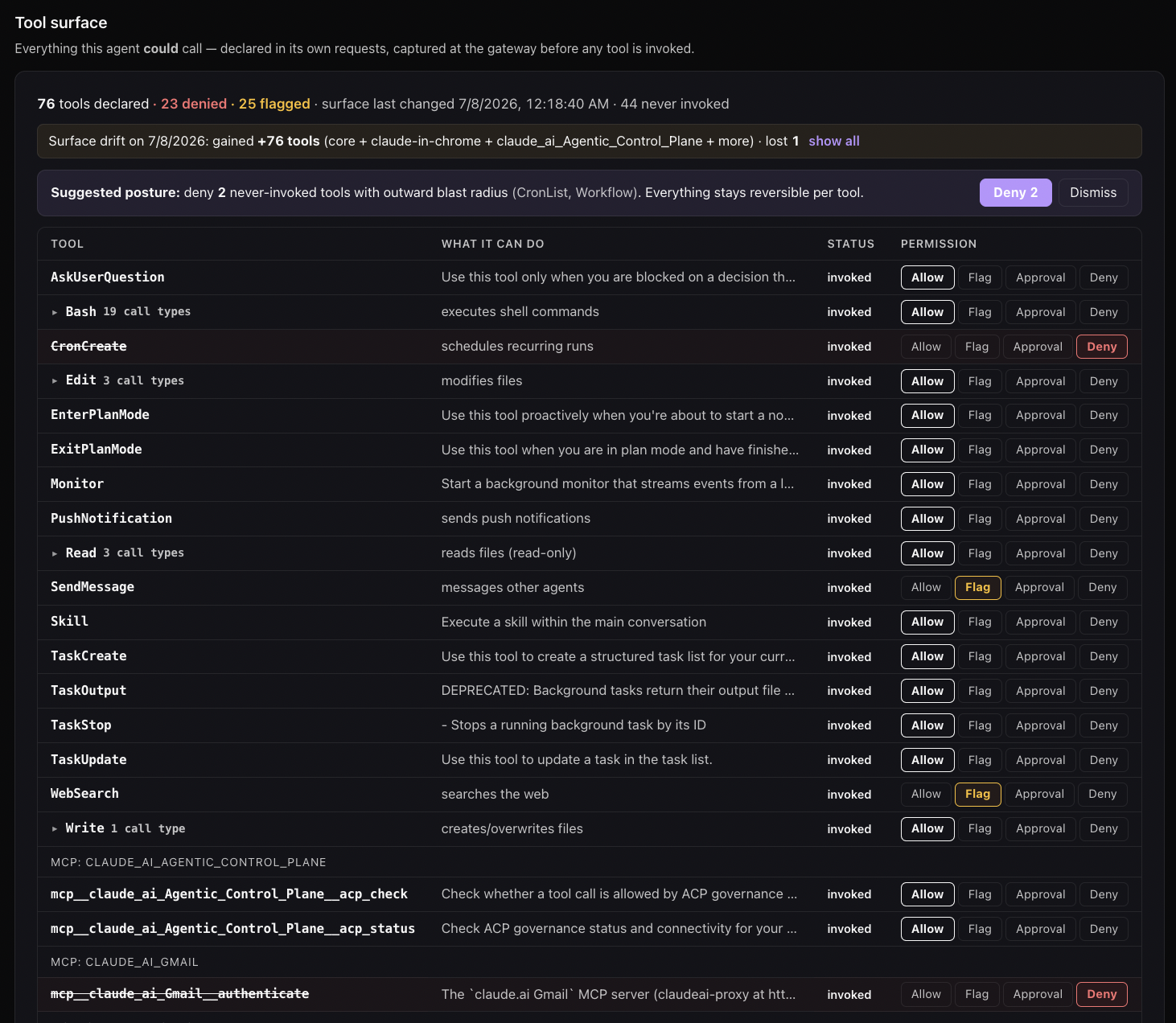
rm -rf, force-push, and the rest. Enforced at the call, outside the model.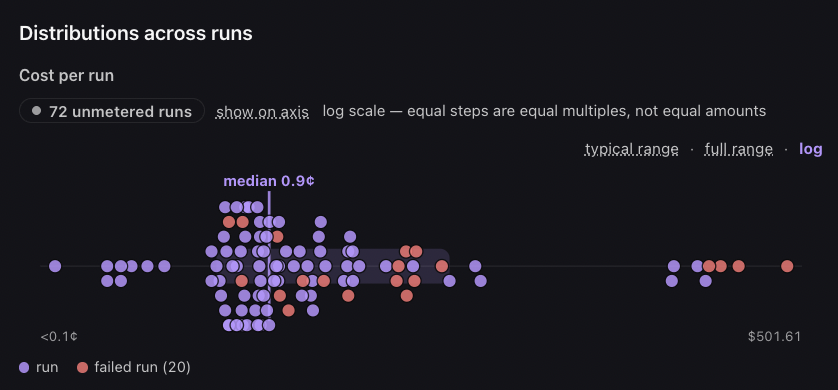
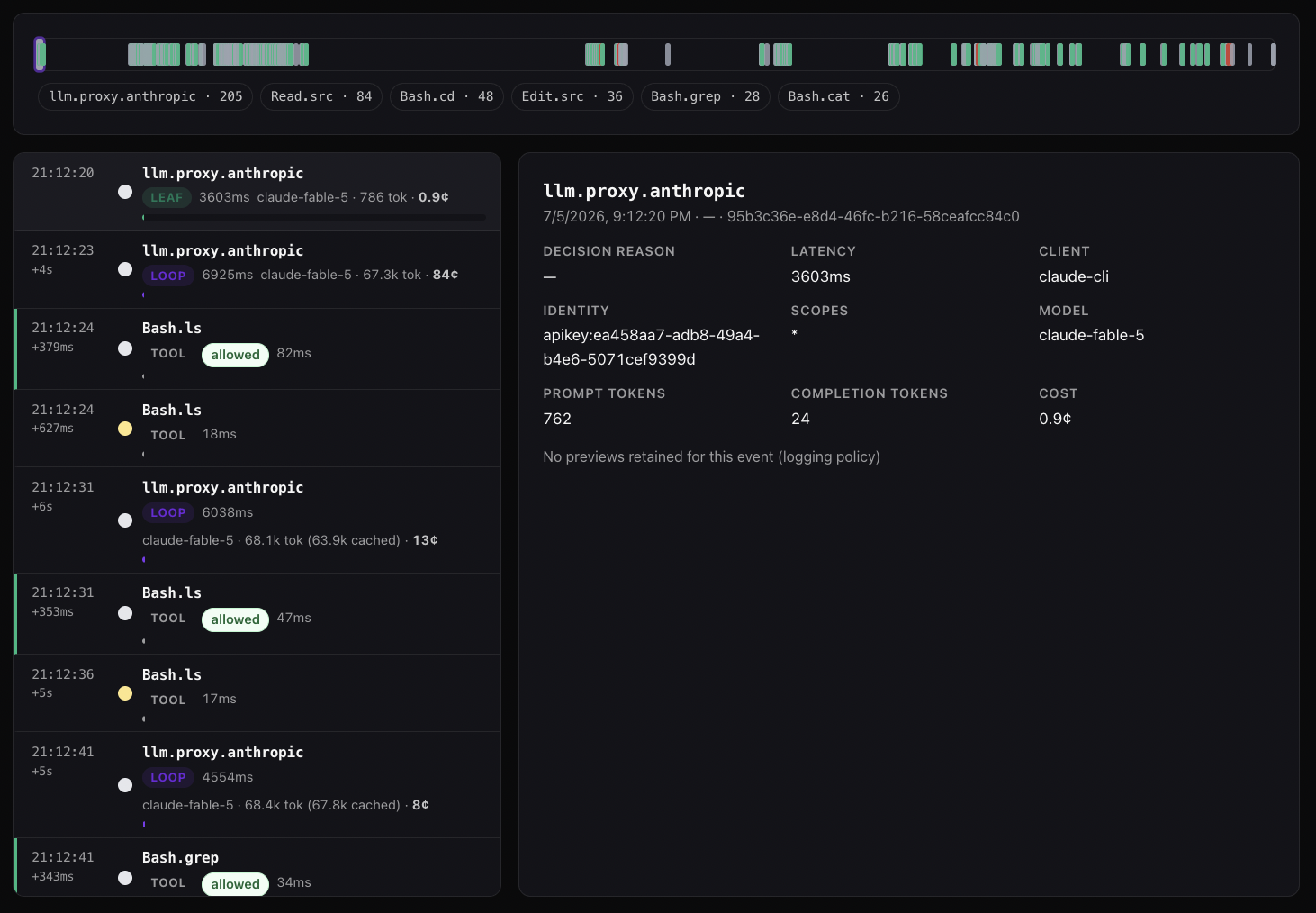
See your first governed call →Free up to 5 agents · full install below
The installer detects opencode (~/.config/opencode or the opencode binary), registers the acp-opencode plugin plus a permission gate in ~/.config/opencode/opencode.json, and opens your browser to provision a workspace. Restart opencode — it auto-installs the plugin from npm on next start — and every tool call is checked against your policy and lands in one activity log with the cost X-ray alongside it, free up to 5 agents. That is the mode to want: policy you can change in one place, and a record you can actually read. (On Windows, run the POSIX installer under WSL — install.ps1 covers Claude Code, Cursor, and Codex only.)
Prefer fully on-device? opencode is cloud-only today. The acp-opencode plugin needs a workspace, so the installer’s --local flag skips opencode (it says so); on-device decisions aren’t wired into the plugin yet, and --local covers Claude Code, Cursor, and Codex’s shell calls. What does run without an account is local metering: every model call’s tokens and cost land in ~/.acp/opencode-local.db, readable with npx acp-opencode report. The trade is the same as everywhere: that ledger stays on the one machine — no workspace policy, no shared activity view, nothing to compare across agents.
Prefer to wire it by hand? Add two blocks to ~/.config/opencode/opencode.json:
{
  "$schema": "https://opencode.ai/config.json",
  "plugin": ["acp-opencode"],
  "permission": {
    "bash": "ask",
    "edit": "ask",
    "webfetch": "ask"
  }
}
Then set your ACP key (export ACP_BEARER_TOKEN="gsk_yourslug_...", or write it to ~/.acp/credentials). The permission block matters — see below.
How it works
Unlike Claude Code, Cursor, and Codex — which shell out to a hook script over stdin — opencode ships a first-class plugin system: a module whose exported hooks run in-process. acp-opencode registers four:
| Hook | What it does |
|---|---|
permission.ask |
The primary governance point. POSTs to /govern/tool-use. ACP allow sets the permission to allow (opencode’s prompt is skipped — pre-approved); deny blocks; ask leaves the status untouched so opencode’s native once / always / reject gate fires. |
tool.execute.before |
Deny-only backstop for tools not routed through the permission system — an ACP deny throws, which is how opencode blocks a call. Also caches the args so permission.ask can attach them. |
tool.execute.after |
Fire-and-forget POST to /govern/tool-output for server-side audit (PII / injection / secret scanning). Best-effort; never blocks. |
chat.headers |
Stamps X-GS-Session / X-GS-Client on every model request, so proxy-metered spend (below) joins the hook-side audit rows for the same session. |
All four send X-GS-Client: opencode-plugin/<version> so the dashboard and policy router can tell opencode traffic apart from Claude Code / Hermes / Cursor.
Why the permission block matters. permission.ask only fires for a tool whose permission resolves to "ask". Without the block, you still get the deny-only backstop and the audit trail — but ACP allow can’t pre-approve a prompt away and ACP ask can’t reach the native gate. The installer sets bash / edit / webfetch to ask for you (filling gaps only — it never overrides a choice you made deliberately).
What gets installed and where
| Path | Contents |
|---|---|
~/.config/opencode/opencode.json |
plugin + permission entries added (existing config preserved) |
~/.cache/opencode/.../acp-opencode/ |
The plugin package, auto-installed from npm by opencode at startup |
~/.acp/credentials |
Your bearer token (the same credential every ACP integration uses) |
~/.acp/opencode-local.db |
Local metering database (created on first run, no account needed) |
One install.sh run covers opencode alongside Claude Code, Cursor, and the rest. Uninstall: remove the plugin entry from opencode.json.
Local metering — no account required
The governance plane above needs a workspace key. The metering plane doesn’t. With zero credentials, acp-opencode taps opencode’s event bus and records every model call — tokens (including cache read/write), model, and the cost opencode computed in-process — plus every tool result, to SQLite at ~/.acp/opencode-local.db. Read it back:
npx acp-opencode report            # spend by model, cache hit rate, tool errors, per-task cost
npx acp-opencode report --json     # machine-readable — an agent can read its own economics
npx acp-opencode report --days 30  # widen the window (default 7)
It maintains no price table: cost comes from opencode’s own pricing data, and when opencode reports no cost (unknown model, or subscription-included auth) the call is stored with the cost blank and the tokens exact — money is never guessed. Turn metering off with ACP_LOCAL_METERING=off; it also fails open, disabling itself with one warning on a storage error rather than interrupting your agent.
Add the cost X-ray
Local metering runs on your machine; the cost X-ray puts priced spend, prompt-cache hit rate, and the loop-vs-leaf breakdown on the team dashboard, metered server-side. Start opencode with opencode-acp instead of opencode — same contract as claude-acp and codex-acp:
opencode-acp
The installer already wrote the acp provider into ~/.config/opencode/opencode.json (nothing to paste) and left your default model alone, so plain opencode is untouched. opencode-acp reads your workspace key from ~/.acp/credentials, exports it as ACP_BEARER_TOKEN, and selects acp/gemini-3.5-flash for that launch only (ACP_OPENCODE_MODEL=<id> picks another; the proxy routes gpt-*, claude-*, gemini-* by model id and forwards to the real provider unchanged). If the ACP gateway is unreachable it starts plain opencode and says so — a session that isn’t priced beats no session.
What the installer wrote, if you want to see it:
// ~/.config/opencode/opencode.json (provider only — no top-level "model" change)
{
  "provider": {
    "acp": {
      "npm": "@ai-sdk/openai-compatible",
      "name": "Agentic Control Plane",
      "options": {
        "baseURL": "https://api.agenticcontrolplane.com/v1",
        "apiKey": "{env:ACP_BEARER_TOKEN}"
      },
      "models": { "gemini-3.5-flash": {} }
    }
  }
}
The plugin’s X-GS-Session header ties that spend to the tool-audit rows for the same session. Full walkthrough: Turn on Cost X-Ray.
Fail-open by default — and opting in to fail-closed
If the ACP gateway is unreachable — network error, timeout (>2 s), a non-2xx response, or a malformed body — the plugin allows the call and prints one loud warning per session rather than blocking. ACP never bricks an agent. If every call is being blocked, that’s a deny policy, not an outage — check the dashboard.
Security-sensitive setups can flip that to fail-closed — block whenever the gateway is unreachable — with the same contract every ACP harness uses, so one setting covers Claude Code, Cursor, Codex, and opencode together:
export ACP_FAIL_MODE=closed # or: echo closed > ~/.acp/failmode
A policy deny always blocks regardless; fail mode only governs the unreachable case. A machine with no credentials is always a no-op — fail-closed never blocks before you’ve connected. Disable the whole plugin without touching your config:
export ACP_OPENCODE=off
Setting up policy
The same three policy axes that apply to every harness apply to opencode traffic:
- Tool policies (Policies → Tool Policies) — workspace-wide tool allowlist and required scopes.
- Agent policies (Policies → Agent Policies) — per-tier rules.
- User policies (Policies → User Policies) — overrides per identity.
Most-restrictive wins on conflict. Start in audit mode for a few days to learn what your agents actually do, then switch to enforce mode when patterns are clear.
Policy keys for opencode’s tools. opencode spells its tools in lowercase; workspace rules are written against canonical names. The gateway maps the native spelling before classification, so a rule you already have on Bash.rm or Edit applies to opencode calls without an opencode-specific copy (a rule written against the native spelling keeps working too — the original name is always tried last):
| opencode tool | Policy key |
|---|---|
bash |
Bash — sub-classified by leading command: Bash.git, Bash.rm, Bash.curl, … |
edit, patch |
Edit |
write |
Write |
read |
Read |
grep |
Grep |
webfetch |
WebFetch |
websearch |
WebSearch |
task |
Agent |
Which of those calls reach permission.ask versus only the backstop is decided by your permission block — the opencode permissions reference has every key, the defaults, and the config layers.
Limitations
Honest list of what the opencode integration cannot do today:
- Context composition isn’t broken out. The per-call token buckets, cache splits, and cost are all recorded, but the system/user/assistant/tool share of each prompt isn’t — opencode 1.18.4 exposes the outgoing message array only through an unstable experimental hook. The report’s composition section lights up automatically once a stable hook lands.
- Per-request model duration isn’t exposed per step; message-level fallback rows carry wall-clock, step rows record 0. Proxy-side metering (above) covers durations authoritatively for routed traffic.
- Tier attribution is coarse. opencode’s hooks don’t distinguish its
buildvsplanagents to the plugin, so calls report at theinteractivetier. - Audit is observe-only. The plugin blocks a call (deny) or allows it; the output path flags findings, it does not redact.
Troubleshooting
Plugin isn’t firing. Restart opencode completely — plugins load at startup. Confirm "plugin": ["acp-opencode"] is in ~/.config/opencode/opencode.json and that opencode installed it (look under ~/.cache/opencode).
Prompts still appear for every tool. That’s the ask path with no ACP decision yet (no credentials, or a policy that says ask). Set ~/.acp/credentials, and check your Tool Policies.
acp-opencode report shows no price. opencode reported no cost for that model (unknown model, or subscription-included auth) — token counts are still exact. Route through the proxy for authoritative priced spend.
Nothing in the dashboard. The Activity page is workspace-scoped — confirm the workspace tied to your token in the top-right dropdown. (Local metering is separate and always works, account or not.)
Related integrations
- Hermes Agent — native Python plugin, the same two-plane design
- Claude Code — hook-based governance, the most complete integration
- OpenClaw — native plugin, like opencode
- OpenAI Codex CLI — Claude-style hooks, currently Bash-only
- Turn on Cost X-Ray — meter spend across any harness through the proxy
- opencode permissions reference — every key in the
permissionblock, defaults, auto-approve, worked examples - opencode permissions, explained — the native control model and where it ends