The Coding Agent Tool Surface Index
Every agent harness that speaks a modern LLM API declares its full tool list in every single request — the model can’t call a tool it can’t see. That means an agent’s real capability surface isn’t in its documentation; it’s in its traffic. This page indexes those surfaces, per client, captured from live requests — the declared surface, not the marketed one.
Surfaces drift: harnesses lazy-load tools mid-session, MCP servers connect, updates add families. The captures below are maintained by the same drift detection we run in production — when a client’s declaration changes, this page is due an update.
Verdicts follow the posture argued in Which Claude Code tools should you deny out of the box?: allow the core loop, deny the outward tail until first need, gate the irreversible.
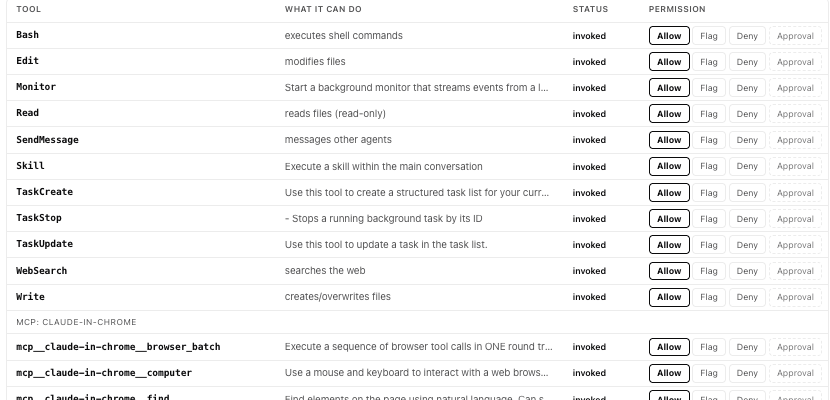
At a glance
| Client | Tools declared | Can send / publish | Can schedule itself | Spawns sub-agents | Browser control |
|---|---|---|---|---|---|
| Claude Code (v2.1, captured 2026-07) | 76 | Yes — messages, push, published web pages | Yes — cron + wakeups | Yes — local, remote, multi-agent workflows | Yes — 21 tools, acts in the user's logged-in browser when the extension is connected |
| OpenAI Codex CLI (v0.142, captured 2026-07) | 17 | No first-party send/publish tools | No | No first-party spawn (plugins can add) | No |
| OpenClaw / Zed / SDK agents | Captures pending — same method applies to anything speaking the Messages or Responses API. | ||||
The headline isn’t that one number is bigger. It’s that the two harnesses embody different philosophies: Codex ships a tight execution core and pushes everything else to plugins; Claude Code ships a broad standing surface — including families most users have never watched it invoke.
Claude Code — 76 tools declared
Captured from a live session, Claude Code 2.1.x with the Chrome extension and claude.ai connectors available. Three distinct layers:
Core harness — 37 tools
The coding loop and its scaffolding. Grouped by blast radius, with the out-of-box verdict:
| Family | Tools | Out of the box |
|---|---|---|
| Read-only | Read Grep Glob CronList TaskList TaskGet TaskOutput ListMcpResourcesTool ReadMcpResourceTool ReadMcpResourceDirTool Monitor | ALLOW |
| Local write | Edit Write NotebookEdit TaskCreate TaskUpdate TaskStop EnterWorktree ExitWorktree | ALLOW |
| Execution | Bash | ALLOW + sandbox |
| Network read | WebFetch WebSearch | FLAG |
| Send | SendMessage PushNotification | DENY until needed |
| Publish | Artifact (hosted public pages) DesignSync ReportFindings | DENY |
| Schedule | CronCreate CronDelete ScheduleWakeup | DENY |
| Spawn | Agent Workflow RemoteTrigger | FLAG local ok · deny remote |
| Interaction / meta | AskUserQuestion Skill EnterPlanMode ExitPlanMode | ALLOW |
The live capture counted 76 declared at session start; the enumeration above includes two tools that registered later in the session.
Browser control — 21 tools (when the Chrome extension is connected)
navigate, computer (click/type/screenshot), form_input, file_upload, javascript_tool, read_page, get_page_text, read_console_messages, read_network_requests, tab management, shortcuts, GIF recording, and more.
This is the largest single grant in the surface and the least discussed: these tools act as the user, in the user’s logged-in browser. A form_input + javascript_tool pair is authenticated action on any site the user has a session with. Verdict: ASK — the reads (screenshot, page text) are defensible to allow; anything that clicks, types, uploads, or executes JS deserves a human gate.
Connectors — 20 tools (claude.ai MCP servers)
OAuth flows and actions for Gmail, Google Calendar, Google Drive, Notion, Canva, job boards, and custom servers. Each authenticate pair is the doorway to a whole account. Verdict: ASK, case-by-case — a connector your workflow doesn’t use is pure downside standing open.
OpenAI Codex CLI — 17 tools declared
Captured from Codex 0.142.x via the Responses API. A deliberately tighter core:
| Family | Tools | Out of the box |
|---|---|---|
| Execution | exec_command write_stdin apply_patch | ALLOW + sandbox |
| Network read | web_search | FLAG |
| Planning / goals | update_plan create_goal get_goal update_goal | ALLOW |
| Media | image_generation view_image | ALLOW |
| Plugins / MCP | tool_search list_available_plugins_to_install request_plugin_install list_mcp_resources list_mcp_resource_templates read_mcp_resource | FLAG plugin install = surface growth |
| Interaction | request_user_input | ALLOW |
Two things worth noticing. First, no first-party send/schedule/publish family at all — Codex’s outward surface arrives via plugins, which makes request_plugin_install the tool to watch: it’s not dangerous itself, it’s how the surface grows. Second, exec_command/write_stdin are a full interactive shell — the sandbox posture carries all the weight.
How to capture your own
You don’t need special tooling to check any of this: dump one request body from your harness (a logging proxy or mitmproxy session will do), list the tools array, and you have your real surface. Diff it across sessions and you have drift detection.
Doing that continuously — every declaration captured, every change diffed, every tool a click to allow, flag, deny, or gate — is what ACP does. One command, and this page’s tables become a live, governable view of your own agents:
curl -sf https://agenticcontrolplane.com/install.sh | bash
The full walkthrough of what that install gives you — the per-session bill, the cost X-ray, the control table — is on ACP for coding agents.
Quick answers
How many tools does Claude Code declare?
76 tools at session start in one real captured session (Claude Code v2.1 with the Chrome extension and claude.ai connectors available): 35 core harness tools (37 enumerated on this page — two registered later in the session), 21 browser-control tools, and 20 connector tools. Captured 2026-07 from live API request bodies — the tools array the harness sends on every call.
How many tools does OpenAI Codex CLI declare?
17 tools (Codex CLI v0.142, captured 2026-07 via the Responses API). Codex ships a deliberately tighter execution core with no first-party send, schedule, or publish family — that capability arrives via plugins, which makes request_plugin_install the tool to watch: plugin install is how the surface grows.
How do I capture my own agent's tool surface?
Dump one request body from your harness (a logging proxy or mitmproxy session will do), list the tools array, and you have your real declared surface — the declared surface, not the marketed one. Diff it across sessions and you have drift detection.
Postures in depth
The tables above give a verdict per family. These pieces argue the verdicts, family by family, with the incidents behind them.
Setting the policy
- Which Claude Code tools should you deny out of the box? — the full argument behind this page’s verdicts, from blast radius
- AI agent tool allowlists: deny by default, scope per task, audit everything — the reference page, with Claude Code, Codex, and MCP config
- Claude Code’s deny list can be bypassed — where client-side rules stop holding, and what a real boundary looks like
--dangerously-skip-permissionsdisables every control hook — the documented opt-out, including of our own hook- How to govern AI agent tool calls (before they run) — the deterministic gate, and why it needs narrow typed tools
- Agent access control: least-privilege scoped tools — why the narrow surface is the precondition for everything else
- When to use a control plane, and when to reach for a sandbox — the honest boundary map
Per-client setup
- Log and control every Claude Code tool call in 60 seconds — the Claude Code install, end to end
- Codex CLI hooks: PreToolUse & PostToolUse reference — what Codex’s hook surface covers, and what it doesn’t
- Claude Code cost tracking: token counters vs per-action attribution — pricing the surface you just captured
The incidents, one family at a time — the Stop Your Agent From… series:
- running
rm -rf· deleting your production database · touching files outside your project · rewriting git history - leaking
.envsecrets · leaking PII through tool calls · being weaponized by a malicious package - burning your API budget · making payments without approval · dropping a Kubernetes namespace · escalating IAM permissions
All the first-party numbers behind these pages — the captures, the metered calls, the benchmark — live on the data page, with method and provenance for each.
Captures dated 2026-07. Surfaces change with client versions — if you spot a drift we haven’t indexed yet, tell us.
Run agents? ACP lets you see, control, and price every tool call they make — allow/ask/deny policy, per-session cost, and a full audit log for Claude Code, Cursor, Codex, and OpenClaw, in one command:
curl -sf https://agenticcontrolplane.com/install.sh | bashirm https://agenticcontrolplane.com/install.ps1 | iexGetting started → · see your first governed call → · free up to 5 agents