Set up permissions across your team’s coding agents
This page takes a team from zero to: one workspace, one policy, every teammate’s agents covered — whatever harness they run.
The per-harness route doesn’t get you there. Claude Code has settings.json deny rules, Codex has config.toml, Cursor has its own allowlist — each is a local file on one laptop, owned by whoever edits it, invisible to everyone else. Your team’s real floor is whichever teammate configured the least (and rules files aren’t policy at all). ACP moves the decision to a layer the team shares: every tool call is checked against workspace policy at execution time and lands in one audit stream, regardless of which harness made it.
Four steps. Order matters — especially step 1.
Step 1: Create the workspace and invite the team — before anyone installs
Sign in at cloud.agenticcontrolplane.com — that creates your workspace — then open the Team page and invite everyone up front.
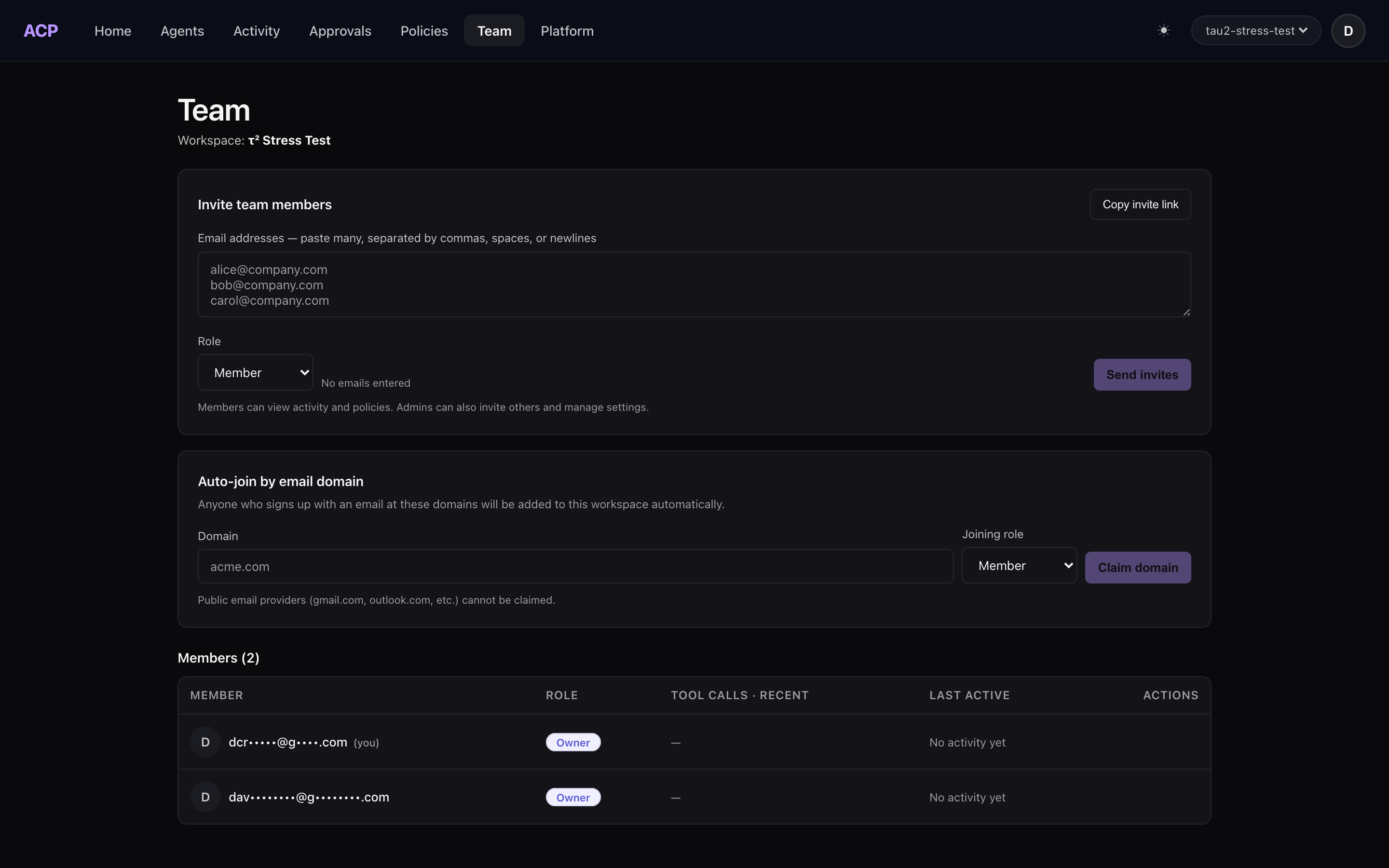
Three ways to get teammates in:
- Email invites — paste one or many addresses (comma or newline separated), pick a role, send. Free workspaces can send 5 invites/day; paid tiers more.
- Shareable invite link — one URL, valid 30 days, joins anyone who opens it at the role you chose. Right for a team channel.
- Domain auto-join — claim your company domain and future signups from it join your workspace automatically. Public email providers (gmail.com and friends) can’t be claimed — those teammates need an invite.
Why invite-first is the rule: a teammate who signs in before being invited gets their own auto-provisioned personal workspace. Now your org is forked — their agents report to a workspace nobody else can see, under a policy nobody set. If it already happened, it’s recoverable: send the invite, have them accept it, and their next install attaches to the team workspace. But invite-first avoids the detour.
Roles
| Role | Can do |
|---|---|
| Owner | Everything: policy, billing, members, approvals |
| Admin | Set policy, invite/remove members, decide approvals |
| Member | Run agents under the workspace policy |
| Viewer | Watch the audit stream and dashboards |
People are free on every plan — you pay for agents that start work, never per teammate.
Step 2: Each teammate runs one installer
Every teammate, same command:
curl -sf https://agenticcontrolplane.com/install.sh | bashirm https://agenticcontrolplane.com/install.ps1 | iexThe installer detects what’s on the machine — Claude Code, Codex, and every other harness we cover — and wires the interception hook: every tool call checked against policy before it executes, and audited after. Because the teammate accepted an invite in step 1, the install attaches to the team workspace, and each member gets their own API key — so every call arrives attributed to a person, not to a shared credential.
Rolling out to hundreds of seats, where nobody runs an installer and config comes from the vendor’s admin console or MDM? That’s the enterprise rollout: the same hook, pushed through Codex’s requirements.toml, Claude Code’s managed settings, or Cursor’s team hooks, with per-person enrollment so attribution survives.
Mixed-harness teams need nothing extra. One teammate on Claude Code, one on Codex, one on Cursor: same policy, same audit stream, same rows in the console. Coverage honestly varies by harness — see ways to set up ACP for what each one’s hook surface can and can’t see.
Step 3: Set the policy once
Policy lives in the workspace, not on laptops. Three layers, evaluated together, most restrictive wins:
- Workspace tool policies — the defaults everyone gets. Deny
git push --force, ask onrm -rf, allow reads. - Role defaults — a stricter or looser baseline per role, so a new member’s agents start bounded without per-person setup.
- Per-user overrides — the exception, scoped to one identity, when someone genuinely needs more or less.
New workspaces start with a starter policy running in shadow mode: nothing is blocked yet, but the console shows exactly what would have been. Run a normal day or two, read the would-have-blocked list, then flip the rules you trust to enforce. You tighten from evidence, not guesswork.
Two properties do the real work at team scale:
- Policy changes are human-only. API keys — meaning agents — can’t edit policy, no matter what a prompt convinces them of. An agent can propose a rule; only a signed-in human applies it.
- Approvals resolve to accountable humans. When policy says ask, the request goes to workspace owners and admins. An agent can’t approve its own escalation, and an unattended prompt can’t be Enter-mashed by whatever your orchestrator does with dialogs.
Step 4: Verify it’s actually covering the fleet
Don’t trust the setup — read it back:
- The console dashboard should show calls from every teammate within their first governed session. A teammate with zero rows hasn’t installed, or is in a forked personal workspace (step 1 pitfall).
- The audit stream answers which agent, acting for which person, allowed by which rule — per call. That’s the sentence you couldn’t say with per-laptop settings files.
- If anyone runs a fleet orchestrator (Orca, claude-squad, Copilot
/fleet), assume the per-harness permission layer is bypassed — most of them do, by design. The workspace policy still holds, because it’s enforced at tool execution, not in the harness UI the orchestrator skipped.
The pitfalls, compressed
- Install before invite → forked personal workspaces. Invite first; recover by accepting the invite and reinstalling.
- Gmail-based teams expecting domain auto-join → public providers can’t be claimed; use invites or the link.
- Enforcing on day one → noise and a team that routes around you. Shadow first, tighten from the would-have-blocked list.
- Treating the harness’s own settings as the team layer → they’re per-laptop and orchestrators bypass them. Keep them as a first line; put the shared floor in the workspace.
Related
- Ways to set up ACP — per-harness coverage detail
- Enterprise rollout — admin-console and MDM delivery for large fleets
- Policies & scopes — the full policy model
- Who controls the fleet? — what orchestrators do to permission prompts
- ACP for teams — the shape of the problem
Run agents? ACP lets you see, control, and price every tool call they make — allow/ask/deny policy, per-session cost, and a full audit log for Claude Code, Cursor, Codex, and OpenClaw, in one command:
curl -sf https://agenticcontrolplane.com/install.sh | bashirm https://agenticcontrolplane.com/install.ps1 | iexGetting started → · see your first governed call → · free up to 5 agents