One Sentence in Our System Prompt Doubled the Agent's Bill

Run agents? ACP lets you see, control, and price every tool call they make — allow/ask/deny policy, per-session cost, and a full audit log for Claude Code, Cursor, Codex, and OpenClaw, in one command:
curl -sf https://agenticcontrolplane.com/install.sh | bashirm https://agenticcontrolplane.com/install.ps1 | iexGetting started → · see your first governed call → · free up to 5 agents
The Agent Optimization Manual · No. 2
Here’s a bug that hid in plain sight for months, cost us real money, and taught us something every builder running agents at scale should check today: a single dynamic sentence at the top of a system prompt can silently turn off prompt caching for the entire run.
We found it while benchmarking context strategies. One arm — the one that keeps the full conversation history every round and should be the most cache-friendly thing possible — showed a 2% cache-hit rate. That’s not low. That’s broken. An append-only transcript is the textbook case for prompt caching: the prefix never changes, so every round after the first should read almost entirely from cache at roughly a tenth of the price.
So we did the thing you can only do when every model call is metered: we opened the session’s cost X-ray, saw the cache-hit number pinned near zero where it should have been near 100%, and pulled two consecutive requests from the trace to compare byte for byte.
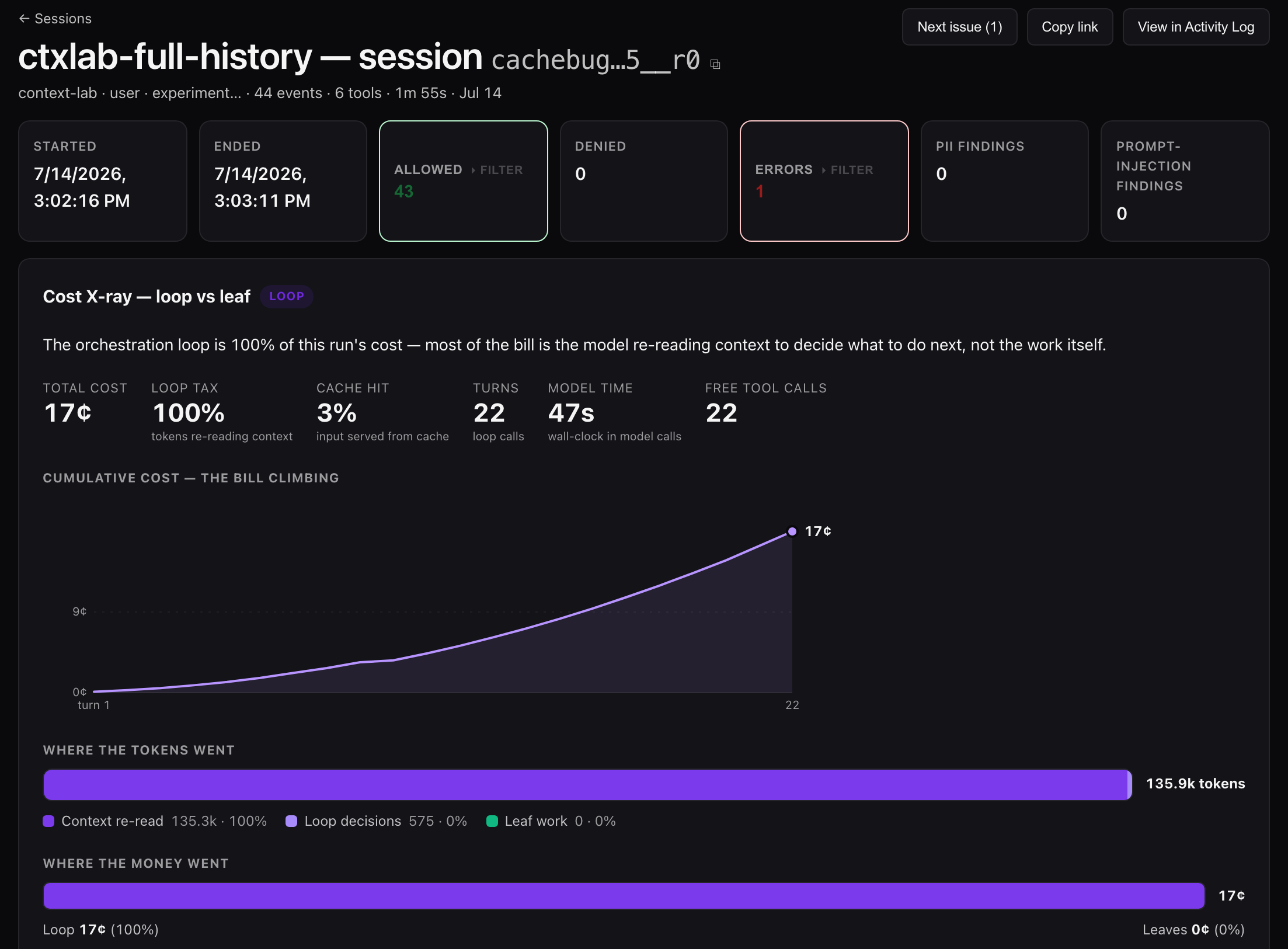
The culprit was a guardrail
The requests were nearly identical — same tools, same history, same task. The difference was in the first few lines of the system prompt:
--- Budget context ---
You've spent $0.34 of a $2.00 hard limit on this run. $1.66 remains.
We inject that line every round so the agent stays aware of its budget and wraps up before blowing the cap. It’s a sensible guardrail. It’s also poison for the cache, because prompt caching matches on an exact, byte-stable prefix — and the system prompt leads the request. Every round, that dollar figure ticks up, the first bytes change, and the cache is invalidated for everything downstream: the whole system prompt, every tool definition, the entire transcript. One moving number at the top throws away the cache for the entire run.
The measured cost
We reran the same arm with one change — freeze the budget text so it’s byte-stable (same enforcement, no live figure):
| System prompt | Cache hit | Cost per run |
|---|---|---|
| Dynamic (live spend line) | 2% | 41.5¢ |
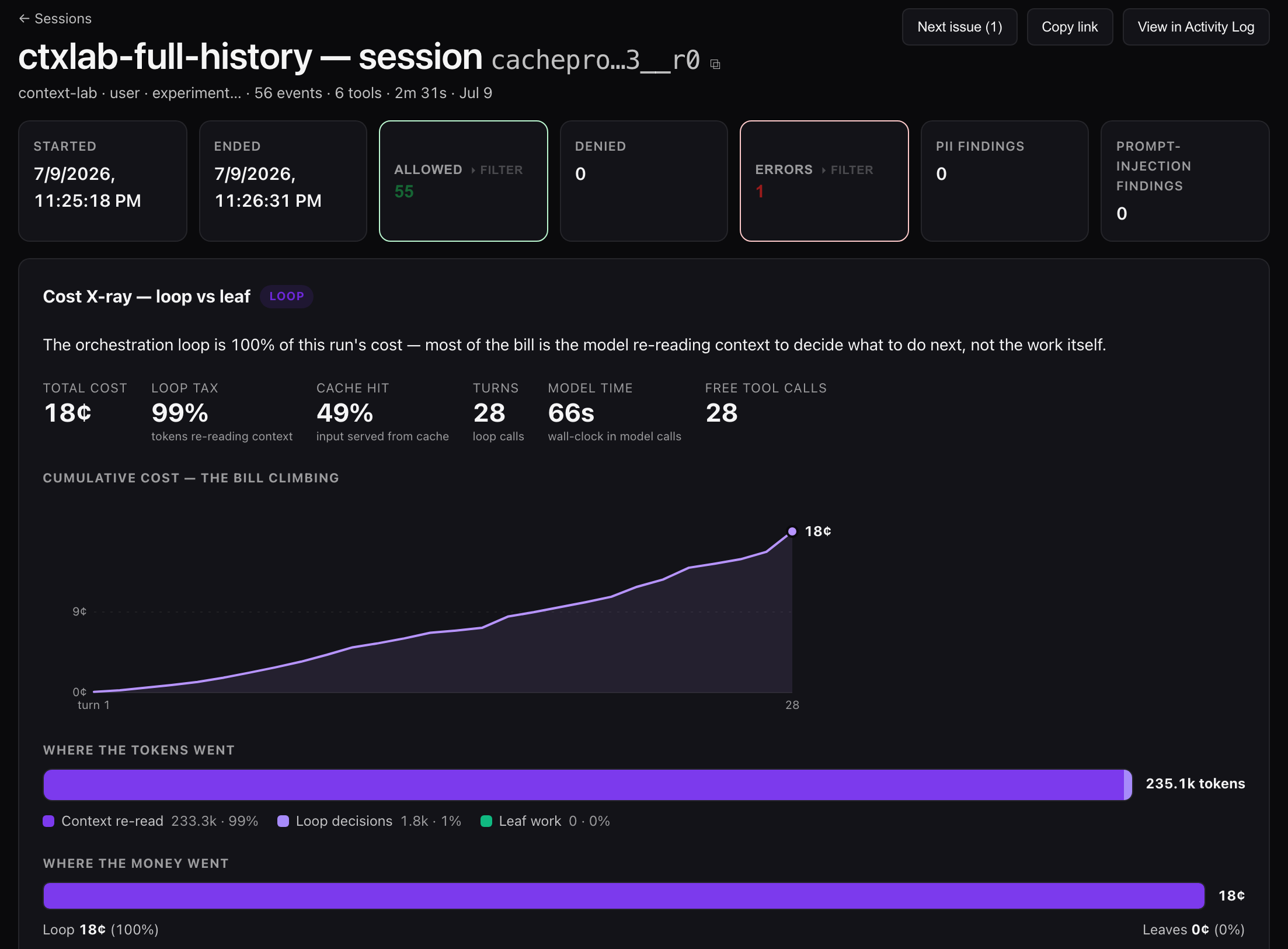
| Static (byte-stable) | 57% | 18.7¢ |
Same model, same task, same context. More than half the cost, gone, by moving one sentence out of the changing region.
Here’s what the fix looks like in the same view:
The twist that makes it worse than it looks
We almost dismissed this as small, because on our cheap Gemini Flash runs the same dynamic line still cached fine — 78% hit. That doesn’t contradict the finding; it sharpens it. The spend figure only busts the cache when it changes between rounds. On Flash, runs are so cheap the two-decimal dollar figure barely moves ($0.00, $0.00, $0.01…), so the prefix stays stable by accident. On Pro, cost accrues fast enough that the number changes every round, so the cache breaks every round.
That’s the dangerous part: the bug does the most damage to your most expensive agents. The exact runs where you care most about cost are the ones where a “helpful” live counter is quietly doubling the bill. A cheap prototype looks fine; the same code in production on a capable model bleeds.
The general rule: watch what changes at the top of your prompt
The budget line is one instance of a whole class. Anything you inject into the stable region of a request — system prompt or the leading messages — that changes between turns will silently defeat caching for the rest of the request. Common offenders:
- Timestamps or “current time” at the top of the system prompt. Moves every call.
- Injected memory / RAG context prepended to the system prompt. Different every turn.
- A tool list that grows or reorders (adding an MCP server mid-session, dynamic tool selection).
- Live counters, run IDs, or per-turn metadata in the leading bytes.
The fix is almost always the same: push volatile content to the end of the message list, and keep the prefix — system prompt, tools, early history — byte-stable. Your dynamic data still gets to the model; it just rides at the bottom where it doesn’t invalidate everything above it. If you genuinely need the agent to see live spend, inject it only when it crosses a threshold (so the prefix busts twice a run, not every round), or put it in the latest user turn instead of the system prompt.
How to check your own agents in five minutes
You can’t fix this if you can’t see it, and most agent stacks report a single blended token count that hides the cache split entirely. You need per-call cost broken into fresh input, cached input, and output. With that:
- Find an agent whose context is append-only or slowly-growing — it should show a high cache-hit rate after the first couple of rounds.
- If its cache-hit rate is near zero, diff two consecutive requests and look at the first few hundred bytes. Something in there is changing.
- Whatever it is, move it out of the prefix.
We caught this because our gateway meters every call with the cache read/write split exposed — the same per-action cost accounting the cost X-ray is built on. If your observability stops at “tokens used,” this failure is invisible: the bill goes up, the dashboard says everything’s fine, and nobody diffs the prefix. That slow, silent regression — same agent, same traffic, rising bill — is agent cost drift.
Caveats, honestly
The numbers here are Gemini 2.5 with implicit caching; the exact hit rates and break-even points differ across providers and between implicit and explicit caching. But the mechanism — a changing prefix invalidates the cached suffix — is universal to how prompt caching works everywhere. The lesson isn’t a Gemini number. It’s: treat the top of your prompt as sacred, and be suspicious of anything helpful you’re tempted to inject there.
Part of The Agent Optimization Manual — measured lessons on making agents cheaper and more reliable, every number metered at the gateway, not estimated.
What is an Agentic Control Plane? → · See the cost X-ray →
- . Your Agent's Bottleneck Is Almost Never the Model
- . One Sentence in Our System Prompt Doubled the Agent's Bill · you are here
- . Your Agent's Last Move Should Be a Tool Call, Not Text
- . Don't Give Up on Cheap Models — Give Up on Fragile Loops