Inside the ACP Console: My Own Agents, Real Data, Every Screen

Run agents? ACP lets you see, control, and price every tool call they make — allow/ask/deny policy, per-session cost, and a full audit log for Claude Code, Cursor, Codex, and OpenClaw, in one command:
curl -sf https://agenticcontrolplane.com/install.sh | bashirm https://agenticcontrolplane.com/install.ps1 | iexGetting started → · see your first governed call → · free up to 5 agents
The hardest thing to explain about a control plane is what you actually see once your agents run through it. A feature list doesn’t land it. So instead of describing the console, I’m going to show you mine — my real workspace, the agents behind Calafia, running in production. Every number below is real, pulled straight from the dashboard. Nothing staged.
Four screens: see every action, control every action, price every action.
1. Every agent, every call — one view
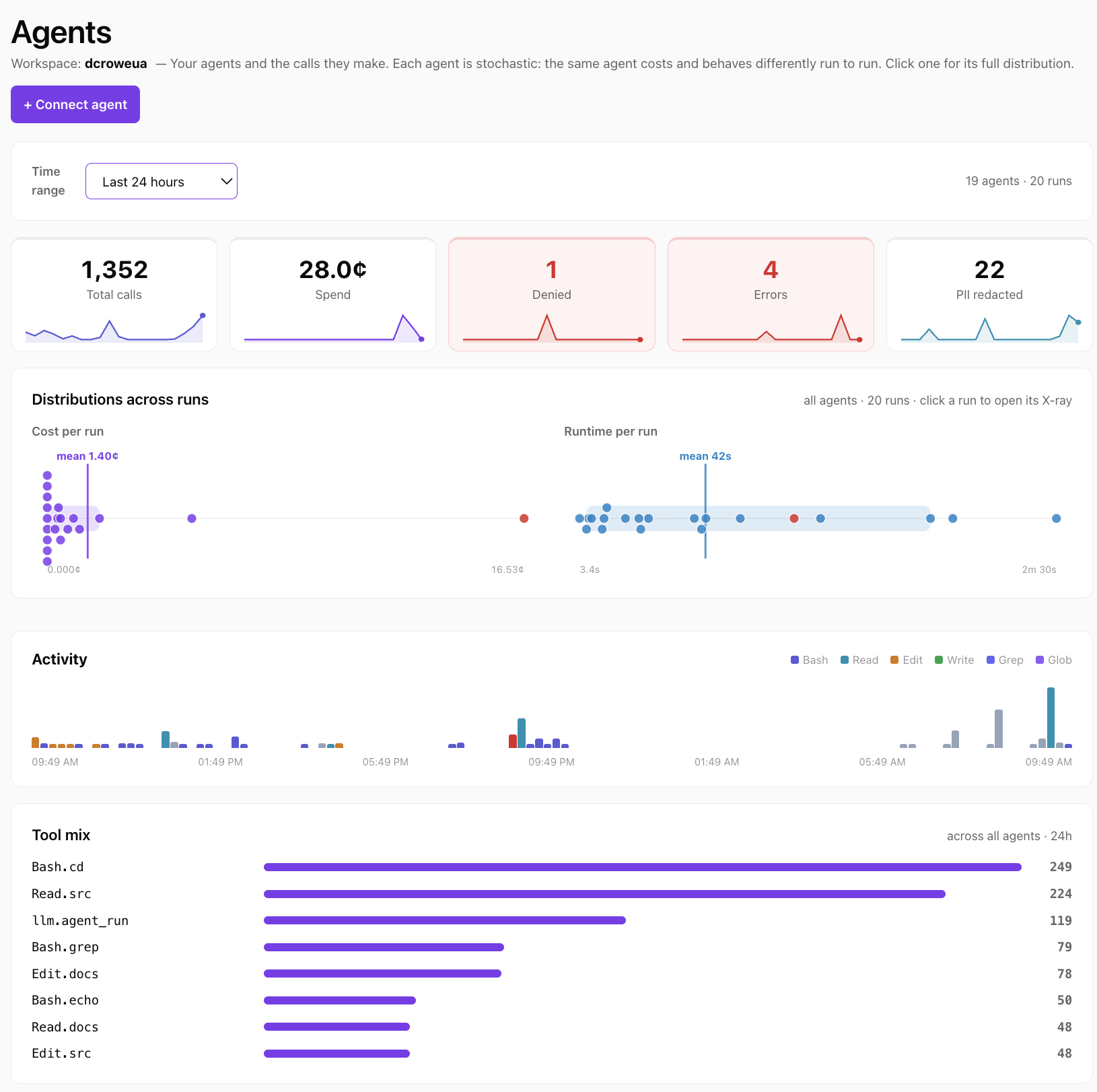
This is the first thing I open. In the last 7 days: 19,662 governed tool calls across 28 agents, $784.63 of model spend, 140 calls denied, 165 errors, 121 PII redactions — each with a little trend line. Below that, the run distributions: every run as one dot, cost-per-run and runtime-per-run, with the long-tail outliers pulled into a gutter so the typical range stays readable.
That’s the black box, turned into a dashboard. Before ACP, “what did all my agents do today, and what did it cost” was a question I couldn’t answer without grepping logs across services. Now it’s the landing page. The denied and PII-redacted counters are control working — quietly — and the distribution plot at the top (one dot per run) is the tell that agents don’t behave like normal software.
2. The same agent is never the same twice
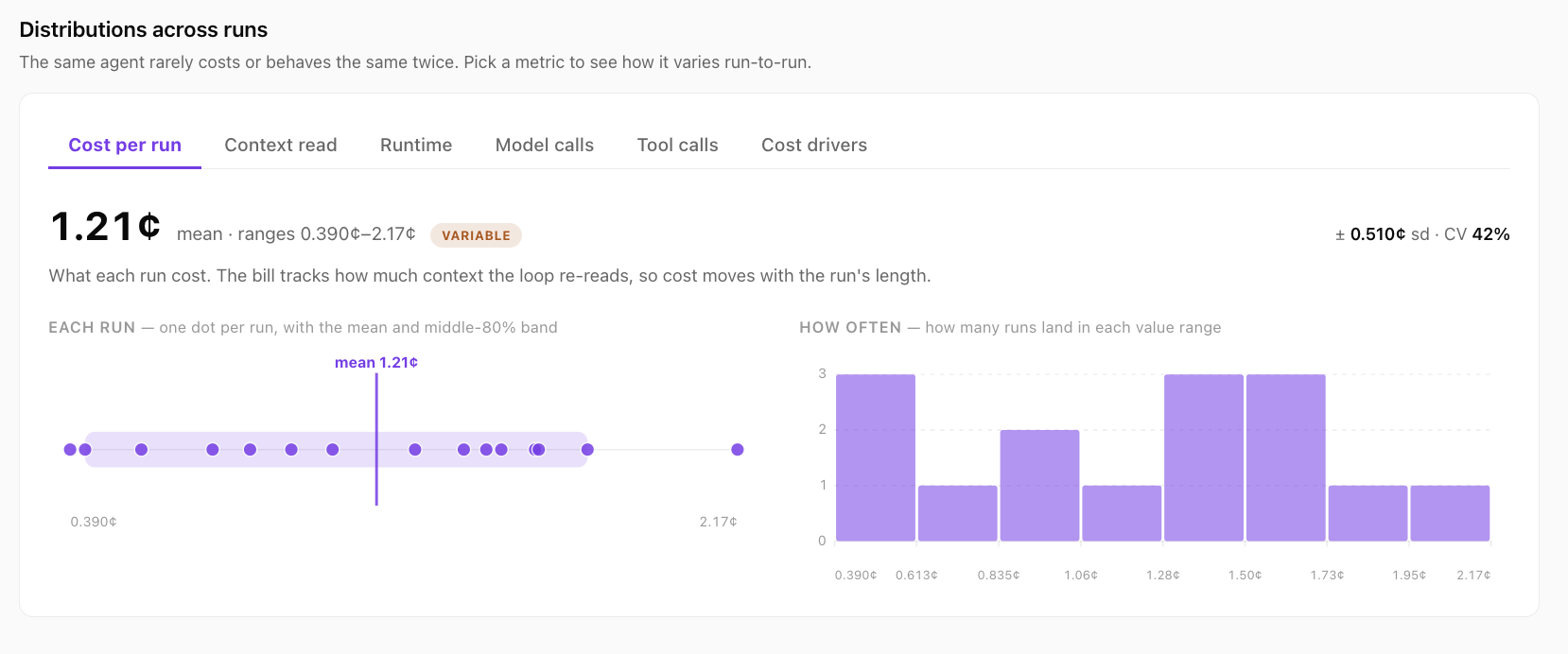
Click any agent and you get its distribution across runs. This is Claude Code over a week: a median run costs $18.59 — but runs range from under 1¢ to $501.61, a coefficient of variation of 172%, flagged erratic. Same agent, wildly different cost run to run, because each run does different work and the loop re-reads a different amount of context each time.
This is the thing traditional observability misses: an agent isn’t a function with a fixed cost, it’s a distribution. If you’re watching the average, you’re blind to the tail — the $501 run hiding behind an $18 median, or the one that quietly stalls. ACP shows the whole spread — cost, runtime, model calls, tool calls — per agent.
3. Where the money actually goes
Update, September 2026: the console now opens cost on its own page.
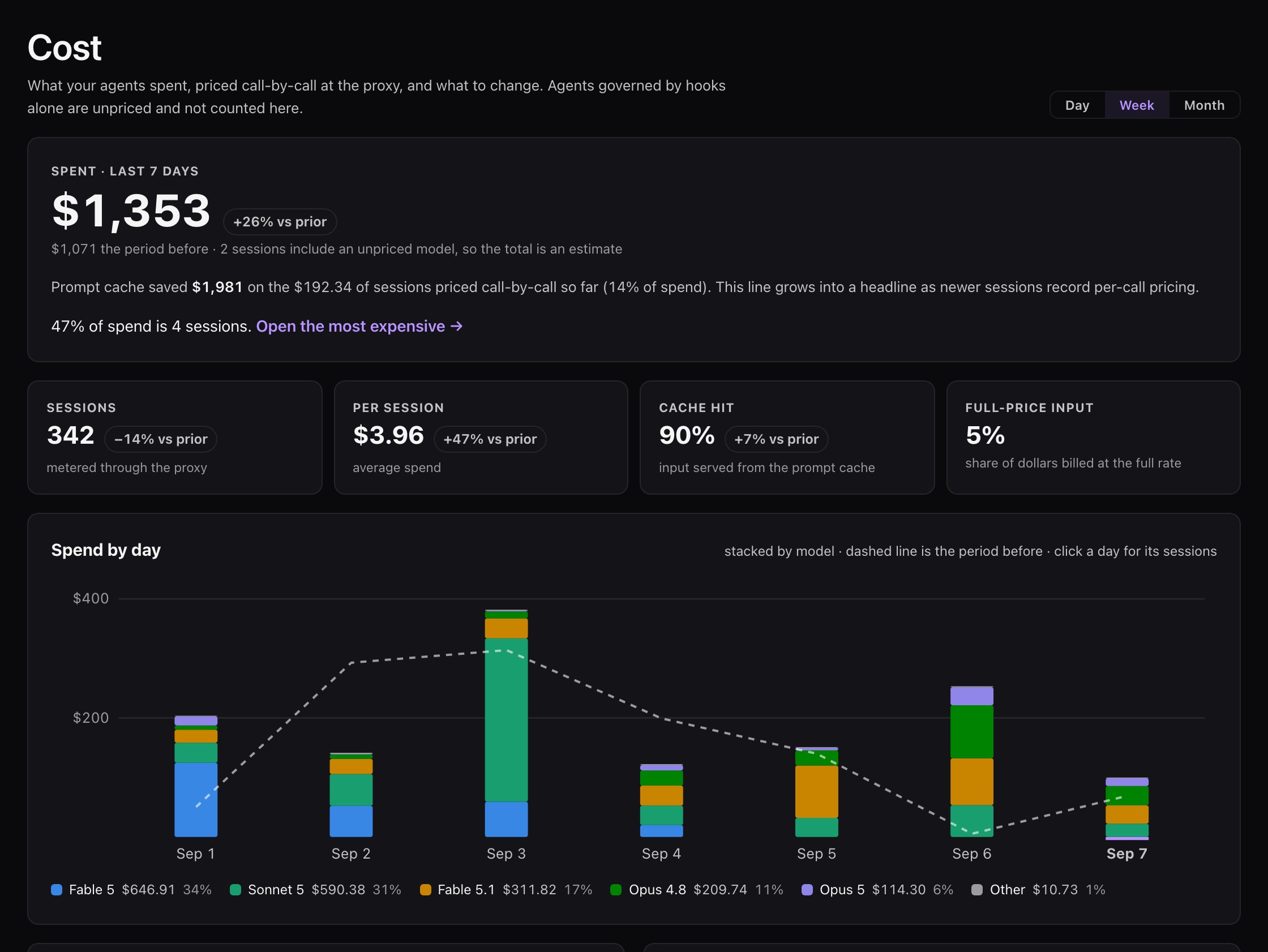
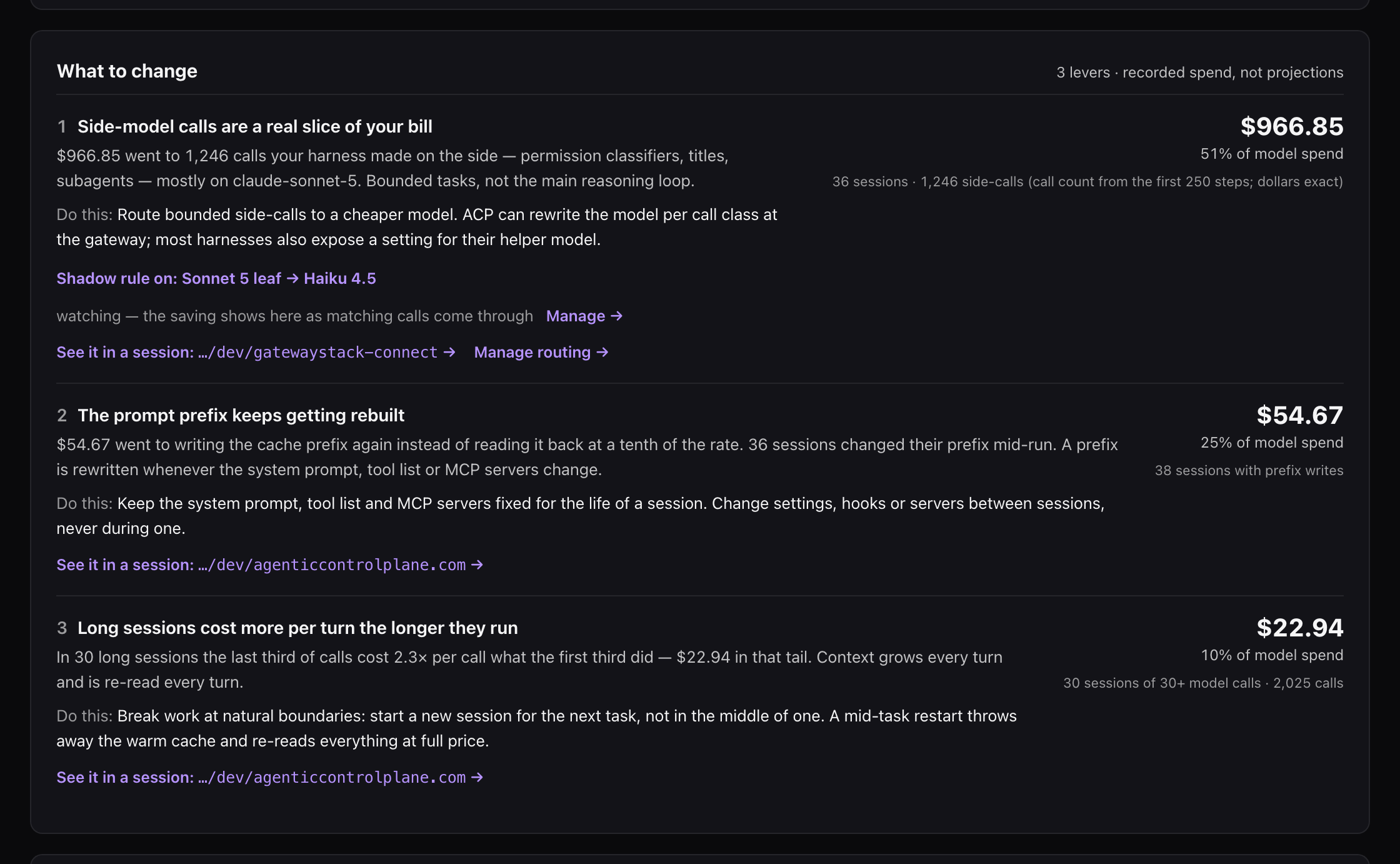
The Cost page answers the four questions in order: how much, on what, is it going up, and what to change. The last one is a list of levers measured from your own calls — side-model calls your harness makes on its own, the prompt prefix being rebuilt, long sessions whose last third costs more per turn, recovery turns after failed or denied calls — each with the recorded dollars, one concrete change, and a session that shows it:
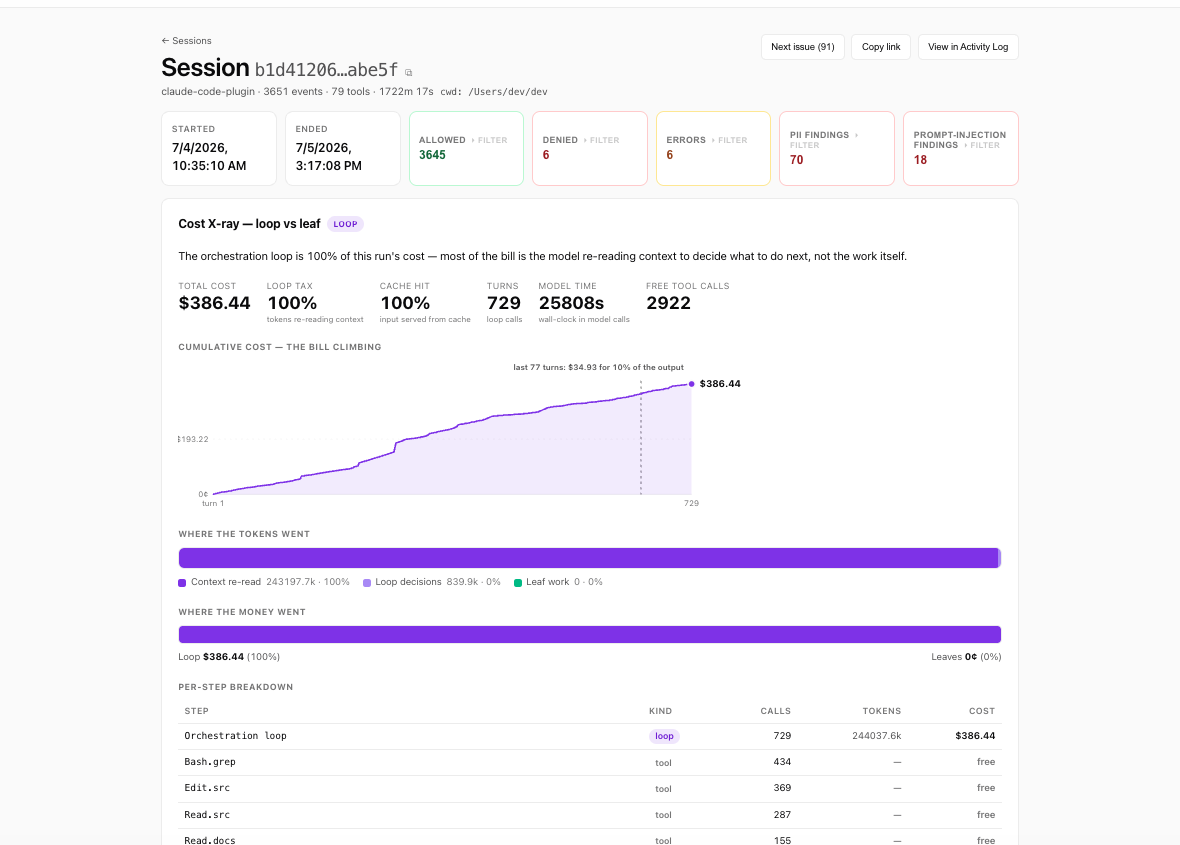
This is the screen I built ACP for. Open a single run and it decomposes the bill loop vs. leaf.
This run cost 0.390¢, and 99% of it was the orchestration loop — the model re-reading its own growing transcript to decide what to do next — not the actual work. The leaf tools (web search, memory lookup, sending an email) were free. The per-step table names the culprit; “context growth” charts the transcript ballooning to 59.3k tokens by the end; and What to optimize spells out the move: prune context between turns, use fewer and better-specced tools so the loop takes fewer turns.
I call this the loop tax, and almost nobody measures it, because measuring it requires being both in the call path and pricing every call in dollars. Observability tools watch but don’t price the enforcement point; gateways price tokens but don’t decompose the run. ACP is one layer, so the governed call and the metered call are the same event — which is the only way you get this view.
4. And the control
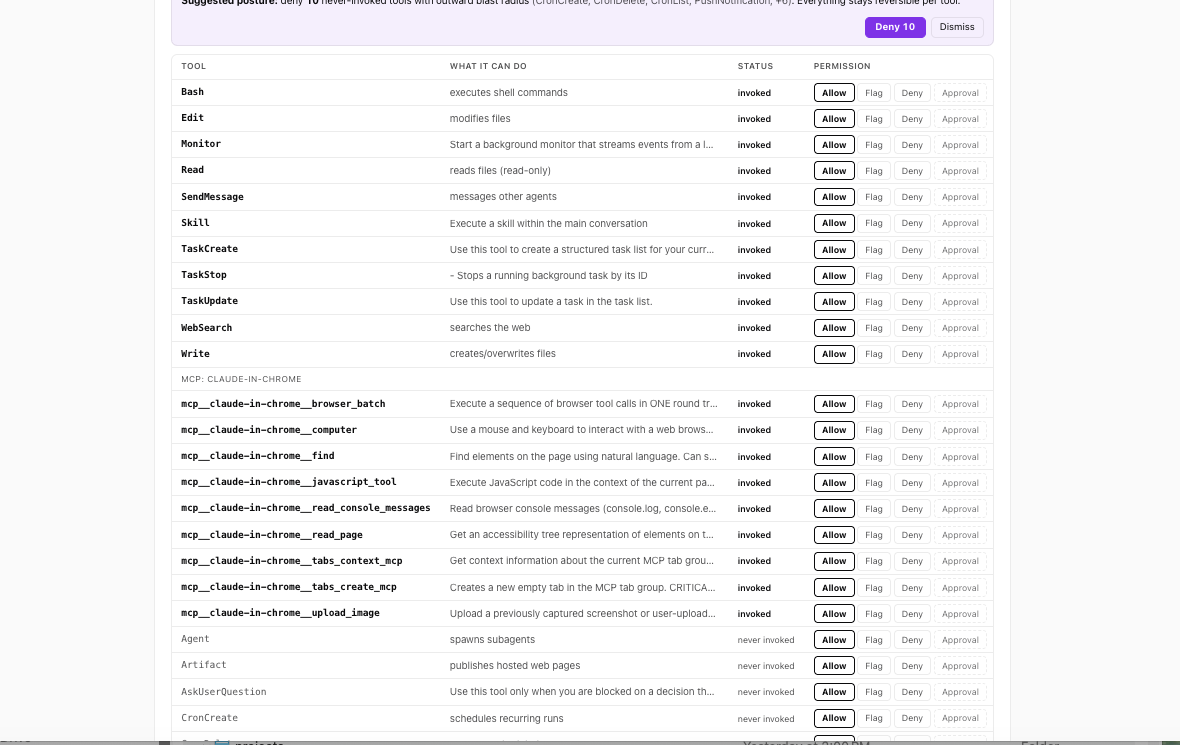
Seeing is half of it. Here’s the other half — per agent, every declared tool — captured from the agent’s own requests before anything runs — is a row with allow, flag, or deny one click away, enforced at the call itself, outside the model. This one runs in the background tier. I can deny notifications.sendEmail or any destructive tool and it’s blocked no matter what the model decides to do — a poisoned web page can’t talk it into an exception, because the rule doesn’t live in the prompt.
Every workspace starts in audit mode: watch everything, block nothing. When you’ve seen enough, you flip to enforce. No big-bang policy migration, no rewriting your agents.
None of this is trapped in the UI
One thing that matters more than any single screen: the console isn’t the only way to get at this data. The activity log, the agent rollups, the policy decisions — it’s all queryable and exportable as CSV, not locked inside the UI. Per-step cost decomposition like the X-ray above is console-side today; the audit and activity data is what’s available through the API. (API docs →)
Pipe the export into your warehouse, a Grafana board, a weekly cost digest in Slack — whatever you want. A control plane that locks your own agents’ data inside its UI isn’t a control plane, it’s a roach motel. Yours comes with you.
That’s the whole thing, in four screens
See every action, control every action, price every action — for whatever agents you’re already running, across whatever framework. It’s the same console you just looked at; the only difference is the data would be yours.
It’s free on your own agents — up to 5 initiating agents, unlimited calls, no card:
curl -sf https://agenticcontrolplane.com/install.sh | bash
One command, about 30 seconds to your first governed call. Or if you’d rather not do it alone, book 30 minutes and I’ll wire it into your agent with you, live. Poke around, break it, tell me what’s missing.
— David
Start free → · Pricing → · How the loop tax works →