What is runtime authorization?
Runtime authorization is the permission check that runs at the moment an action is attempted — on every call, against live context — instead of once at login. Each action triggers a fresh decision: who is verifiably calling, which tool with which arguments, what the session has already done, what it has already spent. Deny by default. Every decision logged.
Also written run-time authorization or run time authorization. Same idea under other names: per-call authorization, continuous authorization, runtime policy enforcement. The permission check moves from session start to the action itself.
The short version: authentication happens once and tells you who is calling. Login-time authorization happens once and tells you what that caller’s role may do in general. Runtime authorization happens every time and tells you whether this action may happen now. For a person clicking through an app the three blur together. For an AI agent making forty tool calls a minute, only the third one describes what actually ran.
Runtime authorization, defined
A runtime authorization decision has four parts, and a system only qualifies if it has all four:
- It runs per action. Not at login, not per session — on every call that could change something.
- It sees live context. The verified identity, the exact tool and arguments, the calls that came before, and cumulative use (requests, spend, delegation depth). A role name alone is not context.
- It is enforced where the caller can’t skip it. The decision sits on the path between the caller and the thing being called. A check the caller is trusted to perform on itself is a suggestion.
- It leaves a record. Each decision — allow, deny, or hold for a person — is written with the rule that produced it.
Drop any one and you have something else: a login-time grant (no per-action check), an allowlist (no context), a system-prompt rule (no enforcement), or a firewall with no logs (no record).
Runtime authorization vs. authentication
These get conflated because both are “auth.” They answer different questions at different times.
| Authentication | Runtime authorization | |
|---|---|---|
| Question | Who is calling? | May this action happen, right now? |
| When | Once, at the start | On every action |
| Input | Credentials, tokens | Verified identity plus the call, its arguments, prior actions, cumulative use |
| Output | An identity | A decision and a reason |
Runtime authorization depends on authentication — the identity it checks has to be verified, not claimed. It does not replace it.
Runtime authorization vs. login-time authorization (RBAC)
Traditional authorization was designed around a human session: authenticate once, receive a role, and the role’s grants hold until logout. That model works when the thing exercising the permissions is a person, because people are slow and deliberate — one click at a time, each action reviewed by the person taking it.
| Login-time (classic RBAC) | Runtime authorization | |
|---|---|---|
| When policy runs | Once, at session start | On every action |
| Question answered | “What can this role do?” | “May this action happen, right now?” |
| Context available | Role, group, tenant | Identity plus the specific call, its arguments, prior actions, cumulative spend, delegation depth |
| Default posture | Grant the role’s full surface | Deny by default, allow explicitly |
| Sees action chains | No — each grant is evaluated in isolation | Yes — read-then-exfiltrate looks different from read |
| Audit granularity | Session-level | Per action, with the matched rule |
RBAC doesn’t disappear in this model. It still defines the baseline — who is allowed what, in principle. Runtime authorization is the layer that checks each actual action against that baseline, plus the context RBAC can’t see.
Runtime authorization vs. ABAC
ABAC (attribute-based access control) is a policy model: decisions from attributes of the subject, the resource, and the environment. Runtime authorization is about when and where the decision runs — every call, at a point the caller can’t bypass. The two compose: a runtime authorization layer usually evaluates ABAC-style policy, and it adds an attribute ABAC on its own rarely has, which is the session’s own history.
How runtime authorization works: the decision loop
Every call carries its context to the policy point. The policy point returns a decision and a reason, and writes the audit row:
# input — assembled by the enforcement point, not the agent
identity:   auth0|8f3a2b1c        # verified JWT, not a claim the agent makes
tool:       email.send.external
agent_tier: background            # no human watching this session
chain:      depth 2, root auth0|8f3a2b1c
spend:      $48.73 of $50.00 daily budget

# output
decision:   DENY
reason:     role:rep denied tool:email:send:external
audit:      written (identity, tool, rule, timestamp)
Three outcomes are possible: allow, deny, or ask — hold the call until a person answers. The decision is boring by design. What matters is that it runs on every call, and that the caller finds out the way any client finds out — a denied request with a reason — rather than being trusted to check policy itself.
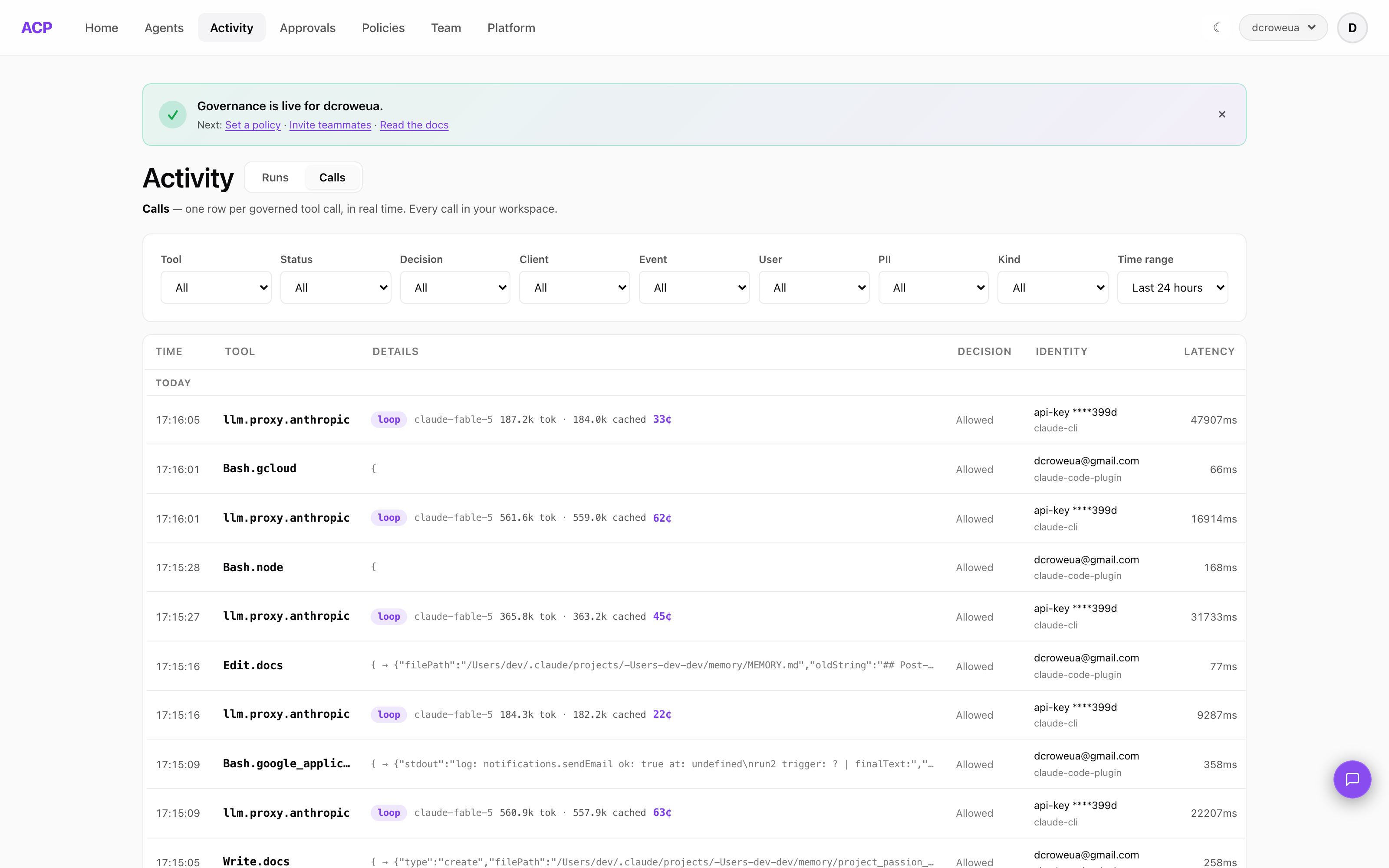
Here is that loop live: one row per policy-checked tool call, with the decision, the verified identity behind it, and the latency of the check.
Runtime authorization examples
Concrete rules, each of which only works if the check runs per call:
- Tool by tier.
Bash.rmis allowed in an interactive session, held for a person when a subagent asks, denied for a background job. Same tool, three answers, decided by who is watching. - Chains. Reading CRM records is allowed. Reading CRM records and then calling
email.send.externalin the same session is denied — the second call is judged with the first in view. - Spend as permission. “May consume $50 of model calls today” is a policy statement. Call 412 is denied because calls 1–411 already spent $49.90.
- Delegation. An agent acting for a manager gets a narrowed scope, not the manager’s scope. RFC 8693 (OAuth token exchange) exists because delegated access is supposed to shrink.
- Argument-level checks.
git pushis fine;git push --forcetomainis held. The tool name alone can’t tell them apart; the arguments can.
Why AI agents force the issue
Runtime authorization existed before AI agents — zero-trust architectures have argued for continuous verification for years. Agents made it non-optional.
An agent given a task chains tool calls autonomously: it decides while running which files to read, which commands to execute, which APIs to hit. It operates at machine speed — dozens of calls per minute — and each call is an action your login-time grant never specifically approved. By the time a human could review the third call, the agent has finished the task.
That gap has a precise shape:
- You authorized intent, not actions. “The agent may act as Alice” says nothing about this
DELETEstatement at this moment. - Risk lives in chains, not calls. Reading CRM data is fine. Reading CRM data then calling
email:send:externalis an exfiltration pattern. Only a per-call layer that has seen the earlier calls can tell the difference. - Delegation shouldn’t mean inheritance. An autonomous process acting for the CFO should not hold CFO-level permissions. Most agent frameworks skip narrowing entirely; OWASP’s Top 10 for Agentic AI names the result — excessive agency — as a headline risk.
- Spend is an authorization question too. A single looping agent can spend a month’s budget overnight if nothing meters it per call.
Where runtime authorization is enforced
Where the check runs matters as much as what it checks.
If authorization lives inside the agent — system-prompt instructions, framework permission hooks, “safety skills” — you are relying on the process being checked to check itself. That layer fails two ways in practice: it can be switched off (Claude Code’s --dangerously-skip-permissions disables every hook with one flag), and it can be talked out of its rules by prompt injection.
Runtime authorization is only worth the name when it’s enforced outside the agent process — at a gateway or control plane that sits between the agent and your backend. The call either passes policy and proceeds, or it doesn’t and never reaches the API. The agent doesn’t get a vote.
When you need runtime authorization
- Your agents take real actions — create tickets, modify records, send email, run shell commands — not just retrieve text
- Agents run unattended (CI, scheduled jobs, background tiers) where no human is watching per action
- You’re in a regulated context (SOC 2, HIPAA, the EU AI Act’s human-oversight provisions) and “we told the model not to” won’t survive an audit
- Multiple runtimes (Claude Code, Codex CLI, Cursor, custom SDK agents) need one consistent policy, not per-tool config drift
- Model spend needs a hard ceiling, per user or per agent, enforced rather than dashboarded
Frequently asked questions
What is runtime authorization?
Runtime authorization is the permission decision made at the moment an action is attempted — on every call, against live context (verified identity, the specific tool and its arguments, what the session has already done, what it has already spent) — rather than once at login. Deny by default, every decision logged. It is also written run-time authorization or run time authorization, and it goes by per-call authorization, continuous authorization, and runtime policy enforcement.
What is the difference between runtime authorization and authentication?
Authentication answers who is calling; it happens once, at the start. Runtime authorization answers whether this specific action may happen now, and it happens on every action. Both are needed: runtime authorization uses the identity that authentication established, and adds the call, its arguments, and the session’s history to the decision.
How is runtime authorization different from RBAC?
RBAC answers “what can this role do?” once, at session start, and the grant holds for the whole session. Runtime authorization answers “may this specific action happen right now?” on every call. RBAC still assigns the baseline permissions; runtime authorization is the layer that checks each action against them — plus context RBAC can’t see, like call chains, cumulative spend, and delegation depth.
Is runtime authorization the same as ABAC?
They overlap but aren’t the same. ABAC is a policy model — decisions based on attributes of the subject, resource, and environment. Runtime authorization is about when and where the decision runs: on every call, at an enforcement point the caller can’t bypass. A runtime authorization layer typically evaluates ABAC-style policy per call.
Why do AI agents need runtime authorization?
Because agents act autonomously at machine speed. A human clicks one button at a time; an agent can make dozens of tool calls in seconds, choosing which calls to make as it goes. Login-time grants authorize intent, not actions — the only checkpoint that reflects what an agent actually does is one that runs on every call.
Where should runtime authorization be enforced?
Outside the agent process, at a gateway or control plane the agent can’t switch off. In-process permission hooks can be disabled (Claude Code’s –dangerously-skip-permissions turns off every hook with one flag) and a prompt-injected agent can ignore instructions. An external enforcement point decides before the call reaches your backend, regardless of what the model wants.
Related concepts
- Per-call permissions for AI agents: why RBAC breaks at agent speed — the long-form argument, with worked policy examples
- What is an agentic control plane? — the layer that enforces runtime authorization outside the agent
- AI agent tool allowlists — deny-by-default in practice for Claude Code, Codex CLI, and MCP
- Agent delegation chains — how identity and narrowed scope survive agent-to-agent hops
- The tool surface index — what agents can actually call, captured from live traffic
Related: What a gateway can actually enforce · The three planes · Agent identity vs. agent control
Run agents? ACP lets you see, control, and price every tool call they make — allow/ask/deny policy, per-session cost, and a full audit log for Claude Code, Cursor, Codex, and OpenClaw, in one command:
curl -sf https://agenticcontrolplane.com/install.sh | bashirm https://agenticcontrolplane.com/install.ps1 | iexGetting started → · see your first governed call → · free up to 5 agents